
Snagit 2026 is the right branch for a Mac on macOS Golden Gate 27, Tahoe 26 or Sequoia 15. For a new install on Sonoma 14, use Snagit 2025. Ventura 13 belongs on the latest Snagit 2024 point release. Apple Silicon runs Snagit natively; an Intel Mac can still qualify when it natively supports the required macOS version.
This is my decision and setup guide for the Snagit Mac collection. It covers the correct branch, official installation, permissions, current platform differences and the first safe checks when capture fails.
Checked September 17, 2026. TechSmith's Mac release history lists Snagit 2026.3.3, released September 14, 2026. Its US store lists the individual plan at $39 per year. Versions, plan contents and regional checkout prices can change.
TechSmith now uses the name Camtasia Snagit in parts of the 2026 app and documentation. The Snagit 2026 Mac release history documents that wording change. Don't let the label throw you — it's still the Snagit capture app, not Camtasia Editor.
Snagit for Mac compatibility in 2026
TechSmith's current Snagit system requirements list Golden Gate 27, Tahoe 26 and Sequoia 15 for Snagit 2026. The table below recommends the simplest current branch for a new installation. It is not an exhaustive point-release matrix.
| Your Mac | Best current branch for a new install | Reason |
|---|---|---|
| macOS Golden Gate 27 | Snagit 2026 | Current supported branch |
| macOS Tahoe 26 | Snagit 2026 | Current supported branch |
| macOS Sequoia 15 | Snagit 2026 | Current supported branch |
| macOS Sonoma 14 | Snagit 2025 | Snagit 2026 does not support Sonoma |
| macOS Ventura 13 | Latest Snagit 2024 point release | Last major branch TechSmith lists for Ventura |
| Apple Silicon | Current OS-compatible branch | Snagit 2021.3 and later run natively |
| Intel Mac | Depends on model and macOS | The Mac must natively run a supported OS |
TechSmith's detailed macOS compatibility matrix was last updated before Golden Gate 27 and still ends at Tahoe 26. Use that matrix to check patched older builds for Tahoe, Sequoia, Sonoma and Ventura, but use the current system-requirements page for Golden Gate 27. Keep a working older installation until you confirm the exact build you need.
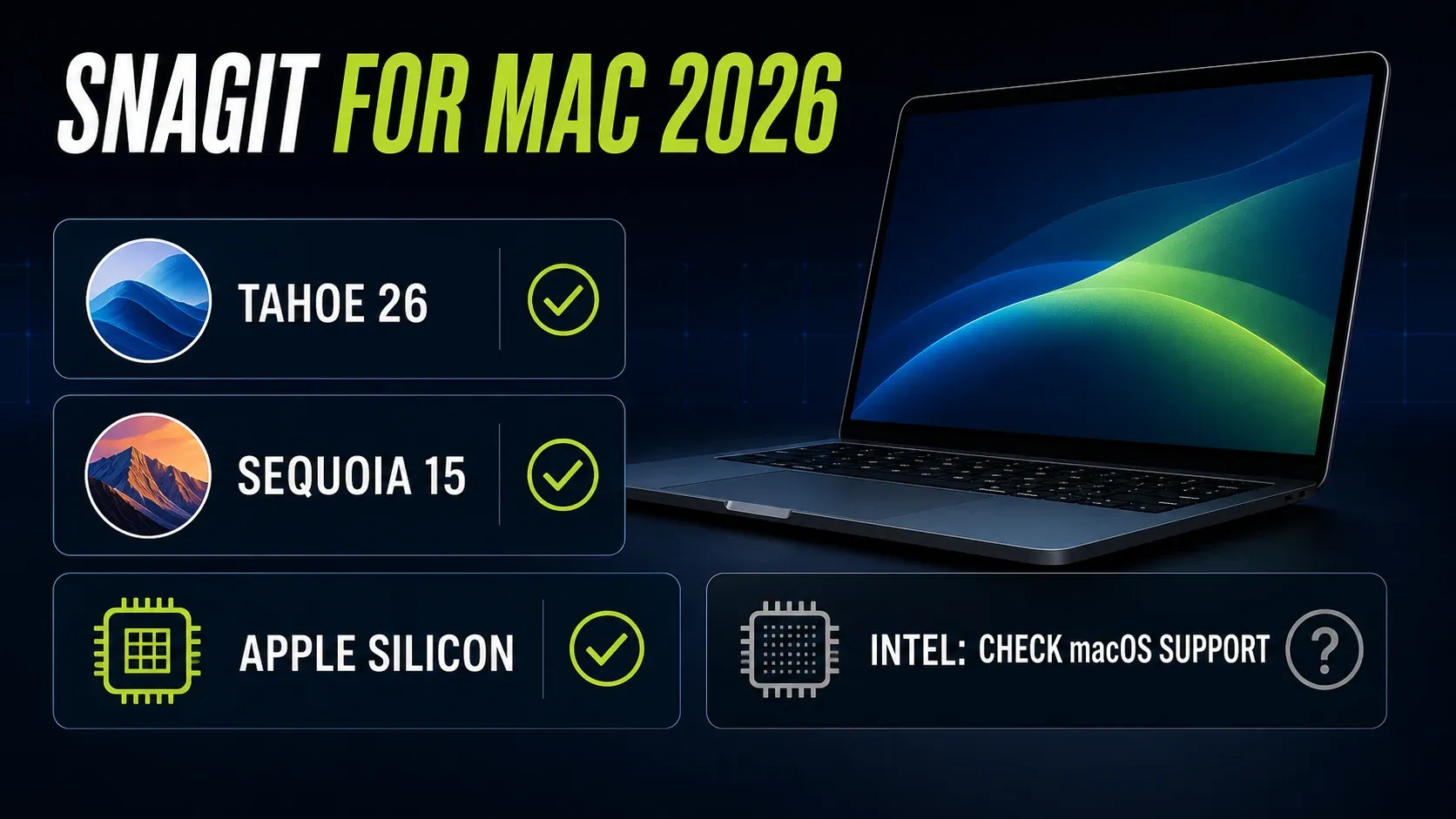
Snagit 2021.3 and later are Universal apps that run natively on Apple Silicon, according to TechSmith's Apple Silicon compatibility note. Earlier builds can use Rosetta, but an unsupported old release is a poor starting point. For Intel, check both the Mac model and macOS branch. TechSmith does not support third-party macOS patchers as a way around the hardware requirement. The full Snagit requirements guide covers the older point-release ranges.
How to download and install Snagit on a Mac
Stick to the official Snagit download. The download page says no credit card is required, but you need a TechSmith account after download to start the trial. Skip mirrors — they may offer an old branch that doesn't match your Mac.
- Download the Mac DMG from TechSmith.
- Open the DMG and drag Snagit into Applications.
- Eject the installer image, then open Snagit from Applications.
- Sign in with the licensed TechSmith account or start the evaluation trial.
- Approve only the macOS permissions required for the capture inputs you plan to use.
That flow follows TechSmith's Mac installation instructions. If your Mac needs an older branch, use TechSmith's version-specific download route. Don't remove the working copy until the replacement opens and completes a normal local capture.
Mac permissions Snagit needs
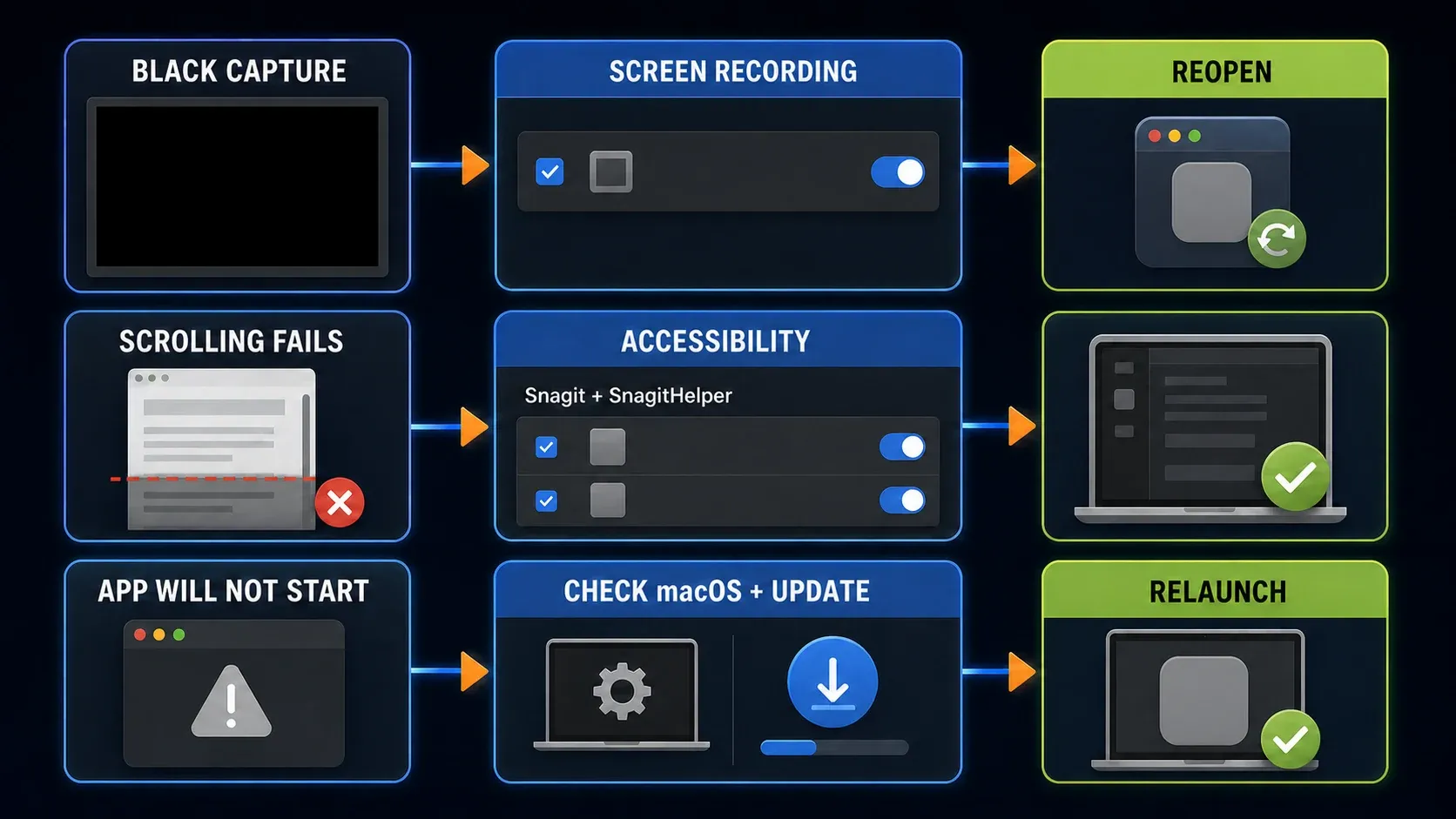
A denied permission can look like a broken app. Grant access by task. Image and video capture need Screen Recording access. Scrolling Capture also needs Accessibility for Snagit and SnagitHelper. Camera and microphone access are optional unless you record those inputs.
- Open Snagit > Settings > Capture.
- Select Fix Capture Permissions.
- Allow Screen Recording for normal image and video capture.
- Allow Accessibility for Snagit and SnagitHelper if you use Scrolling Capture.
- Choose Quit & Reopen when macOS asks Snagit to restart.
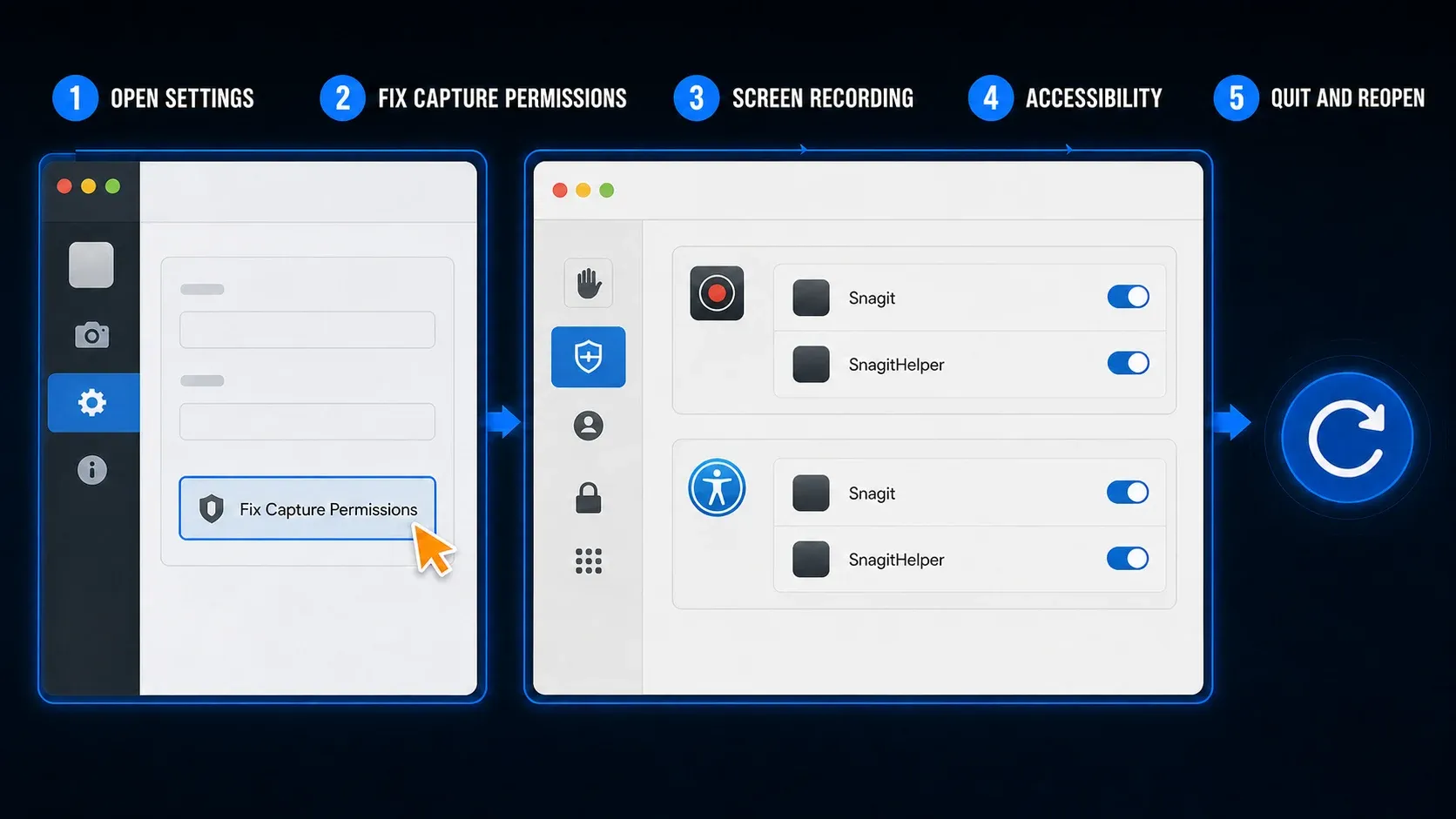
TechSmith documents the recovery path in its Mac permission guide and keeps a separate Accessibility check for scrolling. You can also review access in System Settings > Privacy & Security. Apple's current guide calls the capture panel Screen & System Audio Recording. If the switch is on but the capture is still black, follow the Snagit Mac permissions recovery guide before reinstalling.
What Snagit can do on Mac
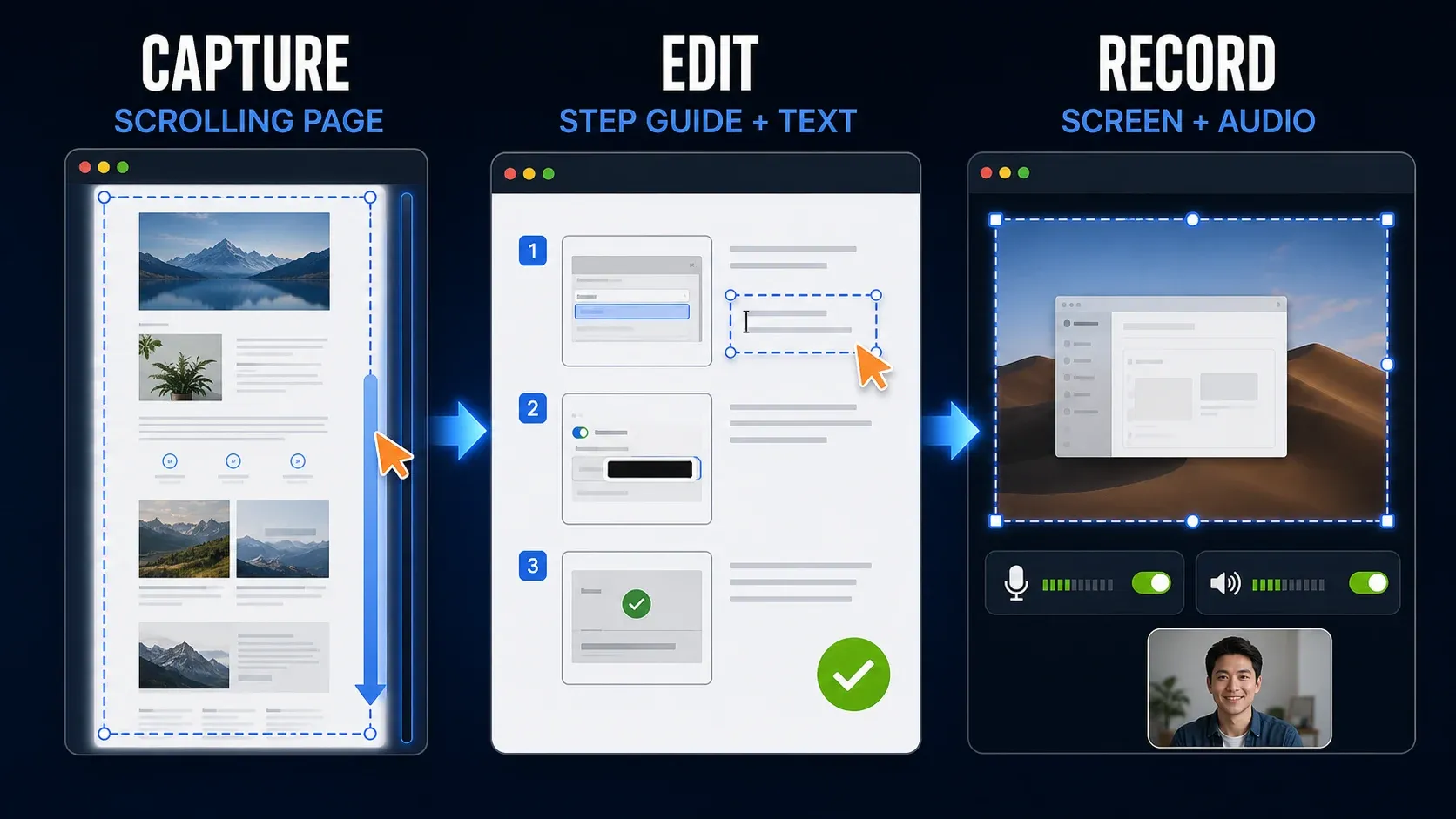
Snagit is useful when a screenshot is the start of a deliverable. You can capture the source, edit it, keep an editable SNAGX file, then export the result without moving through several separate apps.
- Scrolling Capture: capture a long page or supported scrolling window. Page behavior and Accessibility permissions affect the result.
- Step Capture: turn a click sequence into ordered images for a procedure.
- Grab Text: copy recognized text from an image. If OCR suddenly fails, update the current branch before resetting the app.
- Smart Redact: find supported data types such as emails, card numbers, faces and URLs. Review every proposed redaction before sharing.
- Short recording: record the screen, webcam, microphone and supported system audio for an explanation.
- Editable source files: keep captures in SNAGX for later edits and exchange with a Windows teammate.
The Mac 2026.1 release notes document Schedule and Interval controls for image capture. The current TechSmith feature matrix still labels Time-lapse Capture as Windows-only. Those labels are not interchangeable enough to promise the same workflow. Check the Capture controls in your installed point release before building a procedure around it. For the editing side, use the Snagit Editor guide.
Mac and Windows feature differences
The core workflow is similar on Mac and Windows, and SNAGX is the shared editable format. A mixed-device team should still document platform-specific controls because TechSmith's current feature list contains real differences.
| Feature | Mac | Windows |
|---|---|---|
| Scrolling Capture, Step Capture and Grab Text | Yes | Yes |
| Screen, webcam, microphone and system-audio recording | Yes | Yes |
| Webcam image capture | Yes | No |
| Webcam background blur or virtual background | Yes | No |
| Spotlight | Yes | No |
| Object Capture and Multiple Areas | No | Yes |
| Printer Capture | No | Yes |
| Time-lapse Capture label in current feature matrix | No | Yes |
I checked the labels above against TechSmith's documentation on September 17, 2026. A point release can change the list. Confirm a platform-specific feature before promising it in a team workflow.
Snagit price and trial on Mac
TechSmith's US store listed the individual subscription at $39 per year on September 17, 2026. The page included Starter Assets, up to 25 Screencast videos and Camtasia Online, plus a 14-day money-back guarantee. Currency, taxes and plan contents can change at checkout. The Snagit pricing and license guide covers business licensing and current plan differences.
The fully functional trial lasts 15 days. That trial period is separate from the 14-day refund period. TechSmith's trial terms limit the evaluation license to evaluation and review rather than commercial production, training or benchmarking. Use representative nonproduction files, then activate the same installation after purchase. TechSmith's activation guide explains the sign-in flow.
When Snagit is not working on Mac
Start with the version and the failed input. Reinstalling first can erase the clue that separates an OS mismatch from a permission or point-release problem.
- App will not open: compare the exact macOS and Snagit versions with TechSmith's current requirements, then install the latest point release in that supported branch. The release history shows a startup crash fix in 2026.3.1 and separate macOS 27 fixes in 2026.3.3, so match the symptom and OS before choosing a build.
- Capture is black or blank: review Screen Recording access, quit Snagit fully, reopen it and test a normal local window.
- Scrolling arrows are missing: check Accessibility for both Snagit and SnagitHelper, then test a simple browser page before blaming the app.
- Grab Text, Edit Text or Smart Redact fails: update at least to 2026.1.1, 2025.4.2 or 2024.3.7 for the affected current branches documented by TechSmith. Snagit 2023 and older do not receive that OCR update.
- Only one site or remote app fails: test an ordinary local window. Protected video, remote sessions and unusual browser interfaces can have separate capture limits.
TechSmith's current OCR issue notice lists the fixed point releases. Use the Snagit OCR workflow for text-specific checks. If the app still will not open after version and permission checks, follow the Snagit launch troubleshooting guide and record the Mac model, macOS version, Snagit version and smallest repeatable failure before contacting TechSmith.
Is Snagit the right Mac capture app for you?
Snagit is a sensible purchase when you produce support articles, SOPs, training material or short narrated walkthroughs every week. The value comes from ordered steps, reusable annotations, OCR, redaction, editable source files and a shared Mac and Windows workflow.
It is harder to justify for a few lightly edited screenshots each month. During the trial, repeat two real tasks and count how often you still need another app. The Snagit review covers the wider verdict. Compare Snagit with CleanShot X or use the Mac alternatives guide if quick capture matters more than documentation. New users can run the same sample task with the Snagit beginner tutorial.
Snagit for Mac FAQ
Does Snagit work on Apple Silicon Macs?
Yes. TechSmith says Snagit 2021.3 and later run natively on Apple Silicon. Earlier builds can use Rosetta, but you should install a currently supported branch for your macOS version.
Does Snagit 2026 work on macOS Golden Gate 27 and Tahoe 26?
Yes. TechSmith's current system requirements list macOS Golden Gate 27, Tahoe 26 and Sequoia 15 for Snagit 2026. Its detailed compatibility matrix still ends at Tahoe 26, so use the current requirements for Golden Gate and the matrix for older point-release ranges.
Can I use Snagit on macOS Sonoma?
Yes. For a new install, use the latest Snagit 2025 point release. TechSmith says Snagit 2026 does not support Sonoma 14, while its detailed matrix lists compatible older point releases through Snagit 2025.4.0.
Does Snagit still work on an Intel Mac?
It can. The Mac must natively support a macOS version accepted by the Snagit branch you install. TechSmith does not support Macs made eligible with third-party macOS patchers.
Is Snagit free for Mac?
No. TechSmith offers a fully functional 15-day evaluation trial. Its US store listed the individual subscription at $39 per year on September 17, 2026, but regional currency, tax and checkout totals can differ.
Can I install one Snagit subscription on Mac and Windows?
Yes. TechSmith says subscription versions can be installed on unlimited computers, including Mac and Windows, for one licensed user. Only one device may be active at a time.
Can Snagit capture a scrolling page on Mac?
Yes. Allow Accessibility access for Snagit and SnagitHelper, then use Scrolling Capture on a supported page or window. Protected content and unusual scrolling interfaces can still fail.
Which Mac permissions does Snagit need?
Normal capture needs Screen Recording access. Scrolling Capture also needs Accessibility for Snagit and SnagitHelper. Camera and microphone access are needed only when you record those inputs.