
Snagit Individual costs US$39 per year; Business costs US$48 per user per year. The US education store lists $39.36 for educators and $19.99 for verified students. These are annual subscription prices, not one-time purchases. Prices and license terms were checked September 12, 2026; your regional store and final order determine what you pay.
New Snagit 2025 and later releases require a subscription. Older perpetual licenses remain separate. If you already own Snagit, check your existing license before buying a new subscription.
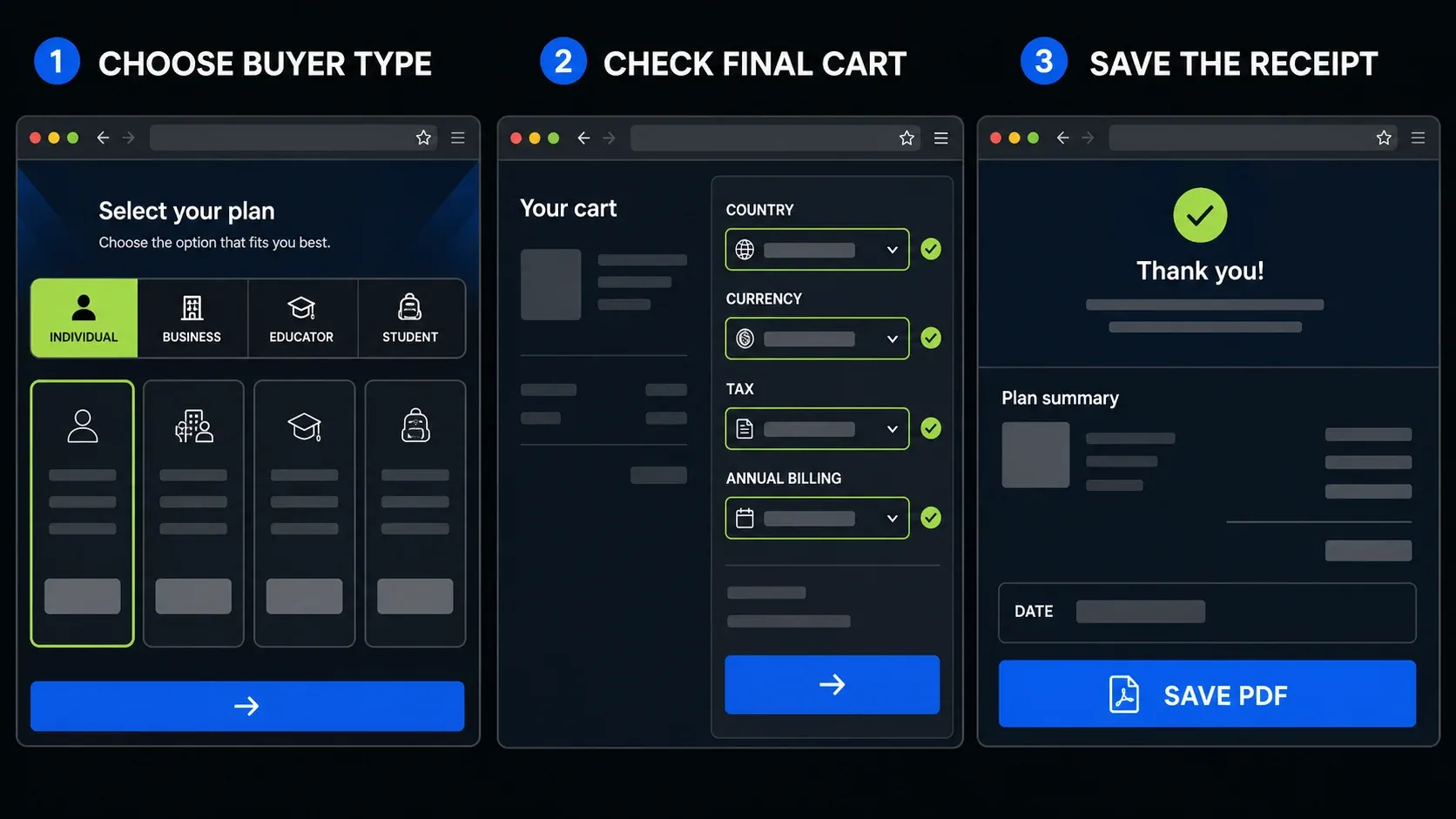
The diagrams below walk through the purchasing choices, while TechSmith's current checkout and account screens show the exact options for your order.
Snagit price in 2026
On a narrow screen, swipe the table sideways to see every column.
| Plan | Public US price | Who it is for | Transferable | Checkout path |
|---|---|---|---|---|
| Individual | $39/year | One person buying for themselves | No | Official individual store |
| Business | $48/user/year | Teams and employer-managed seats | Yes | Official teams store |
| Educator | $39.36/user/year | Eligible accredited institutions | Yes | Education store |
| Student | $19.99/year | Eligible verified students | No | Student Beans verification |
| Enterprise | Custom quote | Large teams or site-wide access | Agreement-specific | Contact sales |
Use the Individual store, Business store, or education store for the relevant offer. The same store can display a different currency by region, so don't convert the US figure and assume it's your local price. The education store currently shows $19.99 for students while TechSmith's general product catalog still shows $20. Confirm the verified offer and tax in your final order.
Dividing the annual price by 12 doesn't give you a monthly plan. TechSmith's current billing FAQ says Snagit plans are billed annually; Screencast is the separate product that TechSmith offers on a monthly subscription.
What the annual price looks like for real buyers
For one person, $39 a year comes to $117 over three years if the annual price stays unchanged. That's a budgeting example before tax, not a guaranteed renewal rate. Five Individual subscriptions total $195 a year, but each belongs to its buyer and can't be reassigned. Five Business seats total $240 before tax, and the $45 difference buys an employer seats that can move to replacement employees.
Ten Business seats have a $480 annual list-price total before tax and volume discounts. The discount starts at 10 subscriptions, so use the amount in your cart or quote rather than assuming a percentage. Above 99 seats, the Business store sends you to sales, and it's worth asking whether a per-user order or a site agreement fits your headcount better.
At the education store's listed offer, one verified student subscription is $19.99 a year. Ten educator seats total $393.60 before tax and any volume adjustment.
Budget: seats × annual price + tax + any extra sharing or asset subscription you actually need. Keep the base Snagit license and optional services on separate lines.
Individual vs Business vs Enterprise rights
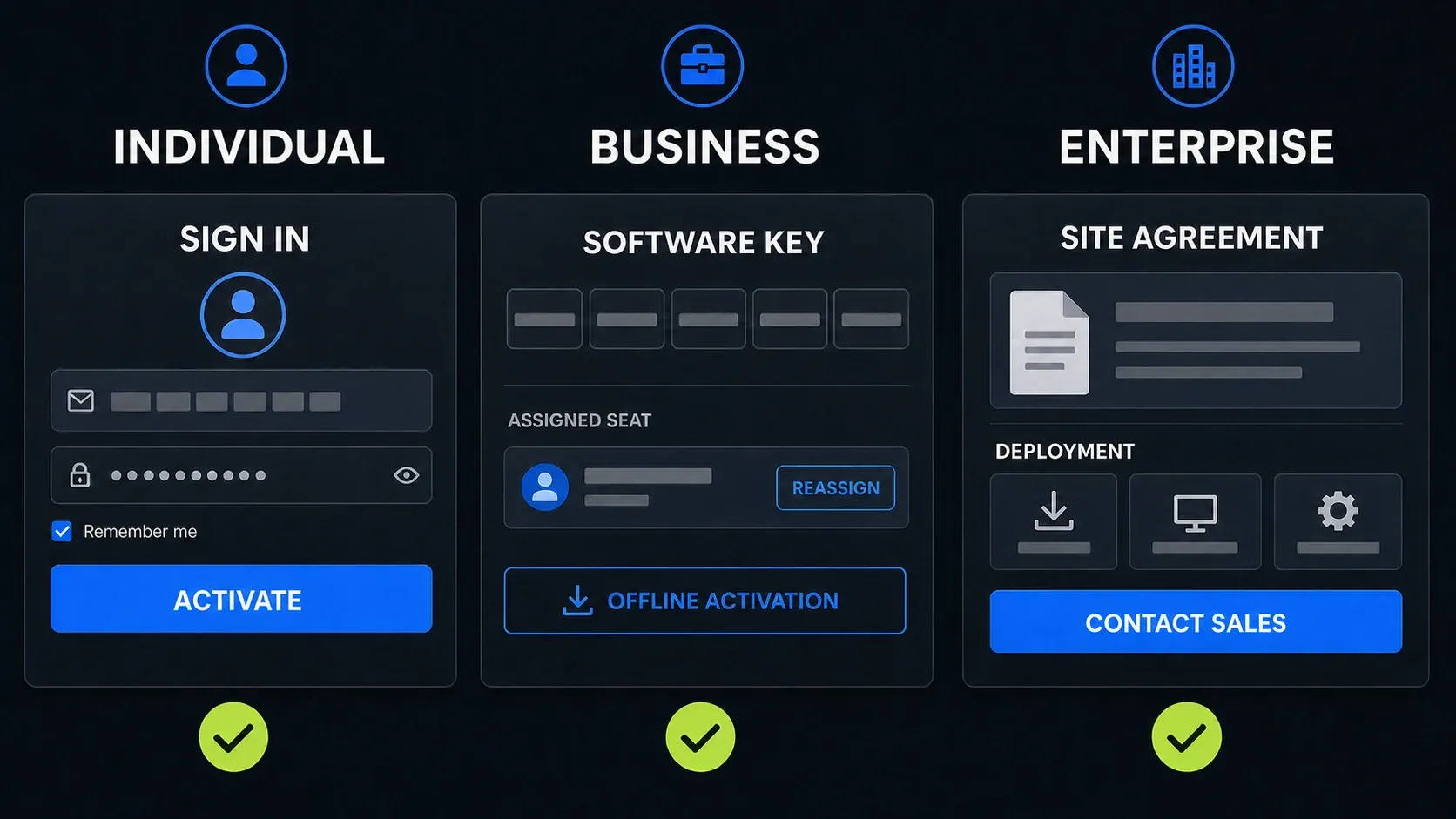
The license controls who may use Snagit, how the app unlocks, whether a seat can move to another employee, and whether an offline computer can activate.
On a narrow screen, swipe the table sideways to see every column.
| Right | Individual | Business | Enterprise |
|---|---|---|---|
| Unlock method | TechSmith account sign-in | 25-character software key | Site or custom agreement |
| Transfer to another user | No | Yes | Agreement-specific |
| Offline activation | No | Available | Available |
| Active devices per user | One at a time | One at a time | Flexible by agreement |
| Support | Email and chat | Phone, chat, and email | Dedicated manager plus support |
| Deployment package | No | Available | Available |
Individual: for your own non-transferable subscription
The Individual subscription is for your own use: you activate Snagit by signing in with the TechSmith account that made the purchase. There's no software key, the subscription can't be reassigned to a colleague, and offline activation isn't available. Email and chat support are included.
This plan fits a freelancer, a consultant, a student who doesn't qualify for the education offer, or an employee buying with their own account and expense method. It's the wrong pick when the company needs to recover the seat after a person leaves. TechSmith's Individual versus Business guide explicitly describes Individual subscriptions as non-transferable.
If you only take an occasional screenshot, a built-in capture tool may be enough. Snagit is more useful when you regularly need scrolling captures, annotations, short recordings, or step-by-step documentation, so check what Snagit is used for before paying for features you won't use. For differences in the latest release, see what changed in Snagit 2026.
Business: a transferable seat with a software key
Business costs $48 per user per year at the checked US list price, and the team gets a 25-character software key. A seat can be reassigned, end users don't need to sign in with a personal account for the desktop app, offline activation is available, and the license includes phone support plus deployment resources.
Choose Business when your organization buys for someone else, reassigns seats, packages installers, controls cloud sharing, or needs offline activation. The public US price is $9 more per user per year than Individual. A disconnected computer can activate by following the Snagit offline activation instructions. Keep in mind that a desktop software key doesn't remove the account and internet requirements of online services such as Screencast.
How many devices can one Snagit license use?
TechSmith separates installation count from active use. Its subscription policy allows subscription versions on an unlimited number of machines, but one licensed user can sign in or activate only one device at a time. The standard Individual and Business plans use this limit; Enterprise activation terms can differ by agreement.
One subscription does not cover several coworkers. Each person needs an authorized seat, unless your organization has a site agreement that covers their use.
Education prices and eligibility
The US education store lists $39.36 per user per year for educators and $19.99 per year for the verified student offer. Educator licenses use a software key and allow reassignment. The student subscription uses account sign-in and cannot be transferred.
TechSmith's education eligibility policy covers full-time students, staff, and faculty at K–12 or higher-education institutions for teaching, learning, and administrative computing. Commercial use is excluded. The separate Student Beans offer is listed for the US, UK, and Canada. Support documentation also mentions qualified recent graduates; eligibility must be confirmed through the offer's verification process.
If you're a corporate trainer outside an accredited school, teaching people doesn't qualify you for the education discount. Business, or a quote that matches the organization, is the right route.
What base Snagit includes
The current Individual, Business, and education store pages list the following base inclusions. Check these limits before paying for a larger package.
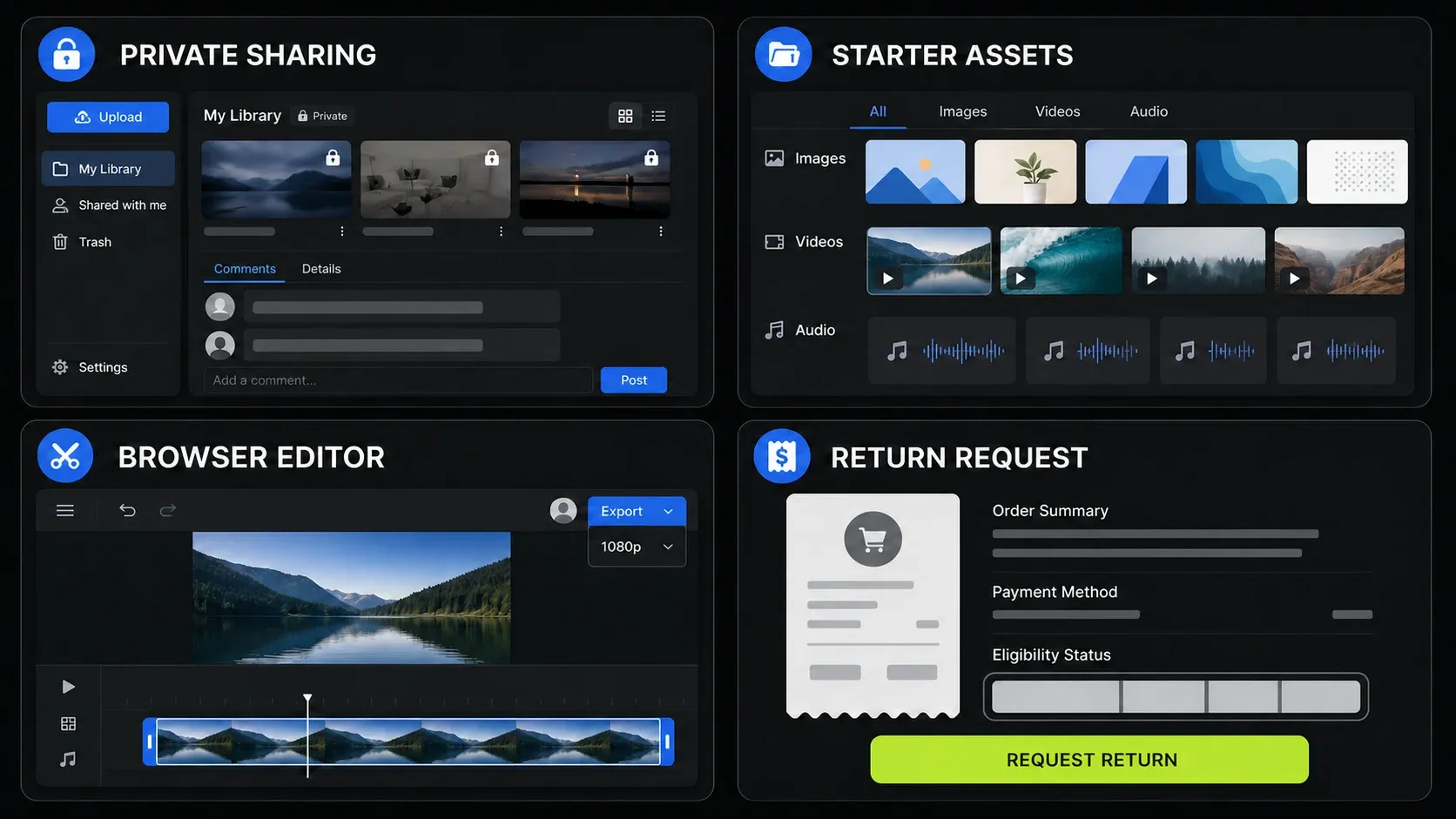
- Up to 25 private Screencast videos: host videos, share links, and collect timestamped comments and reactions. This is not unlimited hosting.
- Starter Assets: a starter royalty-free library, not the complete premium Assets catalog.
- Camtasia Online: the browser-based tool for 1080p video creation, simple editing, and collaboration. It is separate from the paid desktop Camtasia Editor.
- Updates and support: current Snagit versions during your active subscription, plus the support and training listed for your license.
- 14-day return window: subject to the purchase channel and return policy below, not an extra 14 days added to your trial.
Snagit Pro, Snagit Create, and current Camtasia bundles
Be careful with package names in older comparisons. TechSmith's December 2025 Snagit package explanation describes Snagit Create as adding premium images and templates, and Snagit Pro as adding unlimited Screencast sharing. That support article remains online, but the current Snagit store directs bundle buyers to Camtasia Plans.
The current Camtasia Starter, Essentials, Create, and Pro plans all include Snagit. Starter includes Camtasia Editor with watermarked exports, which is a different entitlement from the paid Editor in higher plans. Check the current product list and sharing limits for the exact package, and don't assume an old Snagit Pro description or price applies to Camtasia Pro. Individual Camtasia plans are non-transferable; an organization needing reassignment should request a team quote.
Volume discounts and enterprise licensing
TechSmith's volume and enterprise page says volume discounts begin at 10 subscriptions. Some discounts show up in the online store; custom site licenses and multi-year deals require sales contact. The public Business store asks buyers above 99 seats to contact sales.
TechSmith's described site agreement can cover current employees, allow up to 10% headcount growth, lock pricing for three years, and provide one key, central administration, account management, and onboarding. These are site-agreement terms. They do not automatically apply to a normal 10-seat Business order.
Enterprise pricing is a custom quote. Make the seller put the covered products, employee count, growth allowance, countries, support, deployment method, Screencast/Assets entitlements, payment schedule, renewal, and cancellation terms in the order document.
Renewal cost and total cost of ownership
Check the renewal amount and date in your TechSmith account or renewal notice, because the new-customer list price isn't necessarily your renewal price. If you buy through a reseller, confirm who handles renewal and support. A team should also budget for the work of deploying updates and reassigning seats when staff change.
If you hold a Legacy License Subscription, TechSmith commits to discounted maintenance-based pricing through at least 2030. It also says annual increases can occur. The discount is not a frozen dollar amount, and letting the subscription expire loses the legacy pricing benefit.
Base Snagit includes 25 private Screencast videos and Starter Assets. If those limits are too small, price the extra service or current bundle before approving the budget, and confirm you actually need its additional products as well as the larger sharing or asset allowance.
Compare quotes line by line: Snagit seats, optional services, tax, any reseller or procurement fees, and the renewal total, with optional training recorded separately. For a multi-year calculation, say if you're assuming today's price stays the same or relying on a written price-lock agreement.
Subscription, cancellation, and old perpetual licenses
Snagit 2025 and later releases require an annual subscription. If you cancel, access continues until the paid term ends. After expiration, normal access to those subscription versions ends. TechSmith's subscription transition FAQ also requires initial activation and an internet check at least once every 90 days for normal use, with alternative activation arrangements for offline organizations.
Your local captures are not deleted when the subscription ends. Editor access is a separate matter: TechSmith describes a limited export period after expiry but doesn't state its length on that FAQ. Before cancelling, back up your Snagit library and export any files you need to use elsewhere.
TechSmith says a previously purchased perpetual version remains usable while your operating system supports it. An old license does not grant perpetual access to Snagit 2025 or later subscription releases. The support schedule in the transition FAQ lists Snagit 2024 support through December 31, 2026 without a Legacy subscription and October 2, 2027 with one.
If you already own a key, check its status in your TechSmith account before buying again. For the product decision, read the Snagit review. If annual billing rules Snagit out, compare free Snagit alternatives against the capture and editing tasks you need.
Trial, refunds, and what to check before buying
The full Snagit trial lasts 15 days, according to TechSmith's trial and activation instructions. The return policy separately allows a software return within 14 days of purchase and requires uninstalling the product. Contact your reseller for a reseller purchase; TechSmith handles direct purchases. Extra services, including Assets, have their own conditions. Trying the app and returning a purchase are different processes.
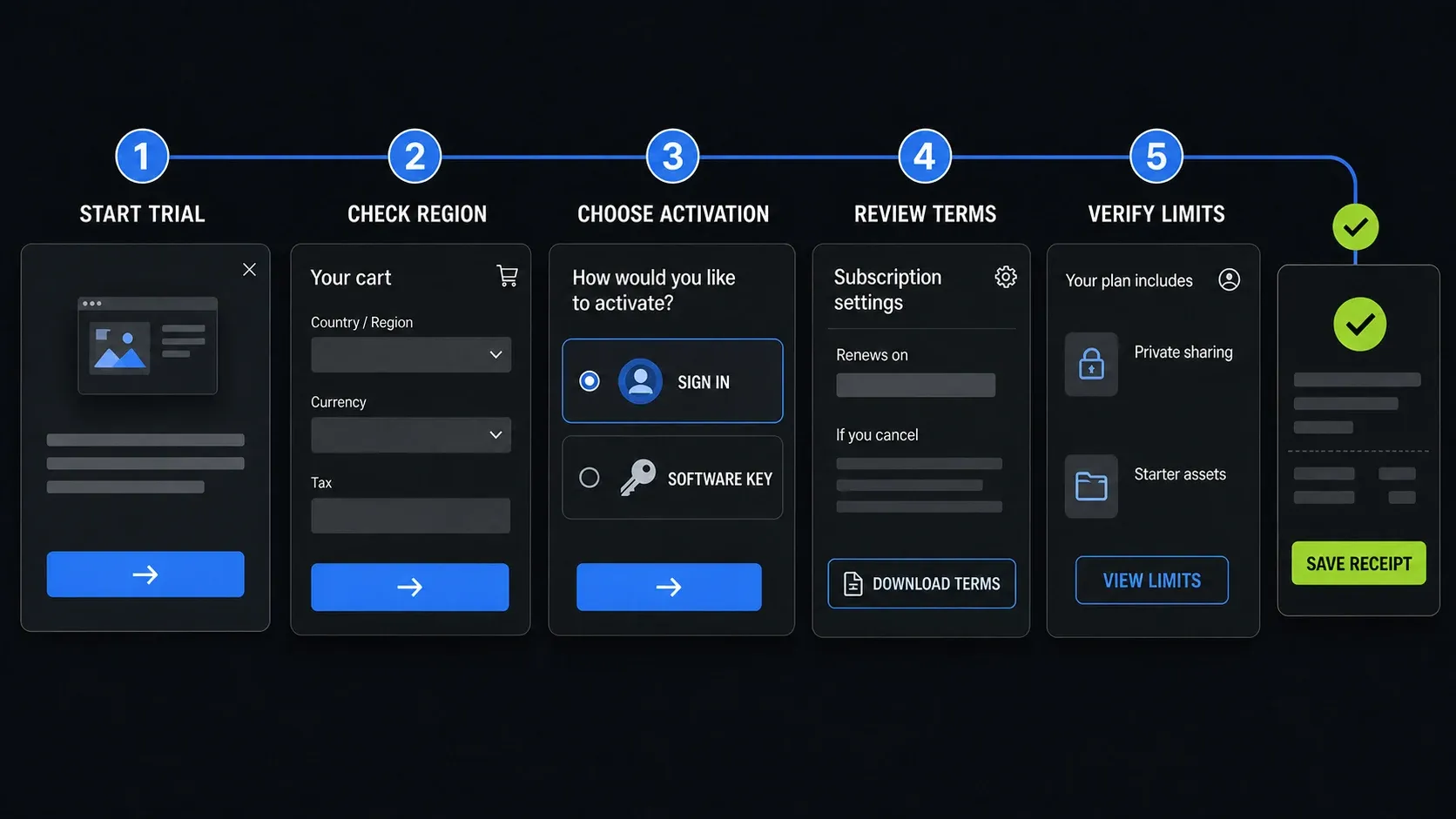
- Run the 15-day trial on the computer you will actually use.
- Confirm country, currency, tax, billing period, and renewal terms in the final order.
- Choose Individual only for the person buying and using that non-transferable subscription.
- Choose Business if the employer needs a key, reassignment, offline activation, deployment controls, or phone support.
- Check whether 25 Screencast videos and Starter Assets cover your work. Compare current bundles or extra services if they do not.
- Save the order confirmation, license type, plan contents, cancellation instructions, and renewal date.
If you are deciding between the screenshot app and TechSmith's full video editor, the Snagit vs Camtasia comparison separates the products. If you need current Mac compatibility before paying, check the Snagit for Mac guide.
FAQ: Snagit pricing and licenses
How much does Snagit cost per year?
The public US prices checked September 12, 2026 are $39 per year for Snagit Individual and $48 per user per year for Business. Both are billed annually. Regional prices, tax, discounts, and your final order can change the amount.
Can I buy Snagit without a subscription?
New Snagit 2025 and later releases are subscription-only. Older perpetual versions remain usable for owners while their operating system stays compatible, but an old license does not grant perpetual access to current subscription releases.
Can I pay for Snagit monthly?
No. TechSmith's current billing FAQ says Snagit subscriptions are billed annually. Screencast is the TechSmith product with a separate monthly subscription option.
How many computers can use one Snagit subscription?
Subscription versions can be installed on an unlimited number of machines. Standard Individual and Business licenses allow one active device per licensed user at a time. Each additional user needs a seat; Enterprise terms can differ by agreement.
What is the difference between Snagit Individual and Business?
Individual uses account sign-in, is non-transferable, and has no offline activation. Business uses a software key, allows seat reassignment and offline activation, and adds phone support plus deployment resources.
Does Snagit include Screencast and Assets?
Base Snagit includes private hosting for up to 25 Screencast videos and a Starter Assets library. That does not include unlimited sharing or the full premium asset catalog. Check the current store for extra services and Camtasia bundles; older Snagit Create and Pro descriptions use different package names.
Is there a Snagit student discount?
Yes. The US education store checked September 12, 2026 lists $19.99 per year for the verified student offer; the general catalog still shows $20. TechSmith lists Student Beans availability in the US, UK, and Canada. Verify eligibility and the final amount through the offer before buying.
What happens if I cancel Snagit?
Subscription access continues until your paid term ends. Your local captures are not deleted on expiry, but normal access to subscription versions ends, so back up and export important files beforehand. Older perpetual versions you purchased remain usable while your operating system supports them.