
Snagit is worth $39 a year when screenshots are part of the job rather than an occasional chore: support replies, SOPs, onboarding guides, bug reports. That is where reusable styles, editable image files and Step Capture pay for themselves week after week. If you take a screenshot now and then, crop it and add an arrow, the tool already on your computer does that for free, and I would keep using it.
Snagit Individual listed at US$39 per year in the TechSmith US store when we checked in September 2026. Currency, region and tax can change your cart, and business seats cost more. The Snagit pricing and licenses guide breaks down every plan, device right and renewal rule.
This review is built from TechSmith's current documentation, release notes, store and support policies, which I rechecked on September 27, 2026. It tells you which documented features fit which jobs and reports no speed, memory or OCR accuracy measurements of my own.
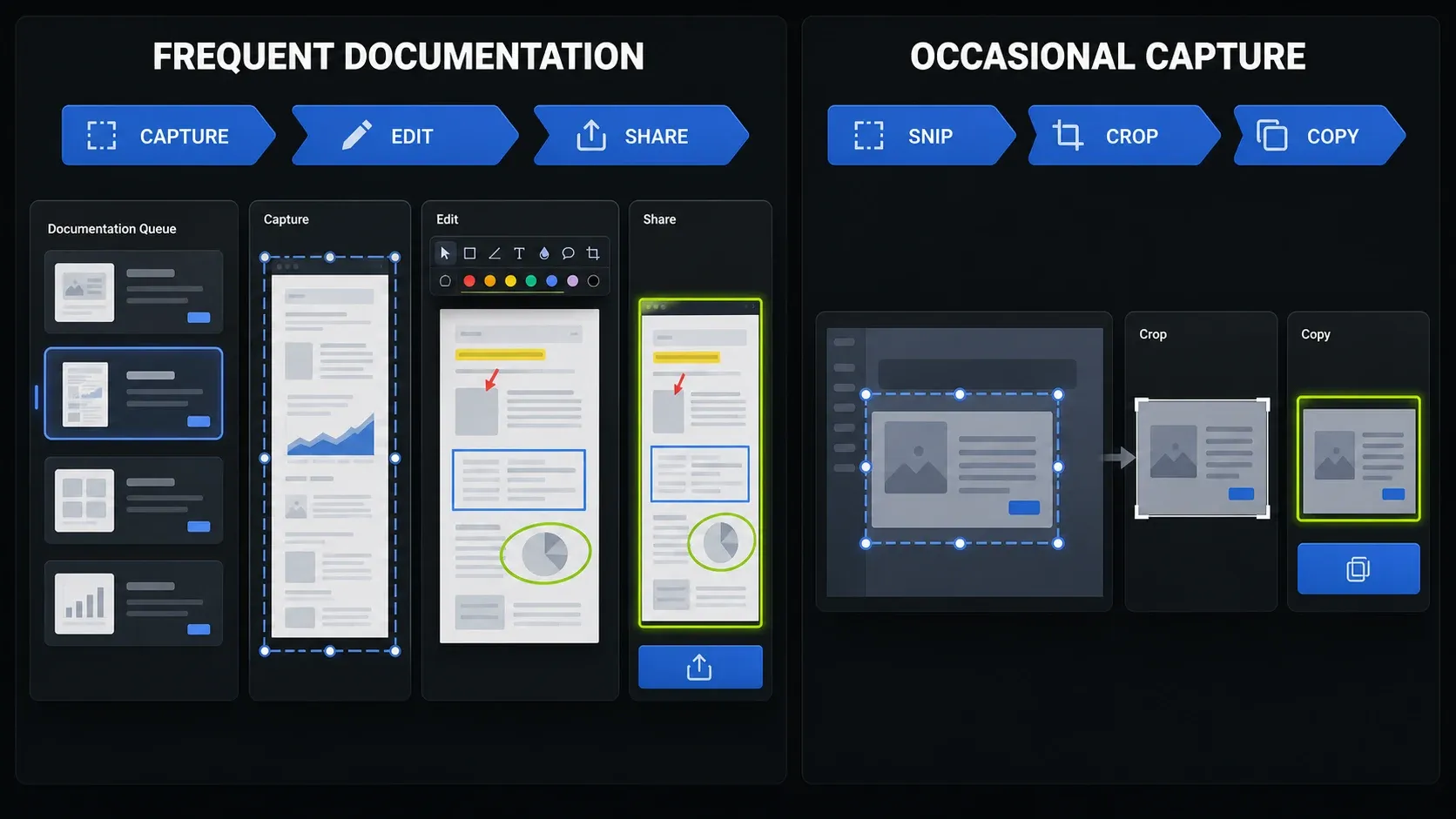
Snagit strengths and limits at a glance
Here is the short version before the detail. The middle column is what the subscription buys you; the right column is what I would check during the trial.
| Task | What you get | What to check |
|---|---|---|
| Screen capture | Region, window, full screen, scrolling, and presets | Capture your actual page or application; inspect missing or repeated content. |
| Annotation | Arrows, callouts, numbered steps, templates, and reusable styles | Is the repeated editing easier than in your current tool? |
| Text and redaction | Grab Text, Edit Text, and Smart Redact | Proofread extracted text and inspect every redaction. |
| Step documentation | A click sequence becomes an editable visual guide | Correct generated labels and remove private information. |
| Short video | Screen and webcam recording, audio, trimming, combining, and GIFs | Test audio and export; use another editor for a full multitrack timeline. |
| Cost | US Individual subscription: $39 per year | A free tool may already complete all your required tasks. |
For documentation work, reusable annotation and editable sources matter more than a long list of recording options. If video is your main output, flip that priority. On a narrow screen, swipe the table sideways to see every column.
What Snagit does well
1. Capture, editing and sharing live in one place
Most screenshot tools stop at the capture. Snagit's real argument is what happens after it: the Editor, saved annotation styles, a searchable Library and export destinations sit together, so a revision takes minutes instead of a rebuild. Keep the editable .snagx file, change one callout when the interface moves, and export a fresh copy.
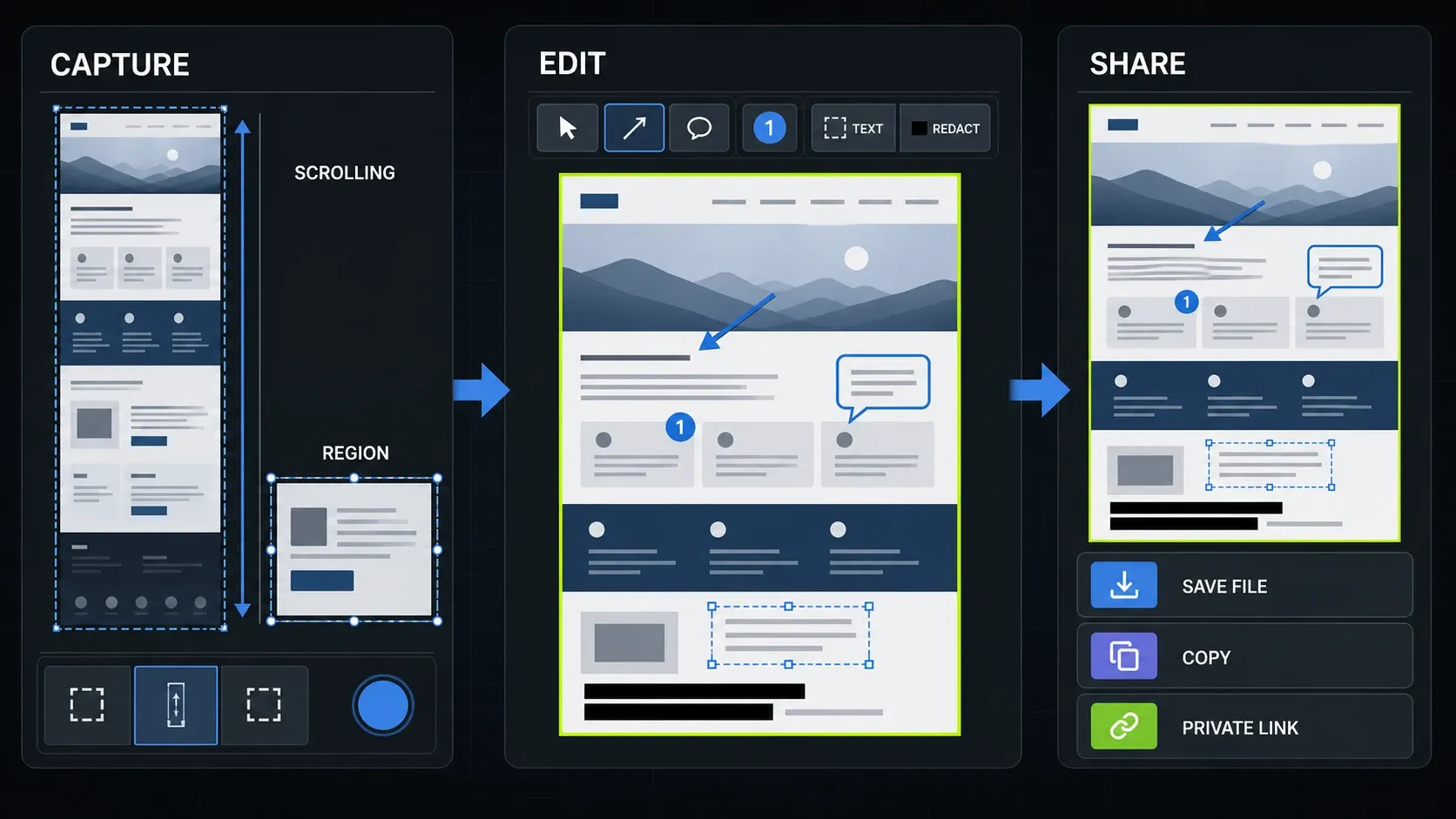
TechSmith's Snagit feature list covers region, window, full-screen, scrolling and time-delay capture, and supported formats run from SNAGX, PNG, JPG and WebP to PDF, GIF and MP4. My Snagit Editor guide walks through the workspace and export choices.
Two sharing details are worth knowing before you send anything. Saving a capture to the Library does not publish it; choosing Screencast as the share destination uploads it. And a Screencast link is not limited to named people by default: TechSmith describes Screencast sharing with anyone who has the link, plus an optional access phrase. The subscription includes up to 25 hosted videos. If your company bans cloud uploads, export to an approved folder and let IT decide which destinations stay switched on.
2. Scrolling capture handles the long-page problem
Long web pages, chat threads and settings panels rarely fit on one screen. Scrolling capture saves you from stitching overlapping screenshots by hand, and for documentation that alone can justify a trial. It is not guaranteed everywhere, though. Nested scroll areas, sticky headers and pages that load content as you scroll are exactly where I would test first, then check the result for missing rows, repeated sections and cropped edges.
The Snagit scrolling capture guide covers the capture itself. If the arrows never appear or the capture stops halfway, the scrolling capture troubleshooting guide has fallbacks.
3. Annotation is built for instructions you repeat
Arrows, callouts, numbered steps, blur, crop and templates are what make Snagit useful for support answers and SOPs. Custom capture presets and shortcuts cut the setup before a capture; saved tool styles keep colors and line weights consistent after it. That matters a lot when a team produces dozens of related images and hardly at all when one person marks up a single email attachment.
Keep the editable SNAGX source when another revision is likely, and export a separate delivery copy. A shape placed over private text in an editable file can be moved, so never send the source to hide something. Check the flattened export instead.
4. OCR, Edit Text and Smart Redact help, but you still proofread
Grab Text copies recognized text out of an image. Edit Text tries to replace captured text while matching its look. Smart Redact finds and covers sensitive details automatically. All three are real time savers and none of them is a final check. Small or low-contrast text, unusual fonts and busy layouts cause mistakes, which TechSmith's Grab Text and Edit Text best practices spell out.
Compare names, account numbers, file paths and error messages with the original. For redaction, scan the whole image, use an opaque cover, export a flattened file, then reopen that file before sharing it. Keep the unredacted original private. The guide to copying text from a screenshot covers the OCR steps. Before processing confidential material, check your organization's policy and share settings. A desktop app is not a promise that every connected service runs locally.
5. Step Capture shortens click-by-click guides
Step Capture turns a sequence of clicks into an editable guide with numbered steps. According to the 2026 release notes, guides shared to PowerPoint on Windows or to PowerPoint or Keynote on Mac become slideshows with editable text and one slide per image. Review the order, rewrite generated labels and remove private data before you share.
It shines on short, stable procedures. A process with branches, hidden states or many near-identical screens still needs an editor's hand. The Snagit Step Capture guide covers capture and cleanup.
6. Short screen recordings are easy to finish
Snagit records the screen, webcam, microphone and supported system audio, including picture-in-picture. You can trim, combine clips, remove background noise, save a frame as an image or turn the clip into an animated GIF. That is plenty for a bug report or a two-minute support answer. Record a short sample first, because permissions, protected content and your audio setup decide what actually lands in the file.
Snagit is not a video editor, and it does not pretend to be. If you need separate tracks, animation or detailed audio work, the Snagit screen recording guide and the Snagit vs Camtasia comparison show where one tool ends and the other starts.
Where Snagit falls short
- The Snagit subscription is the only way in. New licenses from Snagit 2025 onward are annual subscriptions. There is no monthly plan and no new perpetual license.
- Light use is poor value. Paying every year makes little sense for an occasional crop, arrow and local save.
- Video has a ceiling. Trim and combine are handy; a real tutorial production still needs a full editor.
- Windows and Mac are not identical. The feature list marks several capture and webcam functions as Windows-only or Mac-only.
- Automation needs a human pass. OCR, generated step text, Smart Redact and noise removal save time but should never skip your final check.
- It has to phone home. A subscription needs internet for activation and then every 90 days. Individual plans use account sign-in; offline activation is a Business feature.
One licensing detail catches people out. According to TechSmith's subscription transition FAQ, you can install Snagit on an unlimited number of machines but sign in or activate on only one at a time. Individual subscriptions are non-transferable, and the Individual vs Business license comparison shows when a Business seat makes more sense.
Mac users should also check their macOS version first. The Mac release notes say Snagit 2026 and later will not support macOS 14 Sonoma, even though some older TechSmith pages still list Sonoma. Read the Snagit for Mac guide before installing.
Snagit free trial: what to check in 15 days
TechSmith's standard Snagit free trial gives you the full product for 15 days. If you need more time, TechSmith's trial reset article lets you reset the trial once for another 15 days, and the Microsoft Store instructions describe the same extension for that installation route. After you buy, TechSmith's return policy allows a refund request within 14 days of purchase, with the software uninstalled; purchases through a reseller follow the reseller's terms.
Fifteen days is enough if you spend the Snagit trial on your own work instead of the demo file. These are the five tasks I would run:
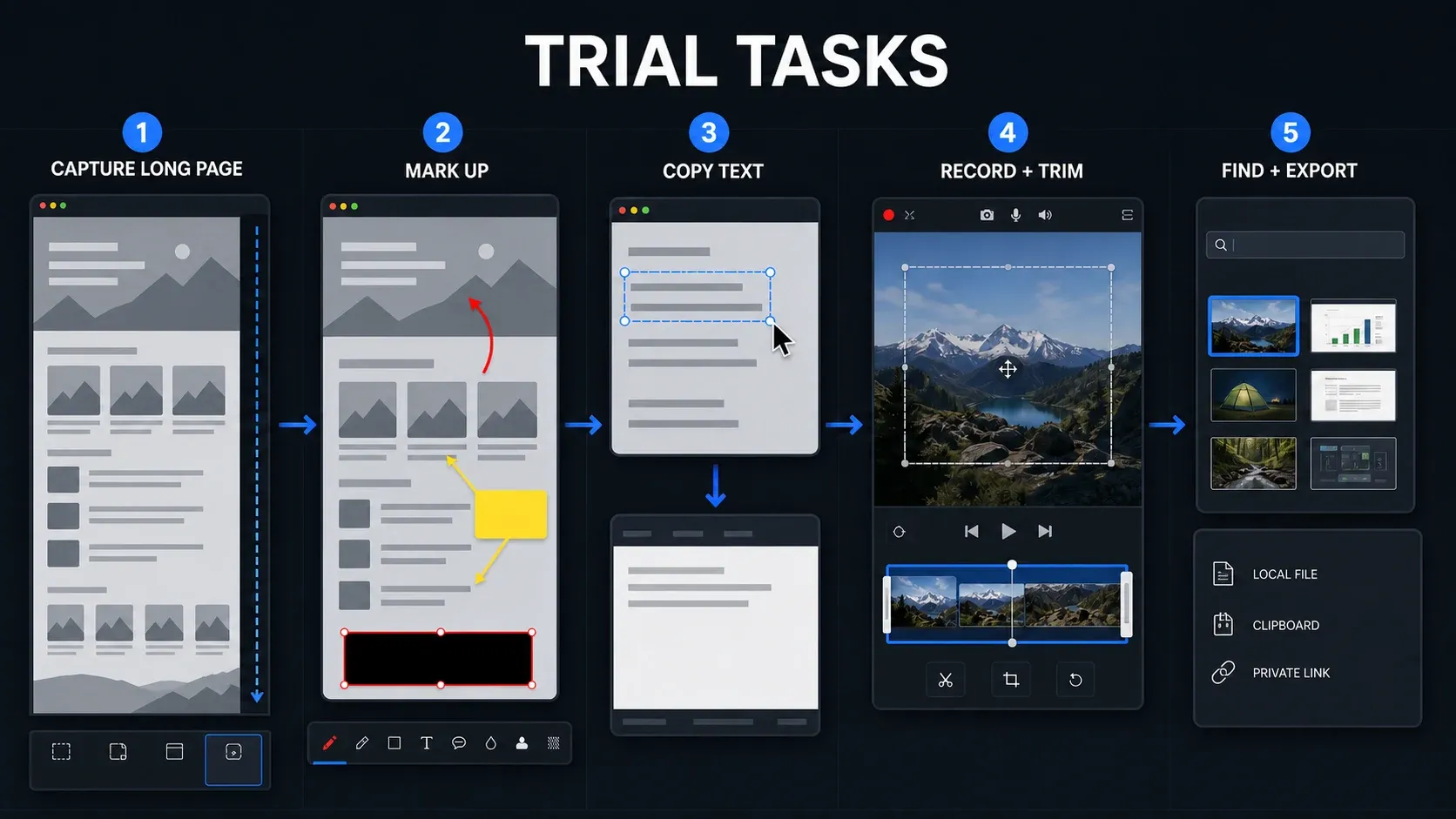
- Capture a long page or scrolling panel you actually use. Check the bottom, the sticky headers and any repeated rows.
- Mark up one real screenshot with your usual arrow, callout, step number, crop and brand color, then save the style.
- Run Grab Text or Edit Text on a difficult sample with small text and compare every character with the source.
- Record 60 seconds with your microphone and system audio, cut one section, add a second clip and export.
- Find the capture again in the Library, paste it into your normal document or ticket, and send a flattened export to your real share destination.
Decide your must-pass tasks before you start. If private information stays visible, system audio goes missing when you need it, or your key application will not capture properly, a success somewhere else does not make up for it. Skip tests for features you will never use and judge the purchase on the work you actually do.
Can you still buy Snagit as a one-time purchase?
No. TechSmith moved Snagit to an annual subscription starting with Snagit 2025, and it is billed yearly, with no monthly option. If you cancel, you keep access until the paid period ends.
Older owners are not locked out. TechSmith's update and upgrade policy says a Snagit perpetual license bought for version 2024 or earlier keeps the updates for that version, and it keeps running as long as your operating system supports it. What it will not do is unlock the current release. If an older license still covers your work, the install and update guide explains how to get back to your version.
The deciding question is practical: does a saved style or editable source remove a step you repeat all week? If it does, $39 a year is easy to justify. If your free tool already does the job, keep it.
Snagit alternatives by workflow
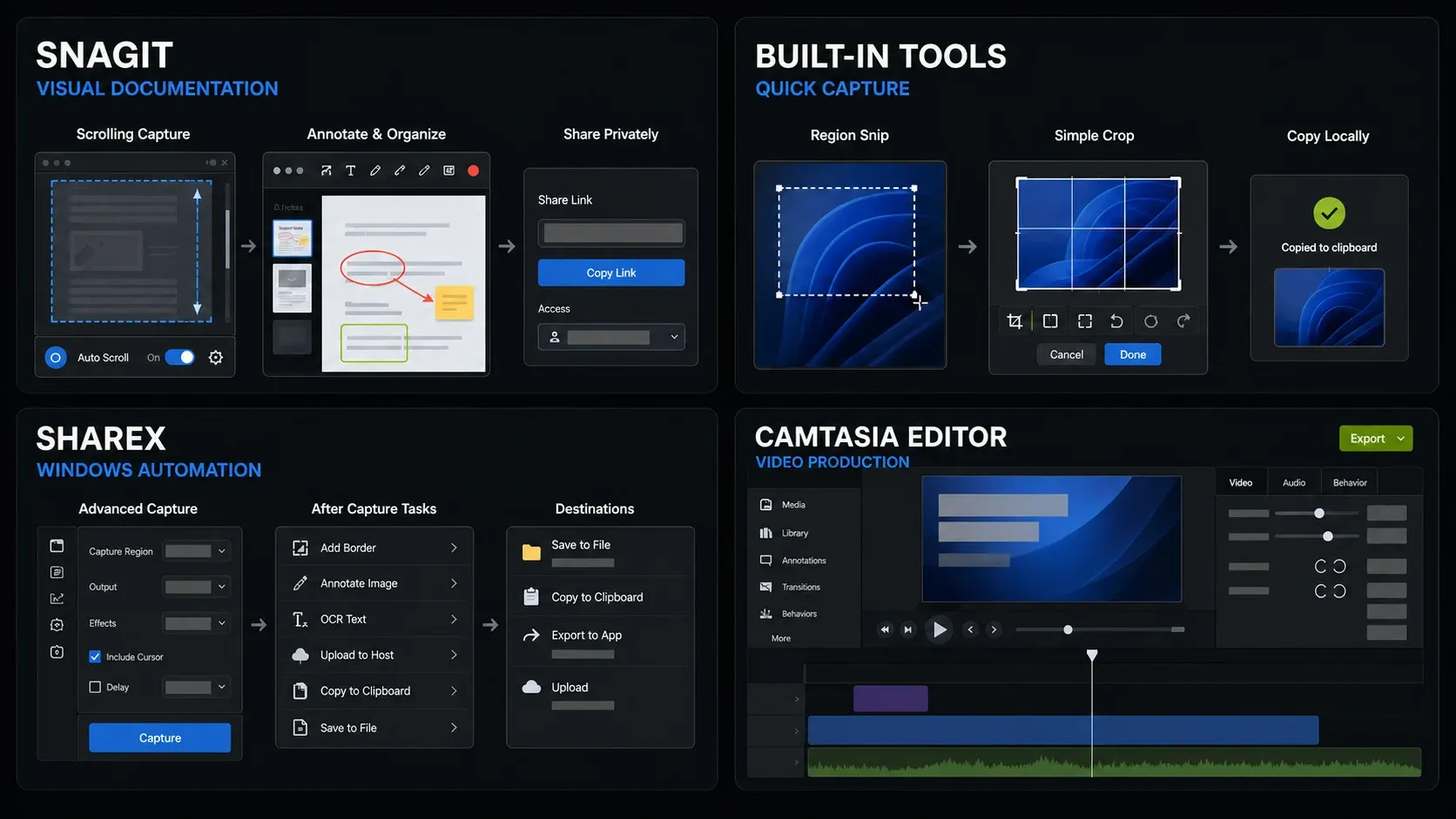
| Option | Platform | Price model | Best fit | Main trade-off |
|---|---|---|---|---|
| Snagit | Windows, Mac | $39/year US Individual | Recurring annotation and visual documentation | Annual subscription; test required capture and sharing tasks. |
| Windows Snipping Tool | Windows | Included | Quick captures, shapes, text extraction, and basic screen recording on Windows 11 | Check whether it covers your repeated documentation tasks. |
| macOS Screenshot | Mac | Included | Quick local screenshots and screen recordings | Basic editing; compare your finished guide, not just capture. |
| ShareX | Windows | Free, open source | Capture, annotation, OCR, scrolling, and automated after-capture actions | More workflow configuration; no Mac version. |
| Camtasia Editor | Windows, Mac | Paid plans; free core mode with watermarked output documented for the Windows Store installation | Multitrack video editing | Separate editor; check export restrictions and plan features. |
Microsoft documents Snipping Tool's capture, text and video functions, and Apple explains the built-in Mac screenshot controls. ShareX adds OCR, scrolling capture, annotation and after-capture automation for free on Windows. None of those features is unique to Snagit. The Snagit vs Snipping Tool comparison and Snagit vs ShareX comparison go head to head, and the free Snagit alternatives guide covers the rest.
Who should buy Snagit
- Technical writers who build procedures from application screens every week.
- Support teams that need consistent arrows, callouts, redaction and quick export.
- Trainers who turn click sequences into short visual guides and slide decks.
- Product and QA teams that file bugs with annotated images or short recordings.
- Teams working across Windows and Mac who want one familiar workflow.
Who should skip it
- Anyone who captures a region, crops it and adds one mark a few times a month.
- Windows users who prefer a configurable open-source tool and do not mind the setup.
- Mac users who mainly want a light native capture utility, not a documentation system.
- Video creators who need tracks, animation, captions and production export controls.
- Buyers who insist on a new perpetual license.
If you decide to buy, the Snagit beginner tutorial walks through your first capture and edit, and what's new in Snagit 2026 covers the latest release. More evaluations sit in the Snagit reviews section.
FAQ: Snagit review 2026
Is Snagit worth it in 2026?
Yes, if you turn screenshots into guides, support answers or bug reports every week. Reusable styles, editable .snagx files and Step Capture save time on work you repeat. If you only crop a screenshot and add an arrow now and then, a free built-in tool is the better value.
How much does Snagit cost?
Snagit Individual listed at US$39 per year in the TechSmith US store when we checked in September 2026. It is billed annually; there is no monthly plan. Business seats, education pricing, currency and tax change the final price, so confirm the cart before you pay.
Is Snagit free, or is there a free trial?
Snagit is not free software, but it comes with a 15-day free trial of the full product. If you need more time, you can reset the trial once for another 15 days. Use the trial on the apps and pages you actually capture.
Can I buy Snagit as a one-time purchase?
Not any more. Starting with Snagit 2025, TechSmith sells new licenses as annual subscriptions. If you bought Snagit 2024 or earlier, that perpetual license keeps working for as long as your operating system supports it, but it does not unlock current versions.
Does Snagit work offline?
Mostly. TechSmith says continuous internet access is not required, but a subscription needs to connect for activation and then once every 90 days. Individual subscriptions use account sign-in. Business licenses support offline activation for computers that cannot connect.
Can Snagit record and edit video?
Yes, for short clips. Snagit records the screen, webcam, microphone and supported system audio, then lets you trim, combine clips, save frames and make GIFs. For multitrack editing, animation or detailed audio work, use a full editor such as Camtasia Editor.
Is Snagit better than ShareX?
For polished, repeatable documentation on Windows and Mac, Snagit is easier to live with. For free, heavily automated capture on Windows, ShareX wins. Both offer annotation, OCR and scrolling capture, so those features alone do not justify paying for Snagit.
Does Snagit work on Windows and Mac?
Yes. TechSmith says a Snagit license covers both the Windows and macOS versions, and most features match, although a few are Windows-only or Mac-only. The Mac release notes state that Snagit 2026 does not support macOS 14 Sonoma.