
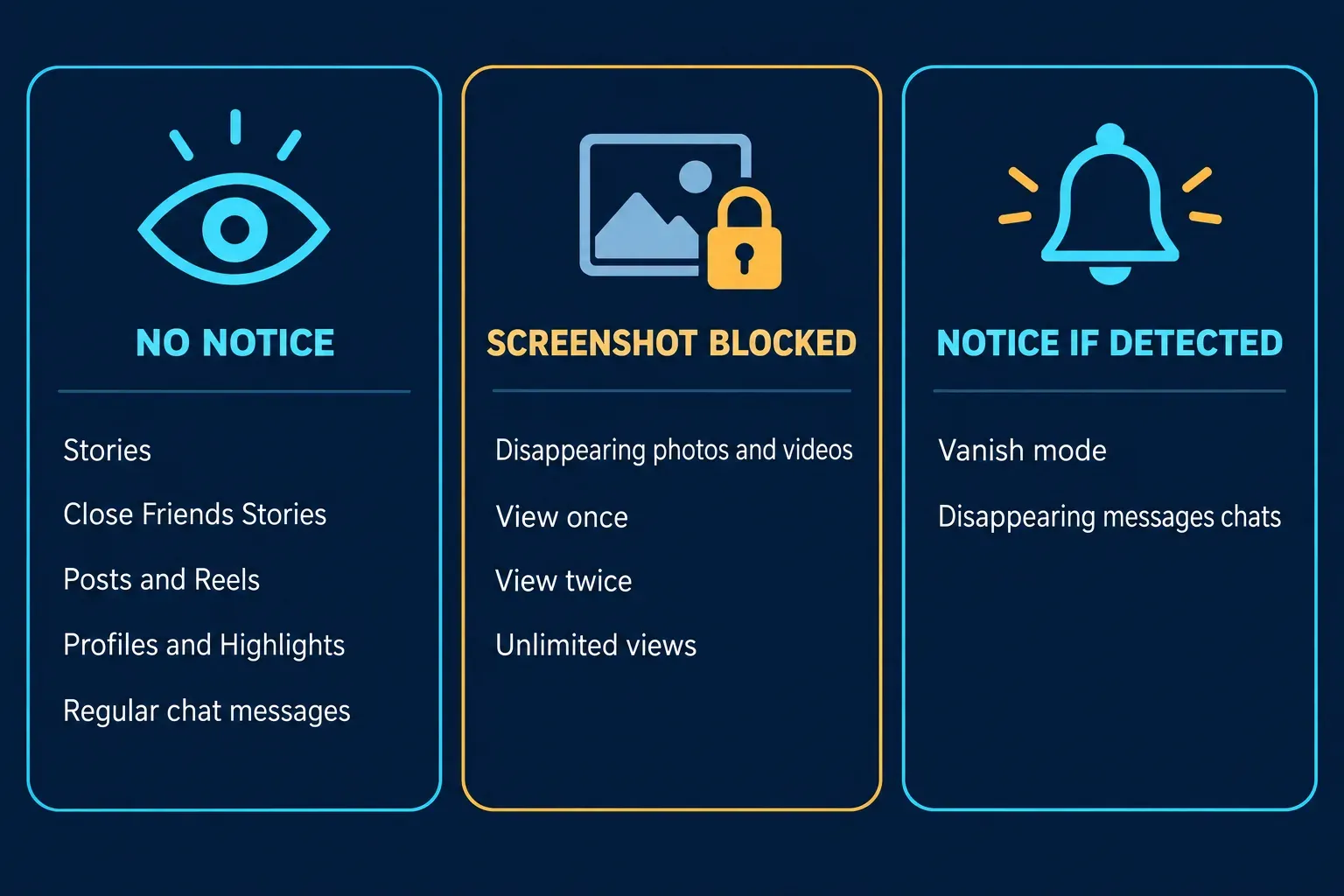
No. Instagram doesn't notify anyone when you screenshot their Story, a Close Friends Story, a post, a Reel, a profile, a Highlight or an ordinary chat message. The exceptions all live inside chats. Disappearing photos and videos sent in a chat can no longer be screenshotted at all, and in vanish mode or a chat with disappearing messages turned on, Instagram says the other person gets a notification if it detects a screenshot.
That's what Instagram's own Help Center said when I checked it on October 1, 2026, and it's narrower than what many guides still repeat. Most of them say a View once photo alerts the sender when you screenshot it. Instagram now describes that case differently: the screenshot is blocked, not reported. Below is what happens for each kind of content, where the "Instagram now notifies you" rumors keep coming from, and what you can actually control about your own Stories and messages.
Does Instagram notify screenshots? The answer by content type
| What you screenshot | Does the other person find out? | What Instagram describes |
|---|---|---|
| Someone's Story or Close Friends Story | No | The owner sees who viewed it, not who captured it |
| Posts, Reels, profiles, Highlights, comments | No | No screenshot alert is described for any of them |
| Regular messages, photos and videos in a chat | No | Only vanish mode and disappearing-message chats mention an alert |
| A disappearing photo or video (View once, View twice, Unlimited views) | Screenshot is blocked | Screenshots are disabled; the sender can see whether it was seen |
| A message in vanish mode | Yes, if detected | The other person is notified if Instagram detects a screenshot |
| A chat with disappearing messages turned on | Yes, if detected | The same alert as vanish mode, in a chat with a timer |
| Your own Story, post or Reel | No one to tell | It's your content |
Screen recording follows the same lines outside chats: nothing mentions it. Inside chats, both help pages warn that someone can screen-record a message, but the alert is mainly described for screenshots, so I wouldn't count on a notification for a recording.
Stories and Close Friends Stories
When you watch someone's Story, your username goes into their viewer list. Instagram's page on how to tell who's seen your story says the owner swipes up to see the number of views and the usernames of the people who watched, can check that list for up to 48 hours after posting, and is the only person who can see it. Nothing on that list says what a viewer did after watching, and no Help Center page describes a Story screenshot alert.
Close Friends Stories work the same way. Instagram's guide to sharing a story with your close friends list says those Stories disappear after 24 hours and that people on the list know they're on it, which is what the green ring around the profile photo signals. A smaller audience doesn't add a screenshot alert. Highlights are older Stories saved to a profile, so the same answer applies, and private accounts don't change it either; privacy controls who can see a Story, not what happens after someone sees it.
Instagram did try Story screenshot alerts once. Gizmodo reported in June 2018 that the company had dropped the feature after several months of testing that began in a limited form that February. People in the test got a one-time warning after screenshotting a Story. Nothing in Instagram's current help pages brings it back.
Why "Instagram now notifies Story screenshots" keeps coming back
The rumor resurfaces every few months, and 2026 produced three versions of it.
- A viral Reel in early June. A Reel with more than 12,000 likes announced that Instagram had started notifying people when someone screenshots or screen-records their Story. It cited no source, one of its most-liked comments called it untrue, and Instagram's help pages never changed to match it.
- A report about blocking Story screenshots. Around the same time, an app researcher posted that Instagram was rolling out screenshot prevention for Stories. That would be a block, not an alert, and it hasn't appeared in Instagram's Help Center, so I treat it as an unconfirmed test at most.
- The Instagram Plus icon in late August. Instagram Plus is Meta's $3.99-a-month subscription, and CBS News listed among its features the ability to see how many times a Story was rewatched and search whether a specific person watched it. When a new icon showed up in some viewer lists, people took it for a screenshot marker. Unilad Tech's write-up of the confusion quoted commenters explaining that the icon relates to rewatches and only appears for Plus subscribers, which fits the rewatch counts CBS described.
Plus does change one thing for Story owners. The same viewer-list help page says the list and view count don't include the usernames of Plus subscribers who previewed your Story. That's a viewing feature, not a screenshot one, but it means the viewer list isn't a complete record of who saw a Story.
What happens when you screenshot in Instagram chats
Chats are where the answer changes, and it depends on what kind of message is on the screen.
Regular messages and photos
Ordinary text, photos, videos, shared posts and Reels stay in the thread like any other message. None of Instagram's help pages describes a screenshot alert for them. Only vanish mode and chats with disappearing messages turned on mention one.
Disappearing photos and videos: View once, View twice, Unlimited views
When someone sends a disappearing photo or video, they pick how it can be viewed. Instagram's guide to sending disappearing photos and videos lists three options: View once, View twice (one replay before it disappears), and Unlimited views, which keeps a preview image in the chat thread.
For these, the current rule is a block, not an alert. Instagram's page on the status of a disappearing photo or video you've sent says that "taking a screenshot is now disabled for a disappearing photo and video you've sent in a chat." The sender can still see whether it was seen. The sending guide also still mentions seeing "if we detect someone took a screenshot," so the detection wording hasn't left every page, but "now disabled" is the newer and more specific statement.
Meta announced the change in October 2024 as part of a campaign against sextortion scams aimed at teens. The announcement covered screen recording as well as screenshots for View once and replay-enabled images and videos, and said those messages would no longer open on Instagram's website, so they can't simply be viewed in a computer browser instead.
Most of the guides ranking for this question still say a View once screenshot sends the sender an alert. That's how it used to be described; it isn't how Instagram describes it now.
Vanish mode
Vanish mode is a chat setting you turn on by swiping up in a conversation. Messages disappear when someone leaves the chat or turns vanish mode off, and they can't be copied, saved or forwarded. Instagram's vanish mode guide warns that the other person can still take a screenshot or screen recording before a message disappears and says "you'll receive a notification if we detect they take a screenshot." The same page notes that vanish mode may be unavailable in Japan and in European countries and only works in a chat with another Instagram account.
Chats with disappearing messages turned on
In some locations Instagram offers a timed version: you swipe up in a chat to turn on disappearing messages, and messages vanish after a default time you can change. Instagram's page about disappearing messages in chats says the feature isn't available everywhere and doesn't work in group chats. Its safety note warns that someone can screenshot or screen-record a disappearing message and says you'll receive a notification if Instagram detects it. The iPhone version of the page words that alert to cover both; the Android version mentions only screenshots.
Why "if we detect" matters
Both pages that promise a notification hedge it with the same three words. Instagram doesn't explain how detection works or when it might miss, and both pages name a risk no alert can catch: someone photographing the screen with another phone or camera. A screenshot alert is a deterrent, not a lock.
So I'd read it from both sides. If you're sending something private, assume it can be kept, whatever mode you use. If you're receiving messages in vanish mode or a disappearing-message chat, assume the sender may see your screenshot.
Can you see who screenshotted your Instagram Story?
No. Instagram gives Story owners a viewer list and, with Plus, rewatch counts, but no screenshot list. Apps and websites that promise to reveal who screenshotted your Story can't show data Instagram doesn't provide, and handing your Instagram login to one of them is the bigger risk.
I accidentally took a screenshot. Will they know?
If it's your own Story, there's no one to tell. If it's someone else's Story, post or Reel, they won't be notified; they'll only see that you viewed their Story, which they'd see anyway. The one place an accidental screenshot can surface is vanish mode or a chat with disappearing messages, where the other person may get a notification. If that happens, I'd just say it was a mis-tap and delete the image.
How to control who can capture your Instagram content
You can't stop someone from screenshotting a Story or post they're allowed to see. What you can control is who sees it and how far it travels.
- Share to Close Friends. When you post a Story, tap Close Friends at the bottom to limit it to your list. Everyone on the list knows they're on it, so it's a smaller audience, not a secret one.
- Hide your Story from specific people. Instagram's guide to hiding your story from someone takes you to your profile, then Menu, then Story, live and location under Who can see your content, where you choose people under Hide your story and live videos from specific people. You can also do it from your viewer list. It isn't blocking; they can still see your profile and posts.
- Limit re-sharing. Under Menu, then Sharing and reuse, turning off Stories in messages stops other people from sharing your Story in chats. Instagram's page on managing who can share your story also points out that when people you mention re-share it, their followers can see it, even if your account is private.
- Send private photos as View once. Instagram blocks screenshots of disappearing photos and videos, and you can only send them to people who follow you or have already accepted your messages. View twice and Unlimited views give the other person more time with the image.
- Keep vanish mode for people you trust. That's Instagram's own advice, and a notification only tells you after the fact.
Before you share a screenshot from Instagram
Most screenshot trouble starts after the capture, when the image gets posted or forwarded. If a Story or chat screenshot shows usernames, faces, phone numbers or message text that isn't yours, crop it or cover those parts first. My guide to redacting personal information from a screenshot walks through what to check, and the one on blurring part of a screenshot explains why a solid cover is safer than blur for text.