
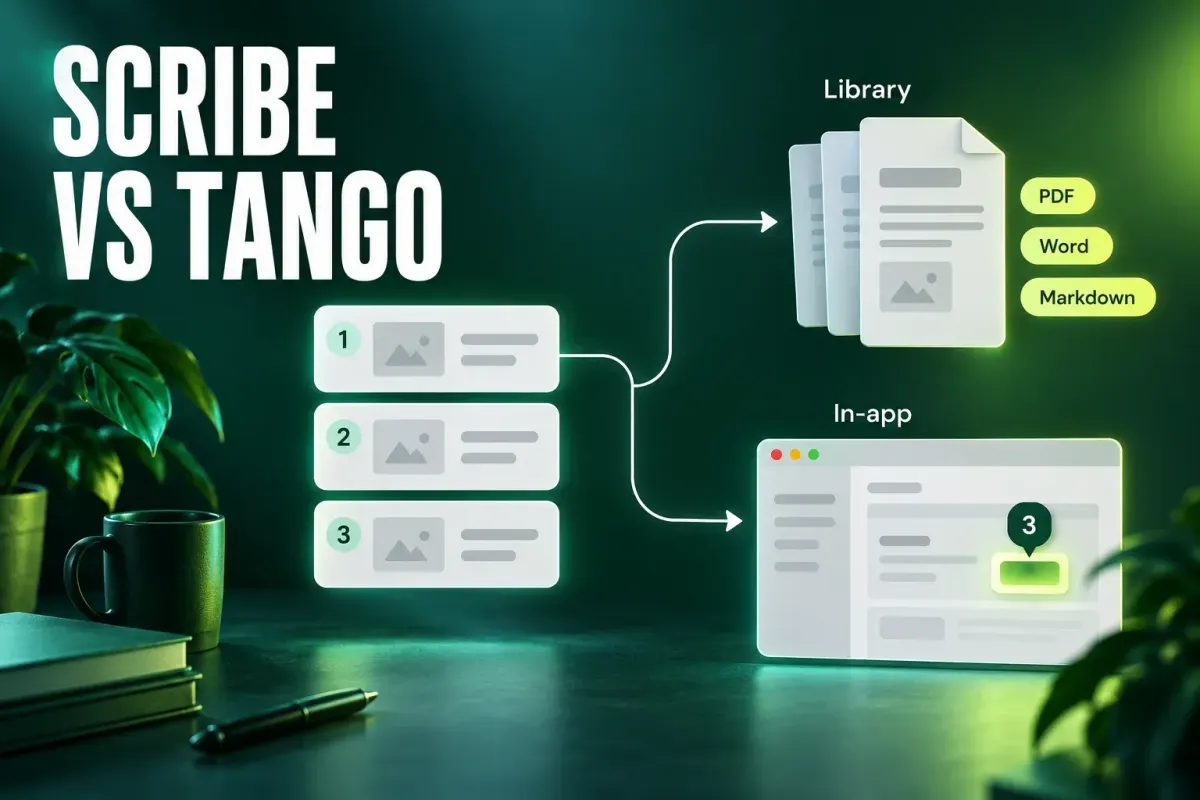
Pick Scribe when the finished guide has to live in a library: a PDF, a Word file, a Confluence page or a knowledge-base article. Pick Tango when the job is helping people finish a task inside a browser app and you can justify its Enterprise tier for Pins, branching workflows and browser automation. Older comparisons split the two on in-app guidance, but that line no longer holds. Both vendors now sell a Guide Me walkthrough, and both attach conditions to it.
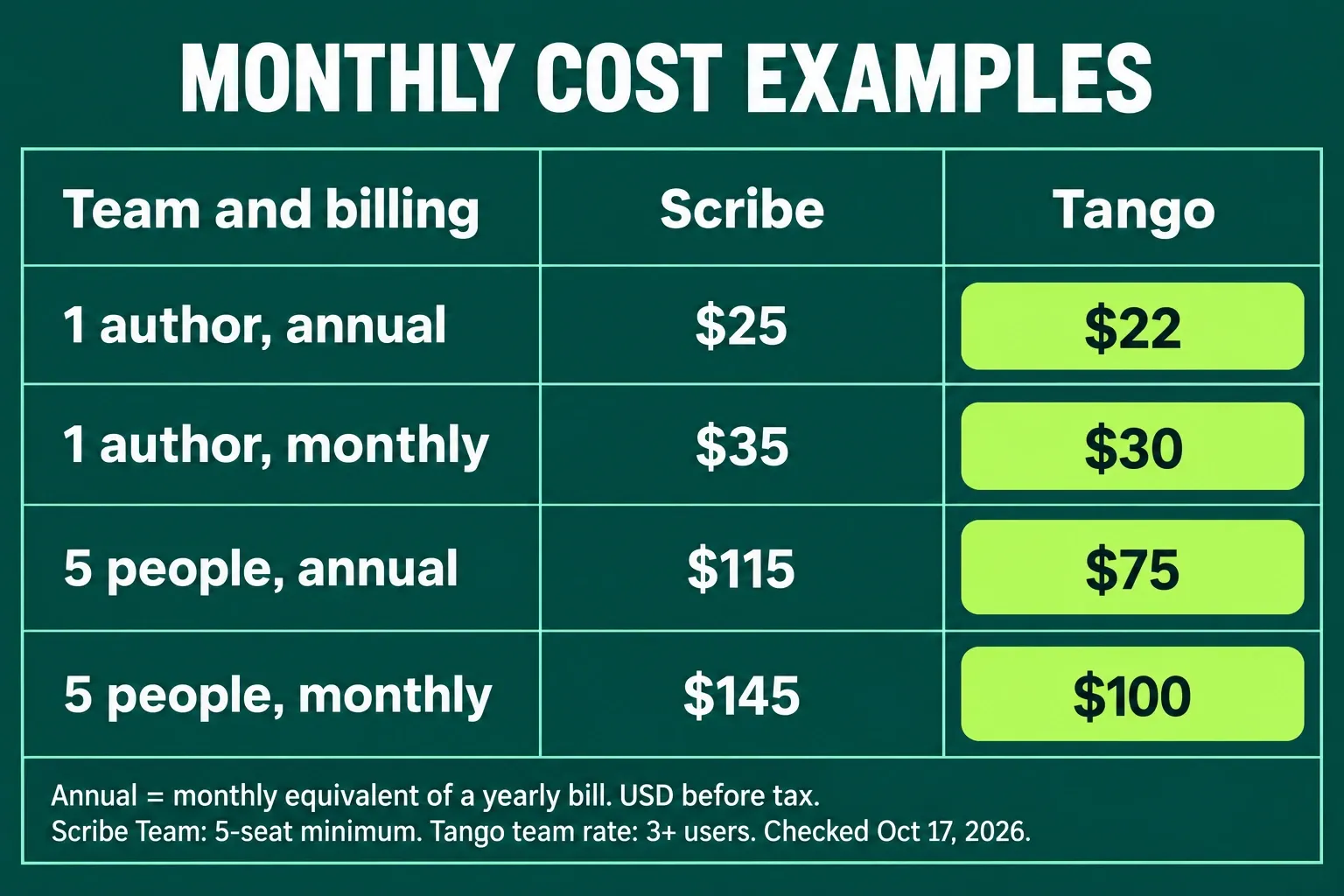
For one author, the displayed annual equivalents are $25/month for Scribe Pro Personal and $22 for Tango Pro; monthly billing is $35 and $30 respectively. Five Scribe Pro Team seats total $115/month on annual billing or $145 monthly, against Tango's $75 or $100. Tango is cheaper in these examples at the October 17, 2026 recheck. Confirm the billing cycle, paid roles and features you need before choosing by price.
I checked both vendors' pricing, security and help pages on October 5, 2026. I haven't run either product, so treat this as a buying guide built from their documentation. Where a vendor's own pages disagree, I say so and tell you what to confirm before you sign.
Scribe vs Tango at a glance
| Decision | Scribe | Tango |
|---|---|---|
| Best fit | A documentation library: SOPs, client handouts, knowledge-base articles | Guidance inside browser apps, plus Enterprise pins, branching and automation |
| Free plan | Basic: web apps through the Chrome or Edge extension; no guide limit published on the pricing grid | Free: five shared workflows, browser capture, up to ten users per workspace |
| Desktop capture | Pro and Enterprise, Windows and macOS | Pro and Enterprise, Mac and Windows 10 or 11 |
| In-app walkthroughs (Guide Me) | Listed on every plan; runs in Chrome or Edge with the extension; Scribe says its desktop app extends walkthroughs to desktop software | Help documents Free, Pro and Enterprise access; guests get three sessions per workspace. Enterprise adds the view-only Sidekick role. Desktop captures cannot use Guide Me |
| Guidance placed in the app | In-context guide access through Sidekick, listed on every plan | Pins for licensed internal users, Enterprise only |
| Exports | PDF, HTML, Markdown and Microsoft Word on Pro, plus a Confluence integration | PDF, HTML and Markdown on Pro |
| Comments and history | Comments on Pro Team and Enterprise; history one week on Pro, unlimited on Enterprise | Comments on Pro and Enterprise; history 14 days on Pro, 365 days on Enterprise |
| Compliance claims | SOC 2 Type II, HIPAA, FERPA, GDPR | SOC 2 Type 2; no formal HIPAA compliance |
| Enterprise extras | Auto-redaction of PII and PHI, guide verification, multiple workspaces, translation, SSO, SCIM | Automatic PII redaction, multi-path workflows, Pins, automations, translation, audit logs, SSO, SCIM, platform fee |
| My pick | Teams whose readers open a document | Teams whose readers need help while they click |
If you're still deciding whether a click-capture tool is the right category at all, my comparison of process documentation software by job covers the wider field. If precise screenshot editing matters more to you than automatic step capture, the Scribe vs Snagit comparison is the better starting point.
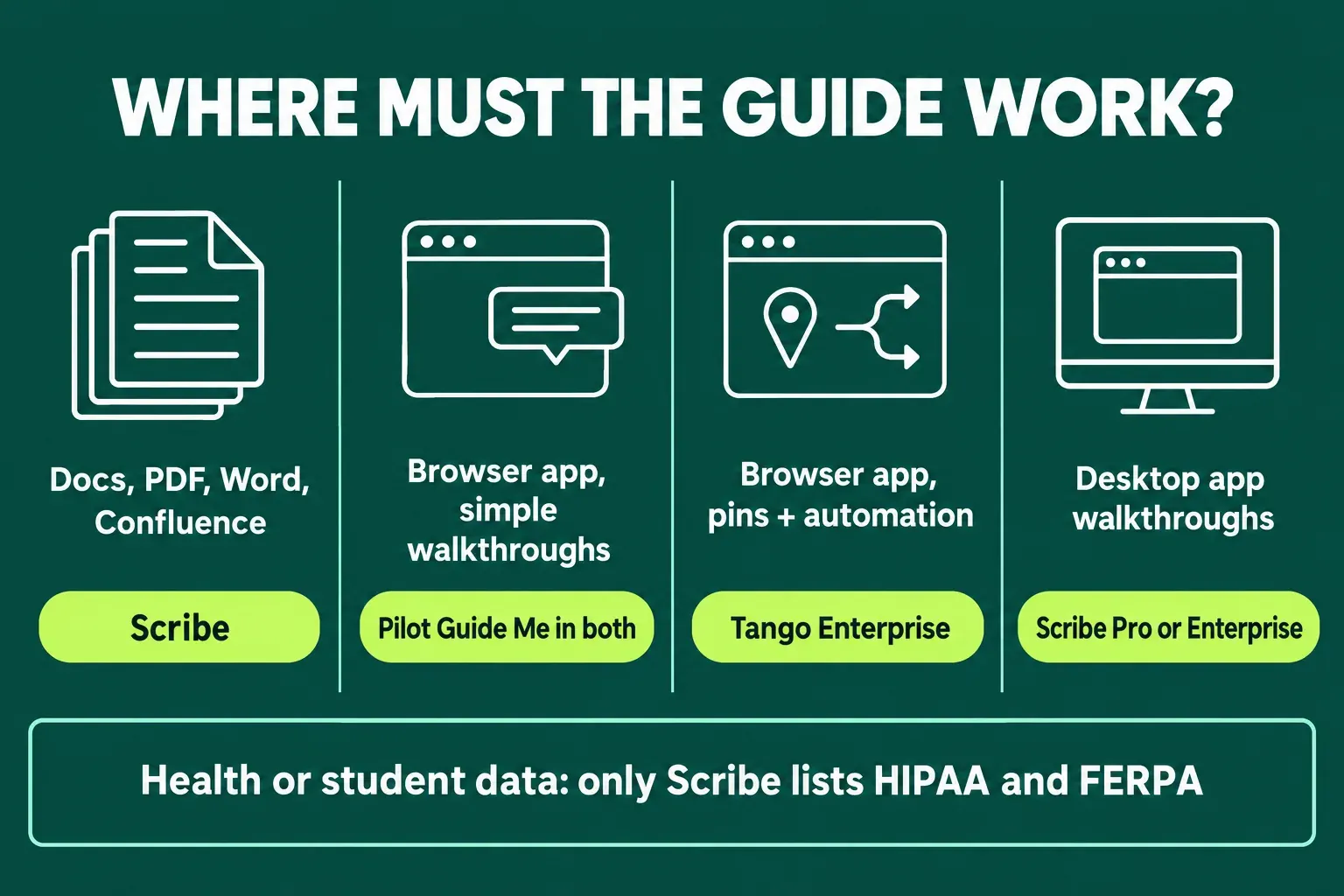
Both now offer Guide Me. The conditions decide
For years the short version of this comparison was simple: Scribe makes documents, Tango guides people inside the app. Scribe changed that in November 2024, and today both vendors describe overlapping features in ways that don't always match their own pages.
Scribe's Guide Me
Scribe announced Guide Me in November 2024 as a feature for all plans: a reader starts a Scribe from Sidekick and gets step-by-step prompts on top of the live page. The announcement names Chrome and Edge with the Scribe extension installed, keeps a beta label for apps Scribe hasn't tested, and covers Scribes created after October 2023. The current Scribe pricing grid still ticks on-screen walkthroughs and in-context guide access on every plan, from Basic to Enterprise.
The Guide Me product page goes further. It says the walkthroughs work in browser and desktop applications, with desktop capture through the Pro and Enterprise desktop app, and that end users need no extra installs. That last line sits awkwardly beside the announcement's extension requirement. Scribe's own Scribe vs Tango page adds to the confusion by marking in-app walkthroughs as a Tango-only feature. I'd plan as if every reader needs the extension and a supported browser, and treat desktop walkthroughs as something to pilot, not assume.
Tango's Guide Me
Tango’s Guide Me access help, rechecked October 17, 2026, documents access on Free, Pro and Enterprise. The reader needs workflow permission, a login and the latest Chrome or Edge extension; the workflow must be a browser capture created on or after May 17, 2023. Desktop captures, uploaded screenshots, phones and tablets are excluded. Guests, including readers entering through public links, get three sessions total per workspace.
The role definitions make the buying distinction clearer: Creators have unlimited Guide Me use; the view-only Sidekick role with unlimited Guide Me and Pins is Enterprise-only. Free members are Admins, and Pro workspace members need paid seats. The Enterprise pricing card still groups Guide Me there without spelling out the broader help entitlement. Confirm the role and seat terms for your intended readers before buying.
Don't buy Enterprise solely on the assumption that the button is otherwise unavailable. Ask Tango to confirm in writing which plan your workspace needs for the readers you have in mind. Pins, the walkthroughs you pin inside an app for licensed internal users, are clearly Enterprise-only.
The desktop gap
This is where the two products split for real. Tango's desktop app documentation says workflows captured in the desktop app don't work with Guide Me, and that the desktop app has no Live Blur. Tango's in-app guidance is a browser story. Scribe claims the opposite for its own desktop app. If your readers spend the day in a desktop ERP client, a thick-client CRM or a design tool, that claim is the one to pilot first, on your own software, before either contract.
What Tango Enterprise adds
Tango now pitches Enterprise as in-app guidance and browser automation rather than a bigger documentation plan. The card lists automatic PII detection and redaction, multi-path workflows, workflow translation, Pins, Guide Me and Automations, 365-day version history with audit logs, SSO and SCIM, and a platform fee based on the number of users supported. The plan grid also lists an MCP connection in beta. A Supered comparison describes this as an April 2025 relaunch built around an AI browser agent. I'd take the direction as settled and the details as something to see in a demo.
Capture coverage: browser first, desktop on paid plans
Both free plans are browser plans. Scribe Basic works with any web app through the Chrome and Edge extensions. Tango Free allows five shared workflows with browser capture, for up to ten users in a workspace. Scribe's grid doesn't tick unlimited guide creation for Basic and doesn't publish a number either, and third-party reviews quote different caps. Check the limit in your own account before you plan a library around the free tier.
Desktop capture is paid in both. Scribe's desktop app for Windows and macOS comes with Pro and Enterprise, not Basic. Tango Desktop needs Pro or Enterprise and runs on Mac, both Apple silicon and Intel, and on Windows 10 or 11. Tango's documentation says it records drag-and-drop actions and keyboard shortcuts as steps.
Scribe's pricing grid has also started listing AI-powered automatic capture on all four plans. The plan cards call it Autocapture and describe it as turning work you've already done into Scribes without a recording. I couldn't find documentation on what it observes or where that data goes, so ask both questions before anyone switches it on near private data.
A desktop client doesn't mean every action in every application turns into a useful step. Before buying, capture the same three processes in both tools:
- a clean browser form with predictable clicks;
- a desktop workflow with menus, dialogs and drag actions;
- a mixed process that crosses applications or waits for a manual approval.
Review what the capture missed, not just what it collected. Text entry, keyboard shortcuts, confirmation states, permission errors and branch decisions usually need an editor's hand even when the screenshots are automatic. My guide to creating an SOP with screenshots covers the triggers, decision points and stop conditions a click recorder can't infer.
Editing, redaction and branding
On paid plans the editing toolkits look similar on paper. Scribe Pro adds custom branding, customizable screenshots and annotations, voice transcription, and both manual and assisted redaction. Tango Pro lists branded workflows and exports, screenshot annotation and blurring, and voice and video embeds. Tango's Live Blur, which hides data while you capture, isn't available in Tango Desktop.
Automatic redaction is an Enterprise feature on both sides. Scribe lists enforced and custom automatic redaction, summed up on its Enterprise card as auto-redaction of PII and PHI. Tango lists automatic PII detection and redaction. Whichever you trial, run it with realistic but authorized sample data and answer five questions:
- Can the author remove or obscure private data before any public link is created?
- Can a reviewer find every image that needs correction?
- Does redaction survive export as well as hosted sharing?
- Can an administrator revoke access and transfer ownership?
- Can the team tell which guide is approved and which one is an unfinished draft?
A blur that's easy to apply but hard to audit may be unsuitable for support or HR workflows. A polished, branded guide with no named owner still goes stale.
Where the finished guide lives
This is still Scribe's clearest advantage. Pro adds exports to PDF, HTML, Markdown and Microsoft Word, a Confluence integration, and Pages, which combine several guides and your own text in one document. If your process documentation already lives in Confluence or a Word-based quality system, that saves a lot of copying and reformatting.
Tango Pro exports PDF, Markdown and HTML too, so export alone no longer separates the two. One correction to vendor material: Scribe's comparison page marks those exports as missing from Tango, which doesn't match Tango's current pricing page. Tango's stronger argument is a hosted workflow that stays current at one link and, on the right plan, shows up inside the app.
Every export creates a copy, and updating the source guide won't correct the PDFs people have already downloaded. Before rollout, write down the source of truth:
- Which version is approved?
- Where do employees or customers find it?
- Who can edit, export and publish it?
- What event triggers a review?
- How will old copies be withdrawn?
If the answer is “people will search for the latest link,” the tool hasn't solved document control.
Review, history and approval
Collaboration features sit on different tiers. Scribe enables comments on Pro Team and Enterprise, not on Pro Personal, and keeps one week of version history on both Pro plans against unlimited history on Enterprise. Tango enables comments and reactions from Pro, with 14 days of version history on Pro and 365 days plus audit logs on Enterprise.
Scribe Enterprise also lists a guide verification workflow. If your team needs a formal sign-off before a guide counts as approved, ask to see how verification works, and who can verify, before you buy. One week of history is short. On Scribe Pro I'd keep a separate review record, such as a change log in the guide itself, for anything that gets audited.
If you write user documentation for a living
Professional technical writers tend to be cooler on both tools than operations teams are. In an r/technicalwriting thread from March 2024, a lone writer publishing user guides asked which to pick. One reply saw no advantage over existing tools for client-facing docs and kept Tango for quick internal guides and support answers. Another said click-capture guides suit simple instructions for products that rarely change, because screenshots need upkeep and plain text is easier to search.
I agree with that split. For customer-facing product documentation, a click recorder is a drafting aid, not the publishing system. My overview of software user documentation covers where screenshots earn their place and where text does the job better.
Pricing by billing period
The prices below are the US-dollar rates shown by the vendors at the October 17, 2026 recheck, with Scribe checked in both Yearly and Monthly views. Annual figures are monthly equivalents of a yearly bill, before tax. Confirm the selected plan, seat count and final checkout total.
| Plan | Annual billing | Monthly billing | Key boundary |
|---|---|---|---|
| Scribe Basic | Free | Free | Web apps through the browser extension |
| Scribe Pro Personal | $25 per seat/month | $35 per seat/month | Starts at one seat |
| Scribe Pro Team | $23 per seat/month | $29 per seat/month | Starts at five seats; check the displayed quote |
| Scribe Enterprise | Custom | Custom | Verification workflow, auto-redaction, SSO, SCIM |
| Tango Free | Free | Free | Five shared workflows; browser capture |
| Tango Pro, 1–2 users | $22 per user/month | $30 per user/month | Browser and desktop capture |
| Tango Pro Team, 3+ users | $15 per user/month | $20 per user/month | Team rate starts at three users |
| Tango Enterprise | Custom | Custom | Platform fee based on users supported |
One author pays the displayed $25 for Scribe or $22 for Tango per month on annual billing, and $35 or $30 on monthly billing. Five Scribe Pro Team seats total $115/month on annual billing or $145 monthly; five Tango Pro users total $75 or $100. Those are pre-tax calculations from the Scribe rates and Tango rates shown at this recheck, not a checkout quote for every buyer.
The seat thresholds matter. Three Tango users meet its three-seat team threshold, giving a $45 monthly equivalent on annual billing. Scribe Pro Team requires at least five seats, a $115 monthly equivalent at the displayed annual rate. Three Scribe Pro Personal seats total $75/month on annual billing, but comments start on Pro Team. Confirm paid roles and viewer access before comparing totals.
Security, privacy and compliance
Scribe's security page lists SOC 2 Type II, HIPAA, FERPA, GDPR and US state privacy laws, with AES-256 encryption at rest and TLS 1.2 or later in transit. It also says its AI providers can't train on customer data, must delete it within 30 days and never receive images. Tango's security page lists encryption at rest and in transit, role-based access, Secure Blur and Live Blur, and a commitment that AI providers never retain or train on customer data. Its pricing FAQ confirms SOC 2 Type 2 and says Tango does not currently maintain formal HIPAA compliance.
That makes the health-data question simple. If your guides will show patient records, Scribe is the only one of the two that claims HIPAA, and your compliance team will still want the paperwork, such as a business associate agreement, before anyone records a live system. The same goes for FERPA and student records.
Vendor claims are screening evidence, not approval. Ask for the documents your security team requires and check:
- where content and backups are stored;
- what the browser extension and desktop client can observe;
- how captured images are processed;
- which subprocessors receive data;
- retention after deletion or account closure;
- SSO, SCIM, audit log and role availability on the quoted plan;
- whether public links can be disabled or restricted.
Use authorized test accounts during the trial. Don't record live customer, patient or employee data to prove that redaction works.
Which tool fits each team?
Choose Scribe for a documentation library
Scribe is my first choice when a small operations, support or consulting team needs to produce many clean step guides and file them where the organization already keeps documents: Confluence, a Word-based quality system, a knowledge base or a client handover pack. It's also the only one of the two to claim HIPAA and FERPA, which settles the question for many healthcare and education teams.
The case gets stronger if your readers work in desktop software and a pilot confirms that Scribe's desktop walkthroughs behave in your apps.
Choose Tango for guidance inside browser apps
Tango is my first choice when the problem is people forgetting how to do an occasional task in a web app: an admin setting, a quarterly report, an approval flow in a SaaS tool. Its hosted workflows stay current at one link, and Enterprise adds the parts that make in-app guidance manageable at scale: Pins, multi-path workflows, translation, audit logs and automation.
Check compatibility with your target apps and the roles your readers will need. A guest’s three-session allowance is different from member access or an Enterprise Sidekick seat. A walkthrough that breaks after an interface change can mislead more than a dated SOP, because the reader trusts the overlay and may miss the missing step.
Keep Snagit beside either tool when visuals need careful editing
Snagit sits beside these tools rather than competing as a third winner. Use it when an author needs precise image cleanup, custom callouts, combined images or other visual work that an automatic guide editor can't produce efficiently. My Snagit vs Tango guide covers that boundary without turning this page into a three-way comparison.
Choose neither until the process is stable
Automatic capture makes a bad process faster to document. If the workflow has disputed ownership, frequent exceptions or no agreed endpoint, fix the process first. Capture one approved normal path, then add decision rules and recovery steps.
A practical trial scorecard
Run both tools on the same three approved workflows. Score each item from 0 to 2: 0 means unusable, 1 means workable with extra effort, and 2 means ready for the intended team.
| Check | What to inspect |
|---|---|
| Capture completeness | Missing clicks, text, shortcuts, dialogs, branches and expected states |
| Correction effort | Time and judgment needed to repair the draft without rewriting it |
| Privacy control | Redaction before sharing, export behavior and reviewer visibility |
| In-app guidance | Does Guide Me run on your actual apps, browsers and plan, with the extension your readers already have? |
| Reader success | Can a representative reader finish without help? |
| Distribution | Hosted link, embed, export and fit with your existing knowledge system |
| Maintenance | Owner, history, update flow and stale-copy control |
| Administration | Roles, SSO, SCIM, audit records and ownership transfer |
| Real annual cost | Required plan, minimum seats, authors, admins, platform fees and renewal terms |
Don't add up the scores until you've set weights. A support team handling private account data may weight privacy control five times higher than branding. An enablement team may make in-app guidance a pass-or-fail requirement.
Final verdict
Scribe fits the documentation-library job. Word and Confluence output, Pages, and its stated HIPAA and FERPA support may matter to a team whose readers open a guide rather than follow an overlay. It is not the cheaper five-seat option at the rates checked here. Confirm compliance documents and the required plan rather than treating vendor claims as approval.
Tango wins when guidance inside browser apps is the point and you're prepared to talk to sales about Enterprise. Pins, branching workflows and browser automation are where Tango has put its effort, and they're the features to see in a demo.
Both now sell Guide Me, so the old one-line answer is out of date. Run the same three workflows through each, with the same test reader and the same privacy rules, and choose the tool whose finished guide is easiest to trust, find and keep current.