

As of September 12, 2026, the latest releases listed by TechSmith are Snagit 2026.3.1 for Windows and 2026.3.2 for Mac. Mac’s September update adds the original SNAGX handoff to Camtasia Online and changes several sharing and export controls. Windows’ July update changes Interval Capture timing and includes security and reliability fixes.
Check the platform as well as the number. This guide separates the current updates from the earlier 2026 features, so you can see what affects your work before installing. It is a documentation-based release analysis, not a claim that these builds were tested on our own Windows and Mac machines.
Current Snagit 2026 version at a glance
| Platform | Latest listed build | Release date | Changes to check |
|---|---|---|---|
| Windows | 2026.3.1 | July 23, 2026 | Original SNAGX handoff, three-second minimum Interval Capture, security and crash fixes |
| Mac | 2026.3.2 | September 2, 2026 | Original SNAGX handoff, Word destinations, export controls and Edge scrolling fix |
These dates come from the current Windows 2026 version history and Mac 2026 version history, checked September 12. A shared major version does not mean identical features or release dates. Use the live histories again if your installer offers a newer build.
Should you update your installed version?
- Already on Snagit 2026: review the current maintenance update for your platform. Security and reliability changes can matter even if you do not use the new sharing features.
- Creating training guides: check the Step Capture destinations, required Camtasia Editor version and your access to the destination before changing a team workflow. Test with a harmless sample, not a private customer guide.
- Using older Snagit on macOS Sonoma: do not install 2026 without checking compatibility. Snagit 2025 is the last major version that supports Sonoma.
- On a managed device: use your IT team’s deployment process. Do not replace a controlled installation or change its experiment settings yourself.
A release note tells you what the vendor changed; it cannot guarantee that your particular crash or capture problem is fixed. After updating, repeat the task that failed and keep the result. For a purchase decision rather than maintenance, the Snagit review weighs the tools against simpler screenshot options.
What changed in the latest Windows and Mac releases?
Windows 2026.3.1
Windows 2026.3.1 sends an image to Camtasia Online as its original SNAGX capture file, carrying cursor, text and other capture information. This changes the transfer format; sharing images to Camtasia Online already existed before 2026. Do not assume every piece of an editable Snagit project behaves identically in the destination.
- Interval Capture has a three-second minimum, up from one second.
- Compose email choices return to the Share to Email output.
- Tool Properties, Effects and Time Delay controls receive accessibility improvements.
- OpenSSL is updated, and the release addresses an untrusted search path issue.
- Fixes cover recording-toolbar and software-key-entry crashes, plus a separate problem with how added Step Capture images appear in Camtasia Online.
The three-second minimum is a Windows 2026.3.1 timing constraint, not a measured speed improvement. If your capture sequence depended on one-second intervals, revise and test it before relying on the next run.
Mac 2026.3.2
Mac’s September 2 update also sends original SNAGX files to Camtasia Online. It adds Word choices for a new document, the current document or asking each time, and improves tray reordering and visibility of the selected capture.
- Export controls: Library and File-menu Export options are disabled when only videos or animated GIFs are selected. This is a control change, not a statement that Snagit can no longer save those media types. Match the file and destination in the export settings guide.
- Recording toolbar: the microphone options button is removed during recording. The note does not say microphone recording itself was removed.
- Fixes: Automatic Scrolling in Microsoft Edge, incorrect Created dates after editing, and several tray and capture-display issues are addressed.
- Maintenance: TechSmith reports faster Step Capture loading, stability improvements and security-component updates. These are vendor release claims, not our benchmarks.
- Managed installations: the Edit in Camtasia button is removed if that destination was disabled during deployment.
The previous Mac 2026.3.1 release, dated July 22, fixed a startup crash. It is no longer the latest Mac build; a continuing launch failure still needs the Editor startup checks.
What changed in Snagit 2026.3.0
Sharing Step Captures to Camtasia Online and Camtasia Editor arrived in Windows 2026.3.0 on July 16 and Mac 2026.3.0 on July 21. Both can send a Step Capture to Camtasia Online or to Camtasia Editor 2026.2.0 and newer, where the steps are placed on a timeline for narration and edits. The destination requirement is separate from the Snagit version. Check destination access and permitted sharing before sending a guide.
Windows 2026.3.0
- Step Capture thumbnails show image counts in the tray and Library.
- A Library category groups Step Captures created with 2026.3.0 or later.
- TechSmith reports better Smart Redact accuracy with experimental Optimized OCR enabled. Still inspect each redaction before sharing.
- Interface, zoom and sharing controls receive accessibility changes.
- Microsoft share destinations use built-in Windows authentication, alongside security-component updates.
Mac 2026.3.0
- Step Captures can be exported as HTML from File > Export > HTML; Snagit saves a folder containing the HTML file and images.
- A Step Capture shared to File can save its images as separate files.
- Anytime access to Screen Draw tools is added as an experimental feature.
- Snagit removes Zoom's green screen-sharing border from recordings.
- A capture preset can open video in Camtasia Editor for separate screen, camera, and audio work.
- The Library gains Step Capture image counts and a category for guides created in 2026.3.0 or later.
The Mac 2026.3.0 notes also list fixes involving sleep, image Effects, the Library, Step Capture recovery/export and HEIC size. These identify particular reported defects; they do not establish that every similar symptom is resolved.
Snagit 2026 release timeline
| Release family | Windows | Mac |
|---|---|---|
| 2026.0 | Yearless app name; experimental improved OCR | Window Capture, Smart Redact actions, editable PowerPoint and Keynote output |
| 2026.1 | Video Open In, experimental Quick Image Annotation, editable PowerPoint steps | Video sharing to Camtasia Online, photo Assets, tray pinning, scheduled images |
| 2026.2 | Videos to Camtasia Online, theme and Fill changes; eligible activation in 2.2 | Eligible Camtasia subscription activation in 2.0 |
| 2026.3 | Step Capture destinations; original SNAGX transfer and interval change in 3.1 | Step Capture destinations and HTML; startup fix in 3.1; SNAGX transfer and export changes in 3.2 |
Snagit 2026.0: naming, OCR, Window Capture, and Smart Redact
Windows 2026.0.0 shipped January 14, 2026. The app name dropped the year, and the vendor moved subscribers away from needing a separate yearly installer for new features. Both platforms’ histories changed references from TechSmith Snagit to Camtasia Snagit. That branding does not turn the capture app into Camtasia Editor.
Windows introduced improved OCR under Experimental Features in 2026.0.0. The 2026.3.0 notes still call Optimized OCR experimental. The vendor’s visual feature changelog groups changes more broadly; use the platform histories for exact build dates.
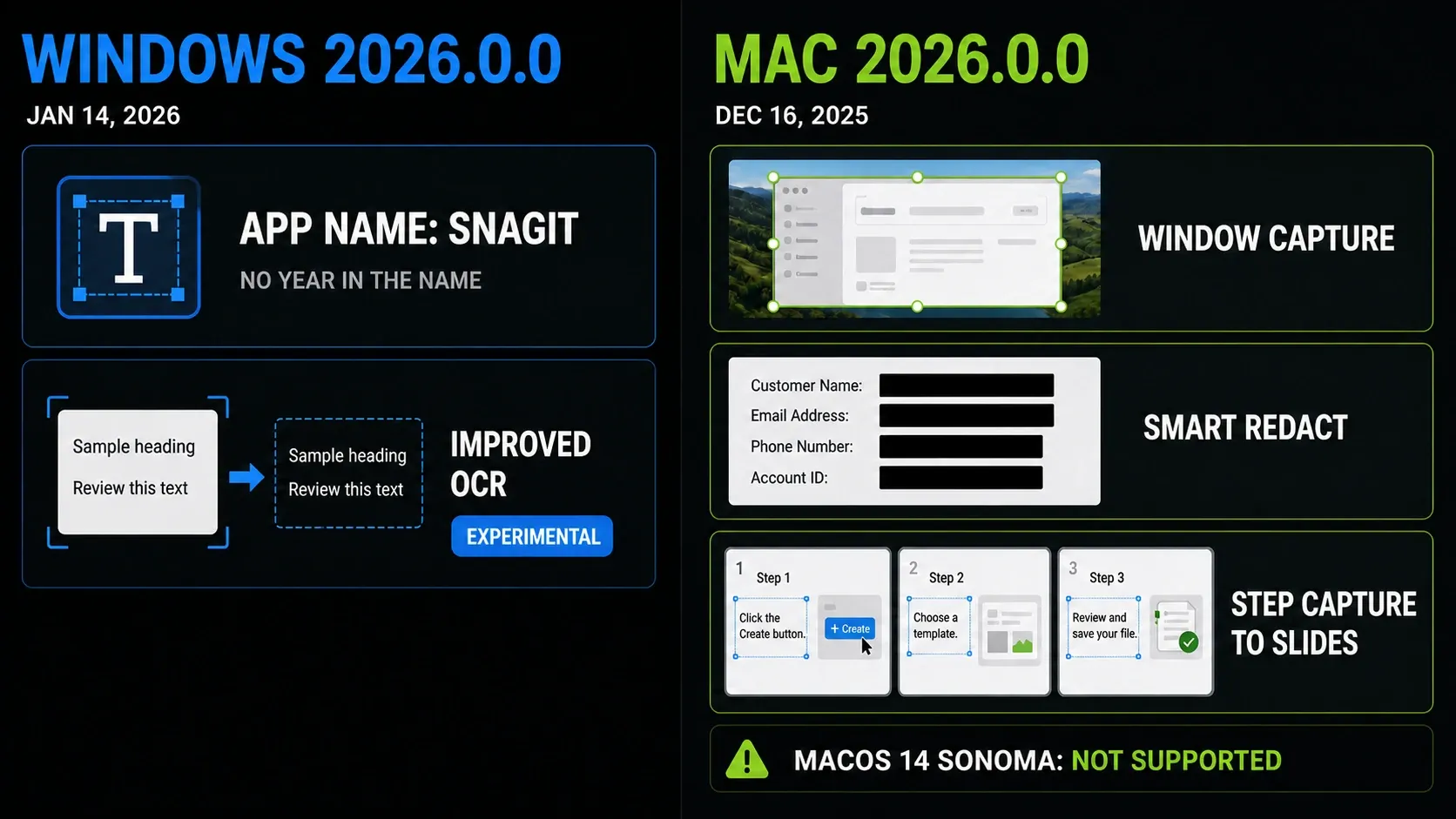
Mac 2026.0.0 shipped December 16, 2025. Window Capture can target one window for an image or video, and during video the capture follows that window if it moves or changes size. Smart Redact gained click-to-toggle and matching-text actions, Step Capture gained editable PowerPoint and Keynote slides, and Panopto was removed as a share destination.
Snagit 2026 does not support macOS 14 Sonoma. The Mac history names Snagit 2025 as the final major version with Sonoma support; the current requirements page lists macOS Sequoia 15 and Tahoe 26. Check the version-specific compatibility guide before a major upgrade, rather than following a stale search snippet.
Snagit 2026.1: video destinations and Step Capture slides
Windows 2026.1.0 shipped March 13. Its Video tab replaces Preview in Editor with an Open In setting: a recording can open in Snagit Editor, skip preview and stay in the Library, or open in Camtasia Editor for separate screen, camera, and audio work. The Snagit Editor guide covers the local path.
Quick Image Annotation entered Windows 2026.1.0 as an experiment: capture, annotate and copy without opening Editor. The complete Windows history through 2026.3.1 contains no explicit graduation notice. That absence is not proof of the exact switch in every installation; check your installed build and deployment settings.
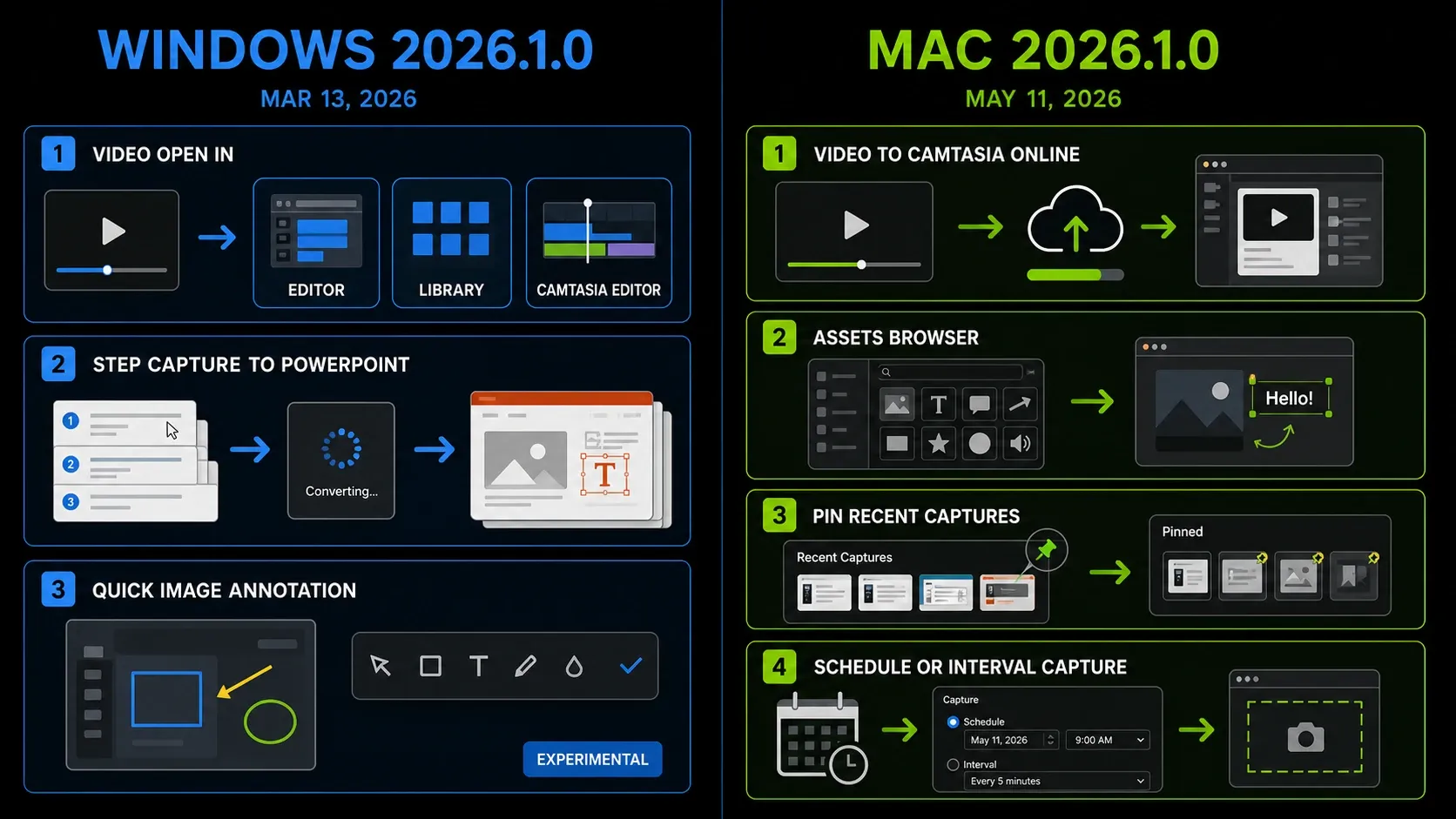
Windows Step Capture gained editable PowerPoint slides with a title slide and one slide per image, plus Select All for like annotation objects. The Step Capture guide covers the procedure. These are output improvements, not the first appearance of Step Capture itself.
Mac 2026.1.0 shipped May 11. It adds Camtasia Online video sharing, an in-app browser for photo Assets, and the ability to pin and reorder files in the Recent Captures Tray. The release also adds multi-object changes, scheduled or interval image capture, Step Capture image export, and better Grab Text results on tall captures.
Snagit 2026.2: Camtasia Online and activation changes
Windows 2026.2.0 shipped April 30. It sends one or more videos to Camtasia Online, where a project can combine clips, backgrounds, transitions, and team input. The release also adds a Camtasia Editor preset, Share to Email that works with classic and New Outlook, an Editor theme that can follow Windows, and Fill on floating images.
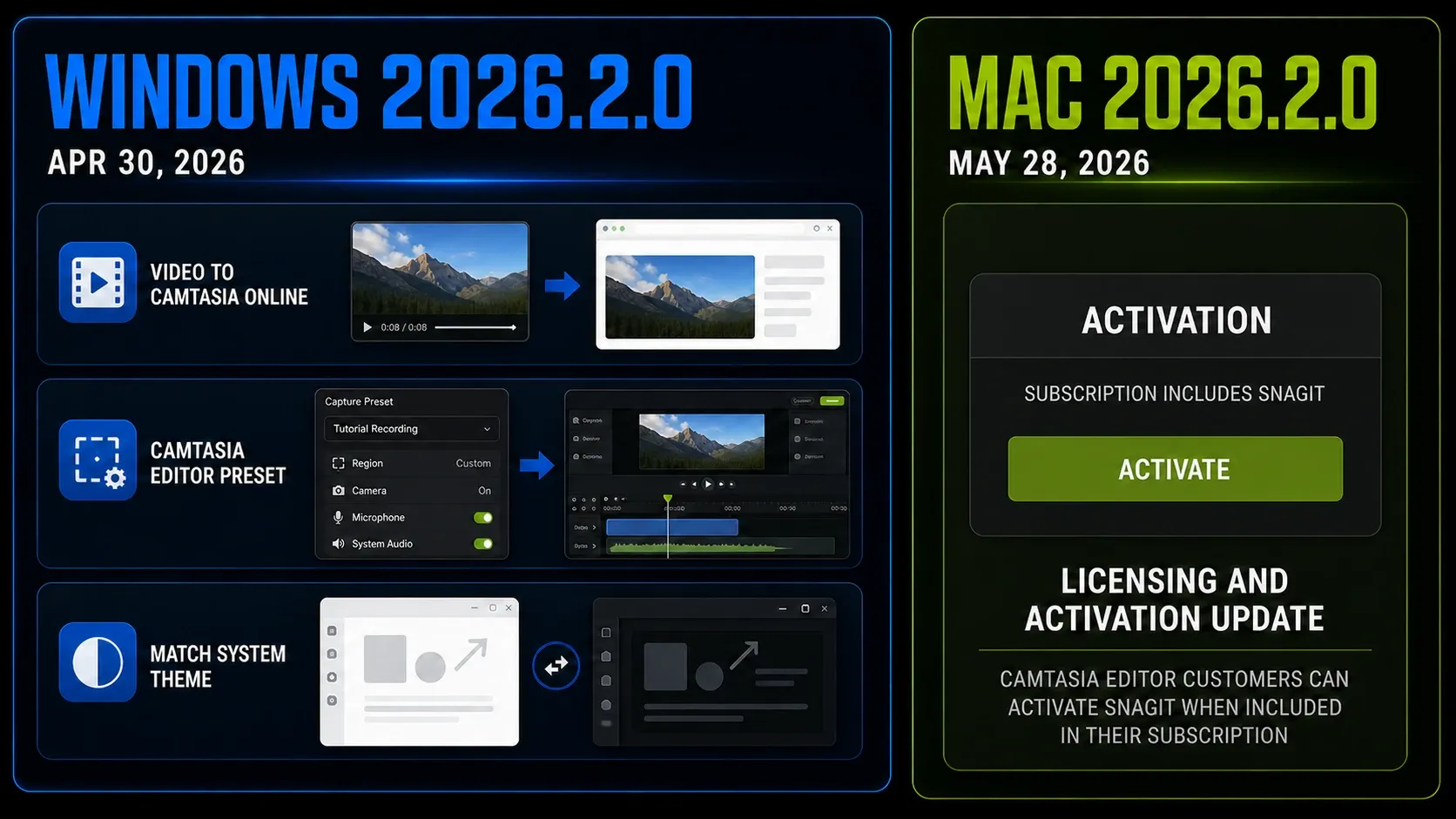
Mac received Camtasia Online video sharing in 2026.1.0 rather than 2026.2.0. Mac 2026.2.0 and Windows 2026.2.2 focus on licensing and activation so eligible Camtasia Editor customers can activate Snagit when their subscription includes it.
For the limits of Snagit's own recording editor and the Camtasia handoff, use the Snagit versus Camtasia comparison. This release page only records when the integrations arrived.
Which Snagit 2026 features are experimental?
Experimental features are optional controls described in the release histories. Their status is not a guarantee of stability, suitability for your data or future availability. Read the terms and your organization’s rules before opting in, and retain the normal capture-to-Editor workflow as a fallback.
- Windows Optimized OCR: introduced as improved OCR in 2026.0.0; still named experimental in 2026.3.0.
- Windows Quick Image Annotation: introduced as experimental in 2026.1.0, with no explicit graduation notice in the checked Windows history through 2026.3.1.
- Mac anytime Screen Draw: this access mode is listed as experimental in 2026.3.0. It is not the first release of all Screen Draw functionality.
The OCR support notice documents Windows’ Edit > Editor Preferences > Experiments route and says administrator settings for experiments or usage data can hide or disable its Optimized OCR option. Do not work around that policy to make a switch appear.
The May 2026 OCR licence issue on Windows
TechSmith’s notice links the May 1, 2026 failure of Grab Text, Edit Text and Smart Redact to an expired third-party OCR licence. Its fixed build numbers match the Windows branch histories, not a universal Windows/Mac version sequence:
- Windows Snagit 2026.1.1 or later
- Windows Snagit 2025.4.2 or later
- Windows Snagit 2024.3.7 or later
The 2025 Windows history and 2024 Windows history date their licence patches to April 1, before the May expiry. These are minimum fixed builds, not today’s latest releases. You do not need to buy 2026 solely for this fix if an eligible patched older branch meets your needs. TechSmith says 2023 and older do not receive this update because they are outside engineering support. For a remaining failure, use the Grab Text and OCR guide; do not diagnose every Mac OCR problem from these Windows numbers.
How to update Snagit safely
- Save accessible edits, stop active captures and back up the Library and settings you need. The Library backup guide separates captures from other configuration data.
- Confirm your operating system and entitlement before changing major versions. On a managed device, ask IT to perform or approve the update.
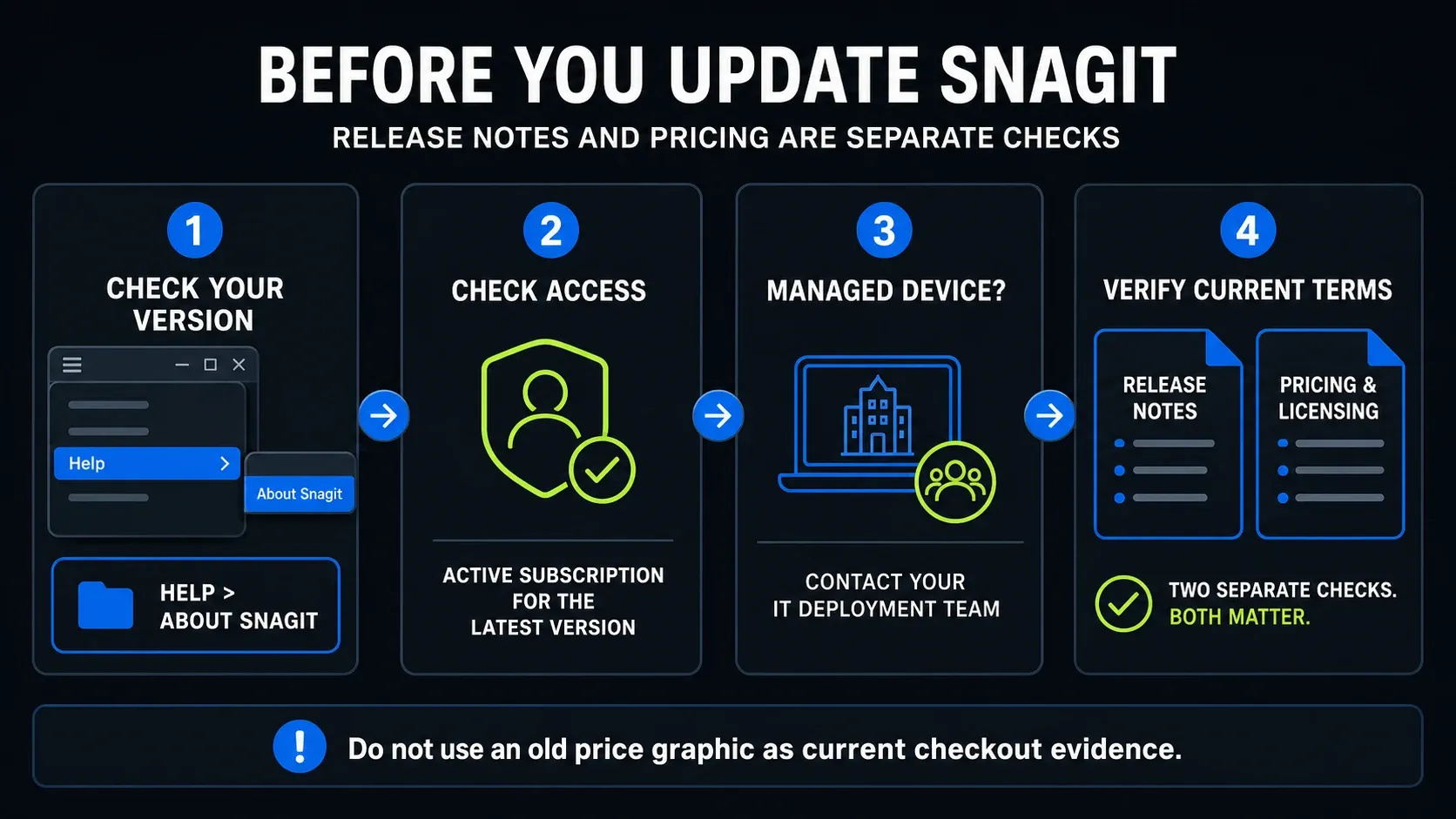
- Windows: in Snagit Capture, choose Help > Check for Updates. Mac: in Snagit Editor, choose Snagit > Check for Updates. Follow the installer’s prompts; do not interrupt work to force it.
- Reopen Snagit after the update. Check Help > About Snagit on Windows or Snagit > About Snagit on Mac, and record the installed build.
- Retest the capture, Step Capture, sharing or OCR task that prompted the update. Keep your backup if the problem remains.
TechSmith’s platform-specific update instructions separate the two menus; its version-check reference identifies the About commands. The current access guidance requires an active subscription that includes Snagit for the latest version. If your organization purchased or deployed it, follow its internal process. For installer choices and preparation, use the Snagit installation and update guide.
Pricing is separate from the release notes
A feature release does not establish your subscription price, renewal terms or offline entitlement. Check the pricing and licensing guide before purchasing, and the offline activation rules before planning disconnected work. This release analysis is the What Changed section of the site’s reviews and buying hub.
Snagit 2026 FAQ
What is the latest Snagit 2026 version?
As of September 12, 2026, TechSmith lists Windows 2026.3.1, released July 23, and Mac 2026.3.2, released September 2. Check the separate platform histories if a newer installer appears; the two version numbers do not have to match.
What changed in Snagit 2026.3.1 for Windows?
Windows 2026.3.1 sends images to Camtasia Online as original SNAGX files and raises the minimum Interval Capture time from one to three seconds. It also restores Compose email options, improves accessibility, updates security components and fixes specific crashes and sharing issues.
What changed in Snagit 2026.3.2 for Mac?
Mac 2026.3.2 adds original SNAGX transfer to Camtasia Online and Word destination choices, changes export and recording-toolbar controls, and fixes Edge Automatic Scrolling and other issues. Mac 2026.3.1 was the earlier July 22 startup-crash fix.
Can Snagit 2026 send Step Captures to Camtasia?
Snagit 2026.3.0 on Windows and Mac can send a Step Capture to Camtasia Online or Camtasia Editor 2026.2.0 and newer. Check access to the destination and permission to share the captured information; these are separate from having Snagit installed.
Are Optimized OCR and Quick Image Annotation still experimental?
Windows 2026.3.0 still names Optimized OCR as experimental. Quick Image Annotation entered Windows 2026.1.0 as experimental, with no explicit graduation notice in the checked history through 2026.3.1. Check the installed build and administrator policy; no notice is not a guarantee about every installation.
Does Snagit 2026 support macOS 14 Sonoma?
No. TechSmith says Snagit 2026 and later do not support macOS 14 Sonoma, and Snagit 2025 is the last major version that does. The current requirements page lists macOS Sequoia 15 and Tahoe 26 for Snagit.
Why did Grab Text stop working in May 2026?
TechSmith attributes the May 1 failure to an expired third-party OCR licence. The Windows fixed minimums are 2026.1.1, 2025.4.2 and 2024.3.7, or later builds in those branches. They are not Mac version requirements. TechSmith says 2023 and older do not receive this update.
Did TechSmith rename Snagit to Camtasia Snagit?
The 2026 histories changed references from TechSmith Snagit to Camtasia Snagit to reflect the Camtasia portfolio. Windows also removed the year from the app name. Snagit and Camtasia Editor remain distinct applications; the naming change does not give Snagit the Editor’s full timeline tools.
Updated September 12, 2026: added Mac 2026.3.2, separated platform update menus and OCR build numbers, and corrected the latest-version answers. The diagrams summarize earlier release families; they are not screenshots of every current setting.