
TikTok’s reviewed Help Center pages describe no screenshot or screen-recording alert for videos, profiles, Stories or direct messages. They do not provide an explicit guarantee that capture notifications never occur. What they do document is visible Story views and, when both accounts enable Profile view history, profile visits.
I reviewed TikTok’s help and mobile developer documentation on October 10, 2026, then reopened the current profile-view, Story and direct-message pages on October 17. Those pages distinguish viewing activity from screenshots. The Android pop-up saying “TikTok detected this screenshot” needs a separate explanation: a system notice to you does not establish what the app does next.
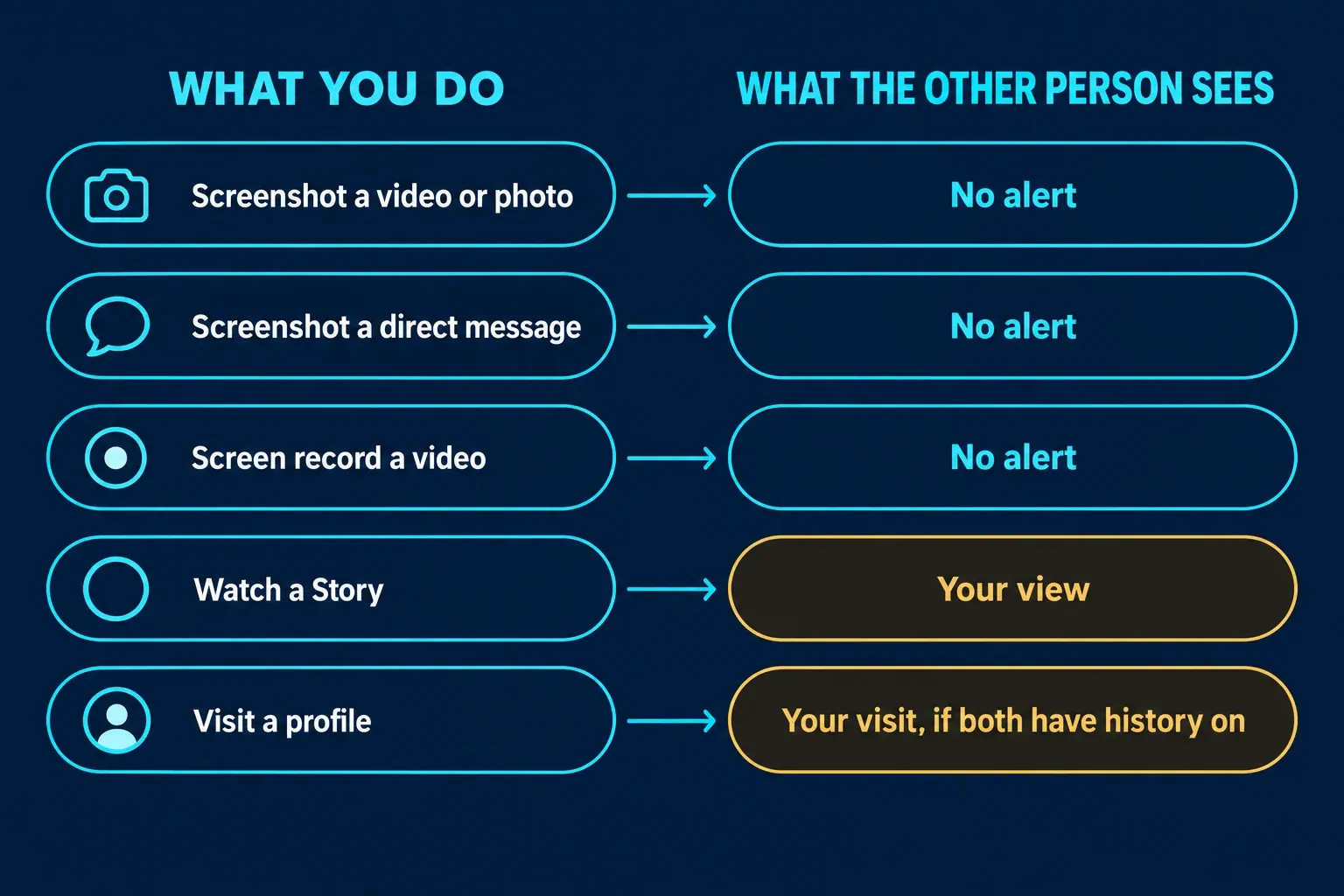
What happens when you screenshot each part of TikTok
| What you capture | Is the other person told? | What TikTok's pages describe |
|---|---|---|
| A public video or photo | No alert described | Creators control downloads, which is a separate setting from screenshots |
| A profile | No alert described | Profile view history shows visits, but only if both people turned it on |
| A Story | No alert described | The poster can see that you viewed it, even if your account is private |
| A direct message | No alert described | Read status and activity status exist; no disappearing or view-once mode is described |
| A screen recording | No alert described | The pages I read don't mention screen recording |
Videos, photos and profiles: no screenshot alert described
The TikTok help pages I reviewed do not describe a screenshot alert for ordinary videos, photo posts or profiles. That finding concerns alerts to other people; it does not establish everything the app records or transmits. TikTok-hosted "Discover" pages that rank for this question answer it in their snippets, for example "No, TikTok does not notify users when someone takes a screenshot of their video or profile." Those are search-style summary pages rather than Help Center documentation, so I didn't treat them as the policy. The help articles are more useful, and none of the ones I read mentions a screenshot alert.
Third-party guides agree. EaseUS's guide to TikTok screenshots says TikTok doesn't currently send a notification for a regular video, profile, Story, LIVE or standard direct message, and Social Champ's 2026 guide adds comments to the list. I'd call that consistent rather than proven. A help center that never mentions a feature is good evidence, not a guarantee, and TikTok can change its app without telling anyone who is reading a blog.
Stories and profile visits: they see you, not the screenshot
This is the part that makes people think TikTok reports screenshots. It reports views.
- Stories. TikTok's page on watching Stories says Stories are photos or videos available for 24 hours, and that people can see you viewed their Story even if your account is private or your profile view history is off. So the poster learns that you watched, whether or not you captured anything.
- Profile visits. TikTok's page on Profile view history describes a two-way setting. If you turn it on, you can see which accounts visited your profile in the last 30 days, but only accounts that also have it on, and they can see your visits the same way. It's off by default and requires you to be at least 16 with fewer than 5,000 followers.
If you'd rather not show up in someone's Profile view history, the setting is yours to turn off. Tap Profile, then the Menu button, then Settings and privacy, then Privacy, then Profile views, and switch Profile view history off. TikTok says that when it's off, you won't see who viewed your profile and others won't see your visits. The Stories page gives no equivalent switch: your view stays visible even with Profile view history off.
Neither is a screenshot alert. Someone who sees that you viewed their Story and later finds a capture of it posted elsewhere may connect the two, but TikTok didn't tell them anything about a capture.
Direct messages: read status, not screenshots
TikTok's direct messages page lists what DMs can do: share videos, set who can message you, adjust notifications, report content, check who has read your messages and see who is active or was recently active. Read status and activity status are the notification-like features. The page doesn't describe a screenshot alert, a view-once mode or disappearing messages.
Some guides and videos name view-once or disappearing messages as an exception. I can't confirm that from TikTok's own page, so I wouldn't plan around it. If a chat in your app shows a notice about captures, trust the notice over a blog post. The same page adds a privacy point that has nothing to do with screenshots: TikTok says messages are encrypted as they're sent and stored, but end-to-end encryption isn't currently available.
"TikTok detected this screenshot" is your phone talking
An Android message saying an app detected a screenshot is a system notice to the person taking it. It does not by itself establish whether a creator received an app notification. Android 14’s screenshot detection API lets an app with the DETECT_SCREEN_CAPTURE permission register a callback, while Android displays a notice on the capturing device. The app decides what action to take afterward.
Three details from that page explain the confusion:
- The callback tells the app that a screenshot happened. It doesn't hand over an image.
- What the app does next is up to the app. Android's documentation suggests warning another user in a messaging app, which is exactly why people assume the creator was told.
- It only detects a screenshot taken with a specific combination of hardware buttons, and it doesn't detect test captures such as ADB.
I can't tell from TikTok's help pages what, if anything, the app does with that signal. None of the pages I read says it is forwarded to anyone. Screen recording works similarly on newer phones: Android 15 lets an app learn when it is visible within a screen recording. On iPhone, Apple's documentation for userDidTakeScreenshotNotification says the notification posts after the screenshot is taken. So both phone systems can tell an app, and the app decides whether to tell a person. TikTok's pages describe no such step.
If you post on TikTok: what you can control
None of the TikTok pages I read describes a screenshot alert to switch on or off, or a setting that blocks screenshots the way WhatsApp's view once does. What exists is a downloads switch. TikTok's page on managing video downloads explains it:
- Tap Profile, then the Menu button, then Settings and privacy.
- Tap Privacy, then Downloads.
- Turn Video downloads on or off.
With downloads allowed, people can save your videos or photos to their device, turn videos into live photos or GIFs, and share them directly on third-party platforms. With downloads off, they can't convert your videos or share them directly on some of those platforms, but TikTok adds that others can still share your content through a link or direct message. Videos saved while the setting was on stay on those devices. If your account is private, or you're under 16, the setting is off by default and you can't turn it on.
The page says nothing about screenshots, and EaseUS states plainly that turning downloads off doesn't stop screenshots or screen recordings. I'd treat anything you post to an audience as something that audience can capture. If that's a problem for a particular clip, the safer choice is not posting it publicly.
If you're the one taking the screenshot
No alert doesn't make it free of consequences. The usual trouble starts later, when a screenshot is reposted with the creator's name, a commenter's avatar or someone's phone number still visible. Before you share a capture of someone else's post, blur the names, faces and comments that aren't the point of the image. My guide to blurring and redacting in Snagit covers the steps. If you're capturing from tiktok.com on a computer, the built-in tools work as they do anywhere else, and my guides to Snipping Tool on Windows 11 and taking a screenshot on a Mac cover the shortcuts. If you're keeping a capture as evidence for a report, keep the untouched original and share a redacted copy.
The answer also changes from app to app, which is why people mix them up. If you're comparing, my guides cover Instagram and WhatsApp separately.
The short version
TikTok’s reviewed help pages describe no screenshot or screen-recording alert. Story views are visible, and profile visits can be visible when both accounts enable Profile view history. An Android “detected this screenshot” pop-up is a system notice on your device; it does not prove whether TikTok separately told a creator. The downloads setting concerns saving content and is not documented as screenshot prevention.