
No. WhatsApp doesn't notify anyone when you take a screenshot, whether it's a one-on-one chat, a group, a status or a video call. I couldn't find a single page in WhatsApp's Help Center that describes a screenshot alert. What WhatsApp does instead is stop some screenshots from happening: you can't capture a view once photo or video, and on supported Android and iOS versions you can't capture someone's profile photo. The only "someone saved your message" notification WhatsApp documents comes from the Keep button in disappearing-message chats, and that's a tap inside the app, not a screenshot.
I went through WhatsApp's own help pages on October 1, 2026, because the search results for this question are a mess: monitoring-app vendors, a ten-year-old Quora thread, and a widely shared post announcing that "WhatsApp will now notify people when you screenshot chats." Below is what happens with each part of the app, what the other person can actually see, and the settings that limit what people can save from your chats.
What happens when you screenshot each part of WhatsApp
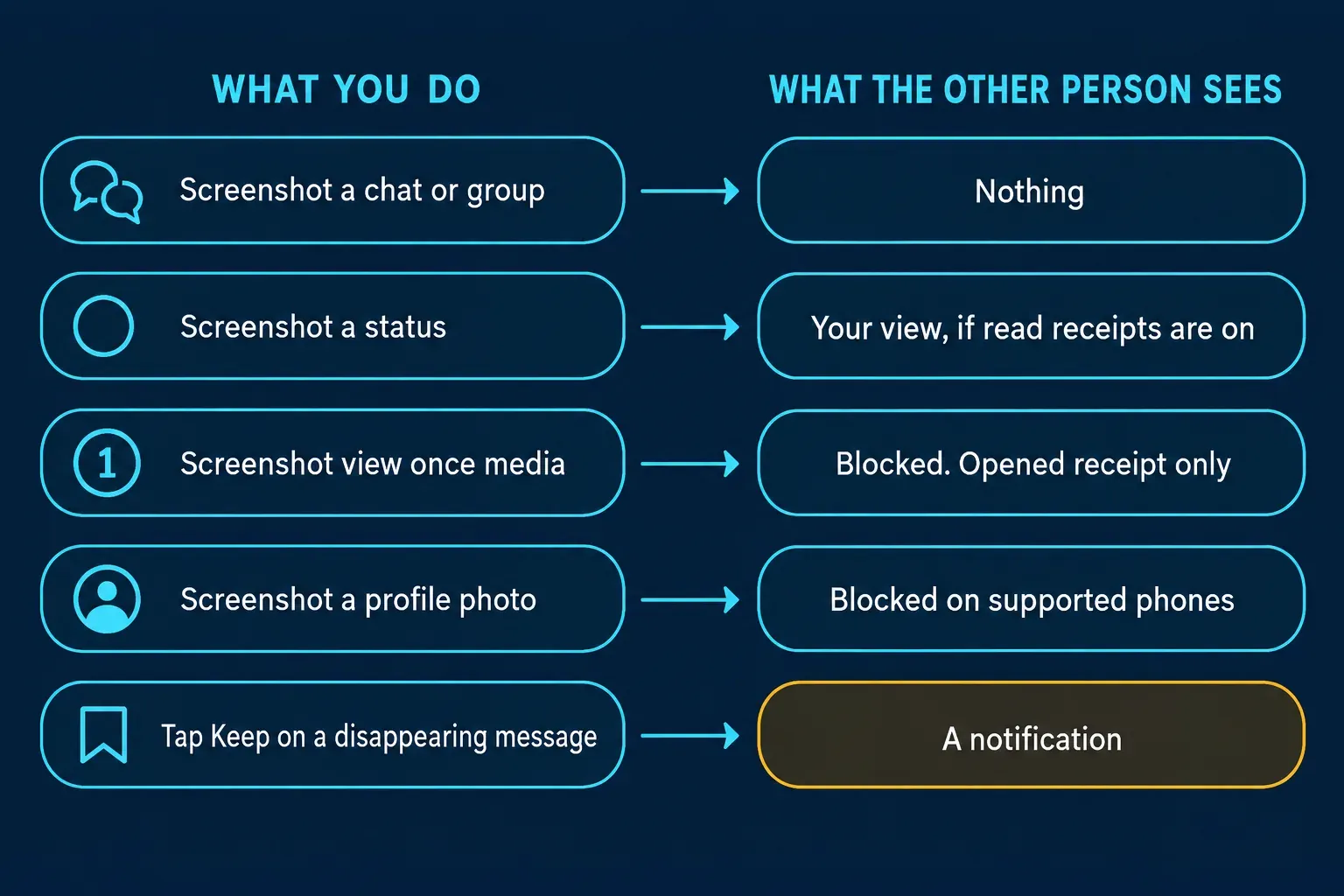
| What you capture | Is the other person told? | What WhatsApp describes |
|---|---|---|
| A one-on-one or group chat | No | No alert of any kind; texts, photos, videos and documents behave the same |
| A chat with disappearing messages on | No | The timer removes messages later; nothing reports a capture |
| Tapping Keep on a disappearing message | Yes | The sender gets a notification and can unkeep the message |
| A view once photo or video | Blocked | Screenshots and screen recordings don't work; the sender sees Opened if your read receipts are on |
| A view once voice message | No | WhatsApp warns that a phone's built-in screen recorder can capture the audio |
| Someone's status | No | You may appear in their viewer list, but only if you both have read receipts on |
| A profile photo | Blocked on supported phones | Screenshots are blocked on supported Android and iOS versions, with no alert |
| A voice or video call | No | No screenshot alert is described for calls |
Chats, groups and calls: nothing is reported
Regular messages are the simple case. A screenshot of a one-on-one chat, a group thread, a photo someone sent normally or a call screen stays on your phone, and WhatsApp doesn't send the other side anything. The only way they'd learn about it is the obvious one: you forward the image, post it somewhere, or someone else in the group does.
Turning on disappearing messages doesn't change that. WhatsApp's page about disappearing messages explains that new messages vanish 24 hours, 7 days or 90 days after they're sent, and that media in those chats isn't saved to your photos. It lists several ways a message can outlive its timer, such as being forwarded into a chat where disappearing messages are off, being quoted in a reply, or being included in a backup made before it disappeared. A screenshot is simply another copy WhatsApp can't see, and the page doesn't mention any alert for it.
Keeping a disappearing message does notify the sender
This is the one place where WhatsApp tells people that something they sent has been saved, and none of the top search results I read mention it. In a chat with disappearing messages, anyone can press and hold a message and choose Keep before its timer runs out. WhatsApp's page about kept messages says a kept message becomes visible to everyone in the conversation and won't disappear, that "if someone keeps a message you've sent, you'll get a notification," and that the sender has the final say: if they unkeep it, no one else in the chat can keep it again. Group admins can also limit keeping to admins only.
So the two ways to save a disappearing message work very differently. Keep is visible and reversible by the sender. A screenshot is silent and permanent. If the other person turned on disappearing messages because they didn't want a record, I think keeping the message openly, or simply asking, is the more honest choice.
View once: blocked, not reported
View once is where screenshots fail rather than trigger an alert. WhatsApp's page about view once says the recipient can't take a screenshot of anything sent this way, that the photo or video isn't saved to their Photos or Gallery, and that it can't be forwarded, copied, saved, starred or shared. The step-by-step page on sending and opening view once media adds that screen recordings of view once photos and videos are blocked too.
Nothing on WhatsApp's pages says the sender is told that you tried. What they can see is an Opened receipt, and only if you have read receipts turned on. If the media stays unopened, it expires from the chat 14 days after it was sent.
WhatsApp is also upfront about the gaps. Someone can photograph the screen with a camera or another device before the media disappears, and the help page says iOS and Android users can record the audio of view once messages with the phone's native screen recorder. That matters most for view once voice messages. I treat view once as "harder to save," not "impossible to save."
If you've read elsewhere that view once can be screenshotted, that advice is out of date. Meta's August 2022 announcement of new WhatsApp privacy features introduced screenshot blocking for View Once as a test, and earlier articles written before then still circulate.
Status updates: they see the view, not the screenshot
When you open someone's status, WhatsApp can put your name in their list of viewers. It doesn't add anything when you take a screenshot. Even the viewer list depends on settings: WhatsApp's page on seeing who viewed your status says the owner can't see who viewed it if either of you has turned off read receipts. The trade-off works both ways, because with your read receipts off you can't see who viewed your own statuses either.
Statuses disappear after 24 hours and go to all your contacts by default. There's also a sanctioned way for a status to travel further than your audience: status mentions. People or groups you mention can see the status even if they aren't in your audience, and they can edit and reshare its content to their own audience. The reshared version doesn't show your name, profile info or phone number, but the content still travels, no screenshot needed.
Profile photos: blocked on phones, with a limit
WhatsApp's page about profile photo screenshot blocking says you can't take a screenshot of another person's profile picture, they can't screenshot yours, and you can't turn this off. There's no notification in either direction; the screenshot just doesn't work.
Read the scope carefully, though. WhatsApp says blocking is enforced on supported Android and iOS versions and that "only users of these devices are blocked." I wouldn't assume it covers a computer or a phone running an older version, and nothing stops someone from photographing the screen.
The setting that actually limits exposure is who can see the photo in the first place. WhatsApp's guide to changing your privacy settings notes that by default any user can see your profile photo, and you can change that under Settings, then Privacy, then Profile photo, to Everyone, My contacts, My contacts except, or Nobody. The same page answers the other common worry: it's not possible to see who viewed your profile.
Restricted chat limits saving, but not screenshots
WhatsApp introduced Advanced Chat Privacy in April 2025 to stop people exporting chats, auto-downloading media and using messages for AI features. On the latest version it's being replaced by Restricted chat. According to WhatsApp's page about restricted chat, when it's on, people in that chat can't automatically save media to their gallery, can't export the chat, can't use Meta AI features in it and can't use linked devices for it. Either person can turn it on in a one-on-one chat, and admins turn it on in groups.
Screenshots aren't on that list, and nothing in the page suggests an alert. The page also warns that people who aren't on the latest version may still be able to use unofficial clients or AI agents in the chat, and you won't be notified if someone isn't up to date. Chats that already had Advanced Chat Privacy don't switch to Restricted chat automatically.
Where "WhatsApp will now notify screenshots" comes from
The claim that WhatsApp now sends screenshot alerts spread around the end of 2025 through a Facebook group post that still ranks for this question and an X post with more than 11,000 likes, both repeating the same line about chat screenshots. Neither points to anything from WhatsApp, and the snippet Google shows from the Facebook post actually says the opposite: unlike Snapchat, WhatsApp won't notify the sender when someone tries to screenshot their media.
The confusion is understandable. WhatsApp did add screenshot blocking for view once and profile photos, it does notify senders about kept messages, and some other messaging apps really do send screenshot alerts. If WhatsApp ever adds one, the help pages on view once and disappearing messages are where I'd check first, not a viral post.
Which messaging apps do send screenshot alerts?
- Snapchat: its guide to the icons on the Chat screen includes separate icons for a screenshot of your Snap or your Chat, and its page on seeing who viewed your Story says you can also see if a screenshot was taken.
- Instagram: only inside chats. Its page about vanish mode says you'll get a notification if Instagram detects a screenshot, and disappearing photos and videos sent in a chat can't be screenshotted at all. Instagram doesn't describe alerts for Stories or posts.
- Telegram: only in secret chats. The Telegram FAQ says it will try to send a notification and admits screenshots can sometimes be taken silently on certain systems.
- WhatsApp: blocks screenshots of view once media and profile photos, and alerts on none.
How to limit what people can save from your WhatsApp
Since WhatsApp won't tell you about screenshots, the useful settings are the ones that decide what's on someone's screen in the first place.
- Send private photos and videos as view once. It blocks screenshots and screen recordings of the media, though not a camera pointed at the screen.
- Narrow your status audience. WhatsApp's page on managing status privacy covers My contacts, My contacts except and Only share with. Changes apply to future statuses, not ones you've already posted.
- Mention people sparingly. Anyone you mention can reshare the content of that status to their own audience.
- Use disappearing messages for sensitive chats, and pay attention to kept-message notifications. If someone keeps a message you don't want kept, you can unkeep it.
- Turn on Restricted chat when you don't want media auto-saved or the chat exported.
- Limit who sees your profile photo to My contacts, or to fewer people.
- Share sensitive things only with people you trust. Every one of these controls can be beaten by a second phone's camera, which is why WhatsApp gives the same advice on its view once page.
Before you share a WhatsApp screenshot
A screenshot of a chat usually carries more than the message you care about: names, phone numbers, profile photos, group names and other people's replies. None of them agreed to be posted. Crop the image down to what matters and cover the rest with a solid box before you share it. My guide to redacting personal information from a screenshot covers what to look for, and if you work in Snagit, here's how to blur or redact a screenshot in Snagit without leaving the text readable.