
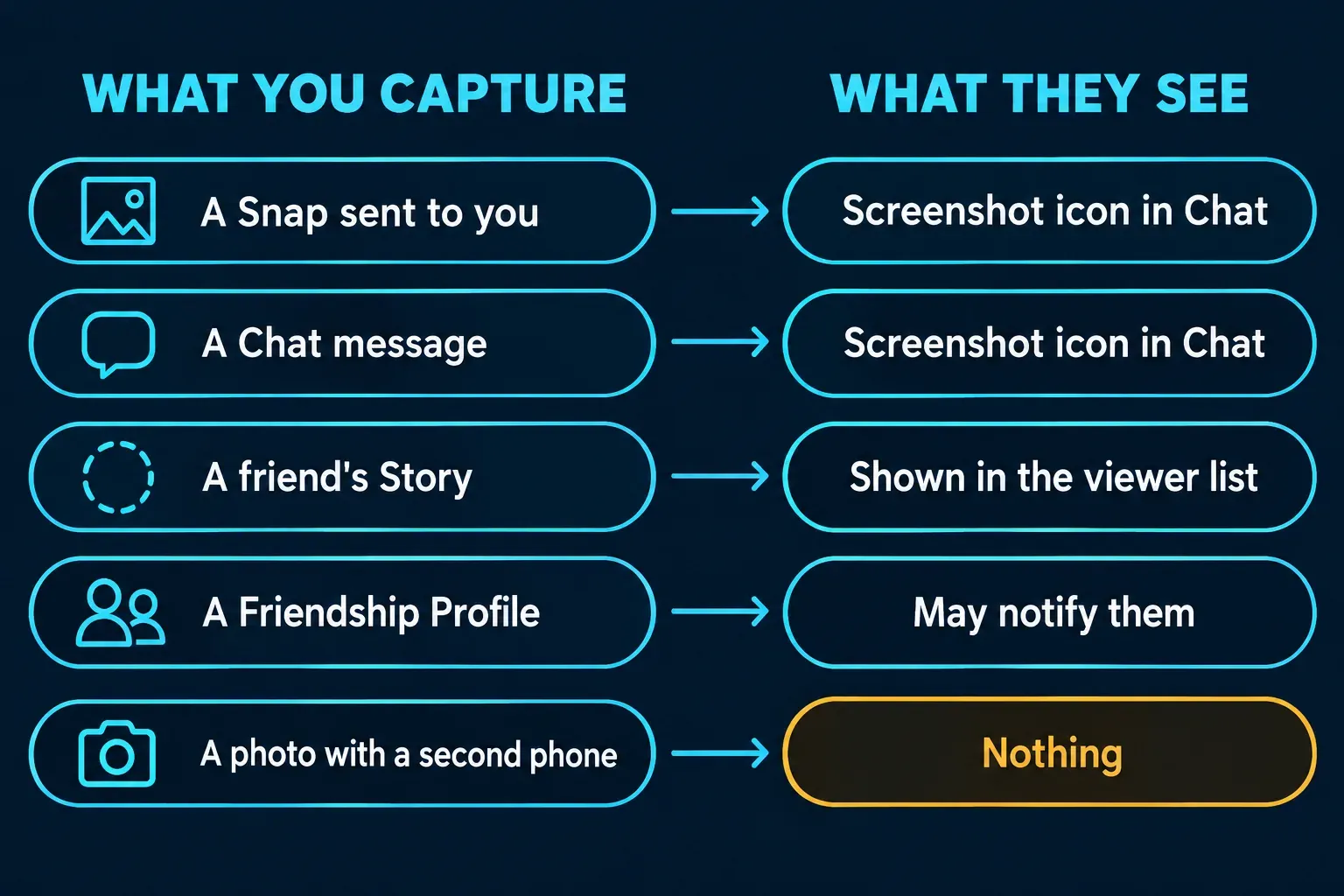
Yes. When you screenshot a Snap or a Chat, the sender sees a screenshot icon next to your name on their Chat screen, and when you screenshot a Story, the owner sees it beside your name in their viewer list. Snapchat's help pages add two cases people miss: saving a Snap from a Private or Shared Story shows the poster the same icon, and screenshotting a Friendship Profile may notify that friend.
The alert has limits, and they matter most if you're the one sending. Snap's own safety tips say the people you send Snaps to can take a picture of them with another device, and nothing in the app sees that. Below is what happens for each kind of content, what the icons look like, where screen recording and Snapchat for Web fit, and the controls you have as a sender.
What happens when you screenshot each part of Snapchat
| What you capture or save | Is the other person told? | What they see |
|---|---|---|
| A Snap someone sent you | Yes | A red or purple screenshot icon by your name on their Chat screen |
| A Chat message | Yes | A blue screenshot icon by your name on their Chat screen |
| A friend's Story | Yes | Your screenshot in their Story viewer list |
| A Snap you save from a Private or Shared Story | Yes | A screenshot icon in that Snap's read receipts |
| A Friendship Profile | Possibly | Snap says it may notify that friend |
| A Snap you replay | Yes, as a replay | A replay icon, not a screenshot icon |
| A Chat or Snap you save in Chat | Visible, no alert | The saved item stays in the Chat for both of you; saved messages turn gray |
| A screen recording | Not stated by Snap | Guides report the same screenshot notice |
| Spotlight and Snap Map posts | No alert described | Snap treats them as public content that can be shared on and off Snapchat |
| A photo of the screen taken with another phone | No | Nothing; the app can't see it |
What does the Snapchat screenshot icon look like?
Snapchat's guide to the icons on the Chat screen lists three screenshot icons: a screenshot was taken of your Snap without audio, of your Snap with audio, or of your Chat. They follow the same color code as the other Chat-screen icons, so red means a Snap without audio, purple a Snap with audio and blue a Chat. The icon itself is an outlined arrow with small triangles flaring out around it.
Don't confuse it with the replay icon. That one is a circular arrow, and it means the person watched your Snap a second time, not that they kept a copy. ScreenSnap's guide to Snapchat screenshot alerts adds that the sender may also get a push notification. Snap's icon page only describes the icon, so I'd rely on the icon, because it's the part Snap documents.
How does a Story owner see who took a screenshot?
From their own Story, in three steps. Snapchat's page on seeing who viewed My Story gives the route:
- Open My Account.
- Tap My Story.
- Swipe up on the Story.
The list shows who watched and whether a screenshot was taken. It names up to 200 viewers; after 200 views the owner sees a number but no more names, and the page doesn't say how screenshots beyond that point are shown.
Private and Shared Stories add a second trigger. Snapchat's page on saving a Private or Shared Story explains how to save a single Snap with the download icon, then notes that whenever a Snap is saved, whoever posted it is notified by a screenshot icon in its read receipts. So saving a friend's Snap the official way looks the same to them as a screenshot.
Does saving a Chat or Snap tell the other person?
Not with an alert, but saving in Chat is visible by design. Snapchat's page on saving Chat messages says you tap a message to save it and tap again to unsave it. Saved messages get a gray background, "so everyone in the Chat can see what's saved," and they stay in the Chat for both of you.
Snaps can be saved the same way when the sender allows it. Snap's privacy-by-product page says the sender decides: a Snap can be saved only if its timer is set to no time limit. The recipient presses and holds the Snap while viewing it or right after, and Snapchat's page on when Snaps and Chats are deleted says it then appears in the Chat as Chat Media. That copy is kept on Snap's servers rather than the phone, and Snap's page on saved Snaps says it can still be exported to Camera Roll.
I'd save in Chat instead of taking a screenshot whenever the sender allows it, because it's open: they see what you kept, and Snap's privacy page says they can delete any message they sent, saved Snaps included.
Does screenshotting a Friendship Profile notify them?
It can. Snapchat's page on how Friendship Profiles work ends with a note: "Screenshotting a Friendship Profile may notify that friend." A Friendship Profile is the page you share with one friend, where the Snaps and Chats you've saved live alongside their Bitmoji and, if they share it, their location on the Map.
Some guides in the search results say profile screenshots never notify, and Storylooker's FAQ says so outright. Snap's word is "may," which isn't a promise either way, so I'd assume the friend can find out.
Does Snapchat detect screen recording?
Snap's help pages confirm that recording happens but don't say what the other person sees. The page on Private Stories says viewers "can always screenshot or screen record," and the privacy page says "anyone can take a screenshot or record a Story!" Neither, and not the icon guide either, says whether a recording produces the screenshot icon.
The guides that answer it agree. Among the top ten Google results for this question, I could read three complete guides, and all three report that a phone's built-in screen recorder triggers the same notice as a screenshot. ScreenSnap adds that the alert usually looks like a screenshot alert rather than a separate "screen recorded" message, and Storylooker's and Blur.me's guides say recordings are flagged too.
The phones make that possible. On iPhone, Apple's sceneCaptureState tells an app whether its scene is being mirrored or recorded, and Android 15 lets an app learn when it becomes visible in a screen recording. I'd assume a recording is flagged like a screenshot, because both systems let Snapchat see it and all three guides report that it does.
On Android 14 and later, a short "detected this screenshot" message on your own screen is a separate thing: it's the phone telling you that an app asked to know about screenshots. My guide to the "detected this screenshot" message explains where it comes from.
What about Snapchat for Web?
Snapchat's page on screenshots on Snapchat for Web doesn't say whether an alert is sent. It says that whether you're on the app or on a desktop, the people who view your Snaps, Chats and other content "can always capture and copy it." ScreenSnap's guide goes further and lists the browser version as a gap where captures aren't detected. If you send Snaps, that's one more reason not to treat the icon as a lock.
What the screenshot icon can't catch
The icon only covers captures that Snapchat's own app can see. Snap's safety tips say the people you send Snaps to "can still take a screenshot or take a picture of the Snap with another device," and the deletion page adds separate software to that list. A photo taken with a second phone leaves no trace in the app.
If you send Snaps, these are the controls you have:
- Saving. Only a Snap set to no time limit can be saved in Chat. With a timer, the recipient can view it or capture it, and an in-app capture shows you the icon.
- Deleting. Press and hold a Snap or message you sent and tap Delete. Snap says it then sets the item to delete from its servers and makes its "best attempt" to remove it from your friends' devices, which might not work if someone has a bad internet connection or an old version of the app. Your friends can see that a message was deleted, and a screenshot taken before that stays on their phone.
- Chat timing. On the Chat screen, press and hold a friend's or Group's name, tap Chat and Notification Settings, then Delete Chats…, and choose After Viewing, 24 Hours After Viewing, 7 Days After Viewing or Never. The same screen has the Keep Snaps in Chat toggle.
I'd treat the icon as a record, not as protection, because it tells you about a capture after it happened and can't see a second camera at all. Snap's page on Snapchat for Web puts it plainly: "Don't send messages or share content that you wouldn't want someone to save or share."
Can you screenshot a Snap without them knowing?
Not through Snapchat itself, and I wouldn't try. The airplane-mode trick that circulates for this gets a poor rating from all three of those guides: ScreenSnap says it rarely works anymore, Storylooker's short answer is no, and Blur.me calls it a last resort and not a reliable workaround. Getting caught halfway costs more trust than asking.
If you want to keep something, ask, or save it in Chat when the sender allows it, so they can see it and remove it if they mind. For your own Snaps, Snap's privacy page notes that you can save a Snap before you send it, and saved Snaps can become part of your Memories.
Before you share a Snapchat screenshot anywhere else
A capture of a Chat carries more than the message: display names, Bitmoji, sometimes a phone number or a spot on the Map. Before you post one or forward it, blur what isn't the point. My guide to redacting personal information in a screenshot lists what to look for, and the one on blurring a screenshot covers the tools. If you're keeping a capture as evidence for a report, keep the untouched original and share a redacted copy.
The phone's own markup tool is enough for a single capture. If you clean up chat screenshots on a computer regularly, for support tickets or moderation reports, Snagit's blur and redaction save repeating the same steps, and my guide to blurring and redacting in Snagit shows them.
The answer changes from app to app, which is why people mix them up. My guides cover Instagram, WhatsApp, TikTok and Facebook separately.
The short version
Snapchat shows a screenshot icon when you capture someone's Snap, Chat or Story, shows the same icon when you save a Snap from a Private or Shared Story, and may tell a friend about a Friendship Profile screenshot. Saving in Chat is visible to both people. Snap doesn't document what a screen recording shows, but all three guides I could read report that it's flagged. A photo taken with another device isn't detected at all, so as a sender, read the icon as a record, not a lock.