
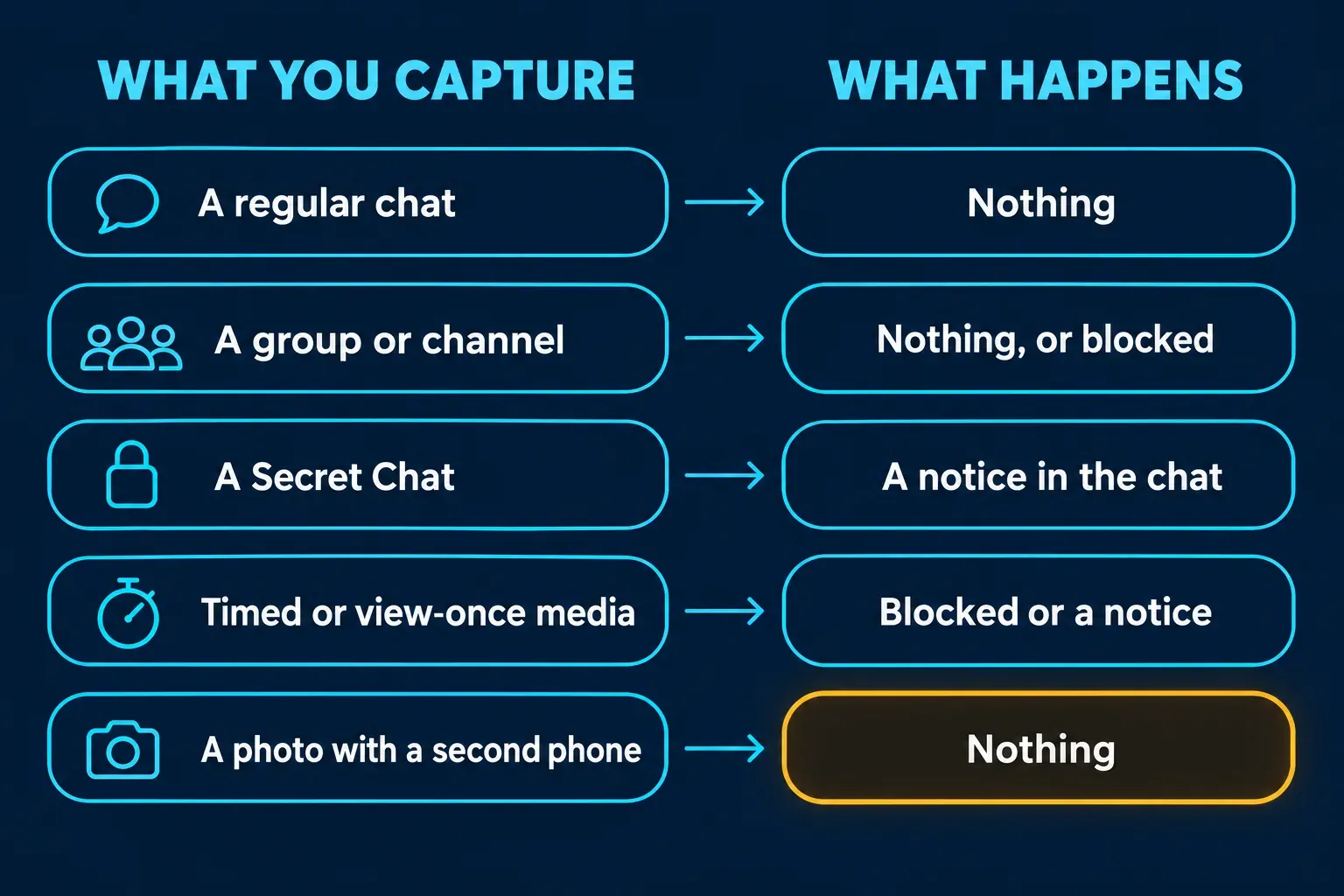
No, not in regular chats, groups or channels. Telegram doesn't tell anyone when you screenshot those. The exceptions are Secret Chats and self-destructing photos or videos, where Telegram's FAQ says it will try to send a notification if a screenshot is taken. Three settings go further and block the screenshot instead: Restrict Saving Content in groups and channels, Disable Sharing in a one-on-one chat, and the screenshot switch on a story.
Telegram is unusually frank about the limits. The same FAQ admits there's no bulletproof way to detect screenshots on some systems, that the notice can sometimes be bypassed, and that nobody can stop a photo taken with another device. Below is what happens in each kind of chat, what the notice says, how phones and computers differ, and the controls you have if you're the one sending.
What happens when you screenshot each part of Telegram
| What you capture | Is anyone told? | What happens |
|---|---|---|
| A regular one-on-one chat | No | The screenshot saves normally |
| A group or channel | No | Nothing, unless the owner turned on Restrict Saving Content, which blocks it |
| A one-on-one chat with Disable Sharing on | No alert | Screenshots and screen recordings are blocked in that chat |
| A Secret Chat | Yes, Telegram tries | A "took a screenshot!" line appears in the chat; some phones block the capture instead |
| A self-destructing or view-once photo or video | Yes, Telegram tries | Telegram says screenshots won't work; where one gets through, it tries to notify |
| A story | No alert described | The owner can switch off screenshots for that story |
| A profile photo | No alert described | Guides that cover profiles report nothing |
| A screen recording | Not documented | Blocked where Disable Sharing is on; otherwise guides report no reliable detection |
| A photo of the screen taken with another phone | No | Nothing; Telegram can't see it |
What does the Telegram screenshot notice say?
It's a line inside the chat itself, not a separate alert screen. Telegram's translation platform lists the English app text for it: "[name] took a screenshot!" for the other person, and "You took a screenshot!" for the side that took it. So the notice isn't a hidden log. It sits in the conversation where both of you can see it.
You'll only see that line in Secret Chats and around self-destructing media. Regular cloud chats have no screenshot notice at all, and Telegram's FAQ doesn't describe one for groups, channels or profiles.
How do Secret Chats handle screenshots on Android and iPhone?
Telegram's own promise is modest. Its FAQ answer on how self-destructing messages work says "We will try to send a notification if a screenshot is taken," and the answer below it says Telegram will "make every effort" to alert you about screenshots in Secret Chats, "but it may still be possible to bypass such notifications and take screenshots silently." It names some Android and Windows Phone devices as the hard cases.
What happens next depends on the phone. Among the top ten Google results for this question, I could read five complete guides, and the three that describe both phones agree:
- Android. The capture is blocked and the phone shows a message along the lines of "Can't take screenshot due to security policy." AirDroid's guide to Telegram screenshot alerts, ScreenSnap and uMobix all report it.
- iPhone. The screenshot goes through, often as a black or blank image, and the other person gets the notice.
I'd treat any screenshot attempt in a Secret Chat as something the other person may see, because on the phones where the capture isn't blocked, Telegram tells them, and that's the whole point of the chat type.
To check whether you're in one, look for the small lock icon next to the name, which ScreenSnap's walkthrough of Telegram screenshots points out. Secret Chats don't open on their own: someone has to open a contact's profile, tap … and choose Start Secret Chat, as the FAQ explains. They're also tied to one device, so a Secret Chat started on your phone won't appear on your computer.
Does Telegram notify when you screenshot a disappearing photo?
It tries to, and in regular chats too. The FAQ says the self-destruct timer works "for all messages in Secret Chats and for media in private cloud chats," so a timed photo or video sent in an ordinary one-on-one chat gets the same screenshot handling. You set it with the clock icon, which sits in the input field on iPhone and in the top bar on Android, and the countdown starts once the message is displayed.
View Once is the shortest version. Telegram's update that added View Once media says that in any one-on-one chat the media editor lets you choose how long a photo or video stays visible, "from View Once to 30 seconds," and the media is deleted once it's opened. The same post states: "Like for all self-destructing media, saving and taking screenshots will not work for view-once media."
I'd send a one-off photo as View Once instead of a normal message whenever I wouldn't want it kept, because it works in any one-on-one chat without Premium or a Secret Chat.
Which Telegram chats block screenshots instead of reporting them?
Three settings stop the capture rather than announcing it:
- Restrict Saving Content for groups and channels. Telegram's protected content update lets owners restrict message forwarding, "which also prevents screenshots and limits the ability to save media from posts." The path is the Group or Channel Info page, then Group Type or Channel Type, then Restrict Saving Content. Sleekshot's guide to Telegram screenshot limits says members who try on a phone usually get a black image or a system message.
- Disable Sharing for one-on-one chats. Telegram's Disable Sharing announcement says it "restricts message forwarding and prevents screenshots or saving media from the chat." Open the person's profile, tap ⋯ or ⋮ and choose Disable Sharing. It's currently a Telegram Premium feature, and the app's text for its No Screenshots option reads "Disable screenshots and screen recordings in this chat."
- Allow Screenshots on a story. Switching it off stops viewers from taking screenshots of that story, covered in the next section.
Disable Sharing is new enough that none of the five guides I could read from the top results mention it, so plenty of advice online still says one-on-one chats are always free to capture. If a screenshot comes out black or refuses to save in an ordinary-looking chat, one of these settings is the likely reason.
Does Telegram notify when you screenshot a story?
No alert is described anywhere in Telegram's documentation, and the guides that cover stories, uMobix's and HitPaw's among them, say none is sent. What story owners get is prevention. Telegram's tour of stories says the privacy menu lets you "choose whether to prevent or allow screenshots," and that turning off Allow Screenshots also hides the in-app options viewers could use to save or share the story.
The owner does see who watched. The viewer list is visible to the story's author, with one gap: Premium users can turn on Stealth Mode, which erases their views from the past 5 minutes and hides what they watch for the next 25. I'd turn off Allow Screenshots on any story I'd mind seeing elsewhere, because a story has no alert to fall back on.
Does Telegram detect screen recording?
Telegram doesn't document a screen-recording notice for any chat type. The only place its own text mentions recordings is the Disable Sharing option quoted above, which blocks screenshots and screen recordings together. ScreenSnap's guide lists screen recording in any chat as "mostly no," with no reliable detection.
If you're the one sending, I'd assume an ordinary chat can be recorded without a trace and keep anything sensitive to View Once media, a Secret Chat or a chat with Disable Sharing on, because those are the only places where Telegram documents a block or a notice.
What about Telegram Desktop and Telegram Web?
Screenshots of regular chats on a computer work the same as on a phone: nobody is told, whether you use the Snipping Tool on Windows 11 or the screenshot toolbar on a Mac. Secret Chats are where computers differ:
- Telegram for macOS, the native Mac app, has them. The FAQ says it "has every feature from the iOS version of the app including Secret Chats."
- Telegram Desktop, the universal app for Windows, macOS and Linux, doesn't. The request to add Secret Chats on its GitHub tracker has been open since 2015, so a Secret Chat started on a phone simply isn't there to capture.
Groups and channels with Restrict Saving Content stay protected in Telegram Desktop as well, according to Sleekshot's guide.
What the screenshot notice can't catch
The notice only covers captures that Telegram's own app can see. The FAQ answer on whether you can be certain your partner doesn't take a screenshot ends plainly: "nobody can stop a person from taking a picture of their screen with a different device or an old school camera." Its advice is to "share sensitive information only with people you trust."
If you send things you'd rather not see copied, these are the controls Telegram gives you:
- View Once or a timer on a single photo or video, in any one-on-one chat.
- A Secret Chat with a self-destruct timer, for a whole conversation on one device.
- Disable Sharing for an ongoing one-on-one chat, if you have Premium.
- Restrict Saving Content for a group or channel you own.
- Allow Screenshots off for a story.
I'd treat the notice as a record, not as protection, because it arrives after the capture and a second camera never triggers it.
Can you screenshot Telegram without them knowing?
In regular chats, groups and channels you don't need to, since nobody is told. In a Secret Chat or a protected chat, not through Telegram itself, and I wouldn't try. Several pages in the top results publish workarounds, from emulators to borrowing someone else's phone, and I'm not repeating them: a blocked screenshot is the sender saying they don't want a copy kept.
If you need to keep something from a protected chat, ask the sender to send it again in a regular chat or as a file. That gets you a clean copy without breaking the trust the setting was meant to protect.
Before you share a Telegram screenshot anywhere else
A capture of a Telegram chat carries more than the message: usernames, profile photos, group names and sometimes a phone number. Before you post one or forward it, blur what isn't the point. My guide to redacting personal information in a screenshot lists what to look for, and the one on blurring a screenshot covers the tools. If you're keeping a capture as evidence for a report, keep the untouched original and share a redacted copy.
The phone's own markup tool is enough for a single capture. If you clean up chat screenshots on a computer regularly, for support tickets or moderation reports, Snagit's blur and redaction save repeating the same steps, and my guide to blurring and redacting in Snagit shows them.
Every messenger handles this differently, which is why the answers get mixed up. My guides cover WhatsApp, Snapchat, Instagram, TikTok and Facebook separately.
The short version
Telegram stays silent about screenshots of regular chats, groups, channels, stories and profiles. Secret Chats and self-destructing or view-once media are where it tries to notify, and on some phones the capture is blocked outright. Restrict Saving Content, Disable Sharing and a story's Allow Screenshots switch block screenshots without any notice. Telegram itself says a determined person can bypass the alert or simply use a second camera, so as a sender, read the notice as a record, not a lock.