
No. Hinge doesn't tell anyone when you screenshot a profile, a chat or a photo, and it doesn't flag screen recordings either. The newer part is blocking: in some regions, India among them, Hinge now darkens other people's profiles when you try to capture them. Your chats and your own profile can always be saved.
So the question has two answers depending on where you use the app. Nobody gets an alert anywhere, but in a blocking region the screenshot of a profile simply won't come out. Below is what happens on each screen, why chats stay open to capture, and what to blur before a Hinge screenshot goes to your group chat.
What happens when you screenshot each part of Hinge
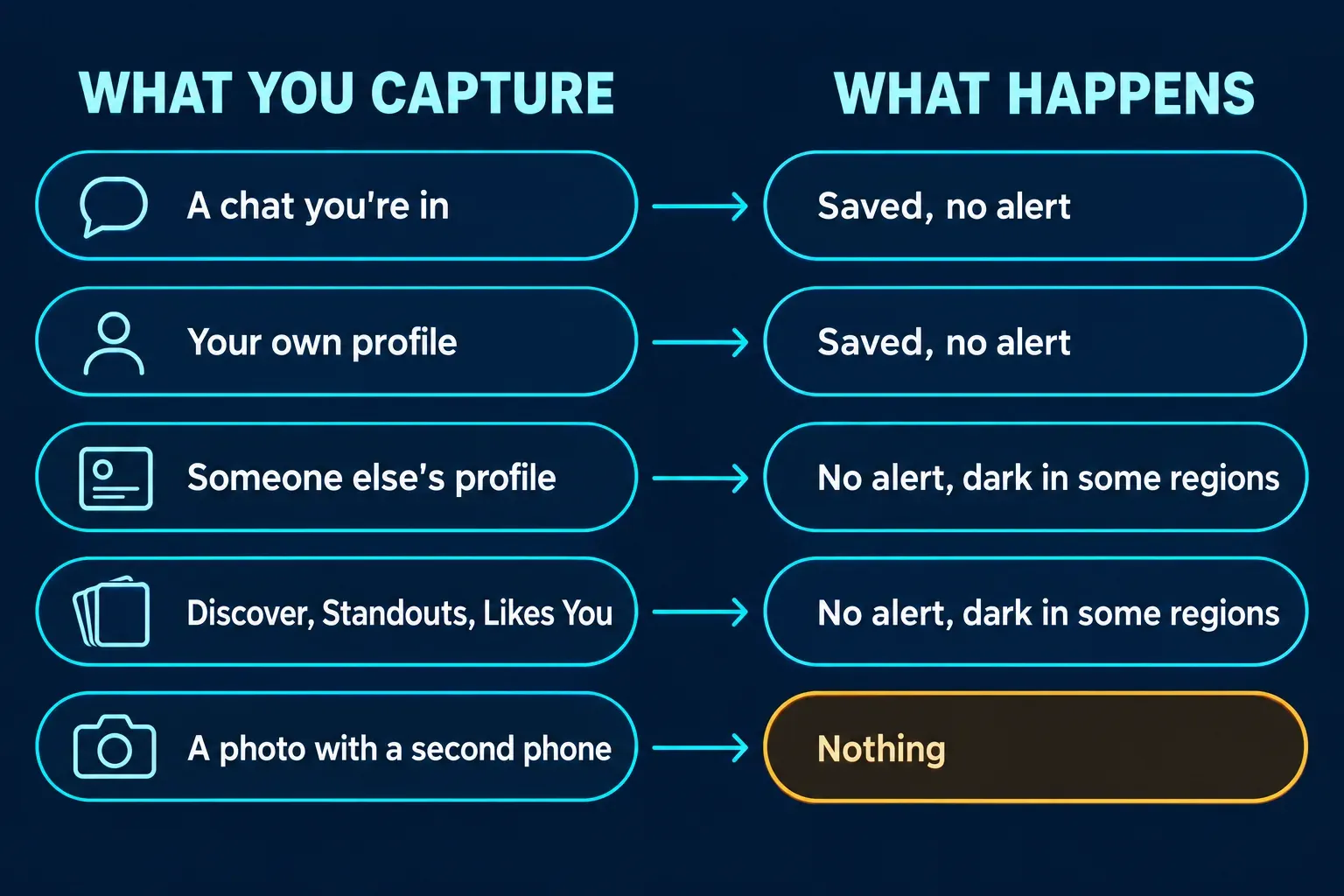
Nobody is told in any of these cases. The only difference is whether the capture works.
| What you capture | What happens |
|---|---|
| A profile in Discover, your main feed | Saves normally, except in regions with screenshot blocking, where the screen goes dark |
| Standouts | Same as Discover |
| Likes You | Same as Discover |
| A match's profile, or anyone else's | Same as Discover |
| A chat you're in | Always allowed, so you can report anything that makes you uncomfortable |
| Your own profile | Always allowed |
| A screen recording | Blocked on the same screens as screenshots in blocking regions; records normally everywhere else |
| A photo of the screen taken with another phone | Nothing; Hinge can't see it |
Does Hinge notify when you screenshot a profile?
No. There's no alert, badge or line in the chat, whether the profile came up in Discover, Standouts or Likes You or belongs to someone you've already matched with. The person whose profile you captured has no way to find out from the app.
That's also what the published checks say. Of the top ten Google results for this question, I could read seven pages in full, from SwipeStats and ScreenSnap to Business Insider and wikiHow, and all seven report no screenshot notification for profiles or chats. Hinge's own help center doesn't describe one either.
The catch is newer than most of those pages. Two of them, ScreenSnap's and DoULike's, state flatly that Hinge never blocks screenshots, and none of the seven mention the regional block. That's why you'll find confident, contradictory answers online: the notification answer hasn't changed, the blocking answer has.
Why does Hinge go dark when I take a screenshot?
Because your region has screenshot blocking switched on. Hinge's help page on screenshot blocking in select regions says that if you try to capture a protected screen, "the page will go dark and you'll see a short message explaining why." The block covers four places:
- Discover, the main feed of suggested profiles
- Standouts
- Likes You
- Anyone else's profile, including your matches
Screen recordings of those screens are blocked the same way, and if you switch to another app while one of them is open, Hinge hides it in the app switcher too. The help page describes the dark screen and the message on your side only. It doesn't describe any alert to the person whose profile you tried to capture.
Hinge doesn't publish a list of regions. The one it has named is India: Hinge's announcement of its updated experience in India, dated September 28, 2026, lists Screenshot Protection for profiles in Discover, Likes You and Standouts next to Face Check and a Block List at onboarding. If your screen goes dark where it didn't before, the feature has reached your account; if a capture is blocked somewhere it shouldn't be, the help page asks you to contact Hinge.
I think the split Hinge chose is the right one. Profiles are the part people screenshot to mock or pass around, and conversations are the part you may need as evidence, so blocking the first and leaving the second open protects people without taking away the record.
Does Hinge notify when you screenshot a chat?
No, and chats are deliberately left out of the block. Hinge's help page says you can still screenshot "any chats you're a part of - so you're able to report anything that makes you uncomfortable," and the India announcement says the same about conversations.
If you're capturing a conversation because you plan to report someone, do it before you report. Hinge's guide to reporting someone on Hinge calls reporting "a confidential and permanent action": once you pick a reason, the profile is removed and you won't see it again. The steps are short:
- Open Matches and tap the profile of the person you're reporting.
- Tap the three dots, then Report.
- Tap a reason. Once you do, their profile is removed.
I'd screenshot the parts of the chat that matter first, including the messages that made you report, because once the report goes through you won't see that profile again. You can also report from any profile page, or by email to hello@hinge.co, which Hinge's safe dating advice lists as well.
Does Hinge detect screen recording?
Hinge doesn't notify anyone about screen recordings, and the two top results that test it, SwipeStats and ScreenSnap, report none. Hinge's support team even publishes steps for recording your Android screen so its agents can see a problem the way you do.
The only limit is the same regional block: where it's on, Discover, Standouts, Likes You and other people's profiles can't be recorded either. Chats and your own profile record normally.
Can you screenshot Hinge without the other person knowing?
Yes, in the sense that Hinge never tells them. Where the screen goes dark, though, I wouldn't try to get around it with a second phone or a workaround app. The block exists so profiles aren't passed around without consent, and Hinge's terms of use already forbid users to "disseminate another person's personal information without his or her permission."
If you only want a friend's opinion on a match, describing the profile or showing it on your own phone gets you the same advice without making a copy. If you're worried about your own profile, the same terms say plainly that other users "may share Your Content with third parties," so I'd write every photo and prompt on the assumption that it could be saved.
Before you send a Hinge screenshot to anyone
A Hinge capture carries more than the line you want a friend to read. Profiles show a first name, photos and whatever basics the person filled in, such as job, school or hometown, and a chat screenshot shows their name and photo at the top. Crop to the part that matters and black out the rest; wikiHow's Hinge guide gives the same advice about names and photos in anything you share publicly.
My guide to redacting personal information in a screenshot lists what tends to slip through, and the one on blurring a screenshot covers the built-in tools on iPhone and Android. A solid box is the safer choice for names, since blur and pixelation can leave enough behind to read. If you're keeping chat screenshots as evidence, keep the untouched originals and share redacted copies.
For one capture, your phone's markup tool is plenty. If you redact screenshots on a computer often, for moderation queues or support tickets, Snagit's blur and shape tools save repeating the same steps, and my guide to blurring and redacting in Snagit shows them.
How Hinge compares with other apps
Hinge sits at the quiet end. Snapchat tells people when you screenshot their Snaps and chats, Telegram tries to in Secret Chats and with self-destructing media, and Messenger does it in disappearing-message chats. WhatsApp sends no alert but blocks view once media. Tinder sends no alert either, but in some regions it now blocks profile screenshots before they're saved. My guides cover Snapchat, Telegram, WhatsApp, Instagram, Facebook and Messenger, TikTok and Tinder one by one.
The short version
Hinge never notifies anyone about a screenshot or a screen recording. In regions with screenshot blocking, India included, it stops captures of Discover, Standouts, Likes You and other people's profiles, and the screen goes dark instead. Chats you're in and your own profile can always be saved, so capture what you need before you report someone, and black out names and faces before a screenshot leaves your phone.