
No. Tinder doesn't tell anyone when you screenshot a profile, a chat or a photo, and screen recordings don't trigger an alert either. What has changed is blocking: in some regions, India among them, Tinder now stops screenshots and recordings of profiles before they're saved. On Android the block is complete; on an iPhone it applies while a profile is on screen.
So the answer has two parts. Nobody is ever told, but where the protection is on, a profile simply won't capture. Below is what happens on each screen, why getting unmatched right after a screenshot is a coincidence, and what to save before you unmatch or report someone.
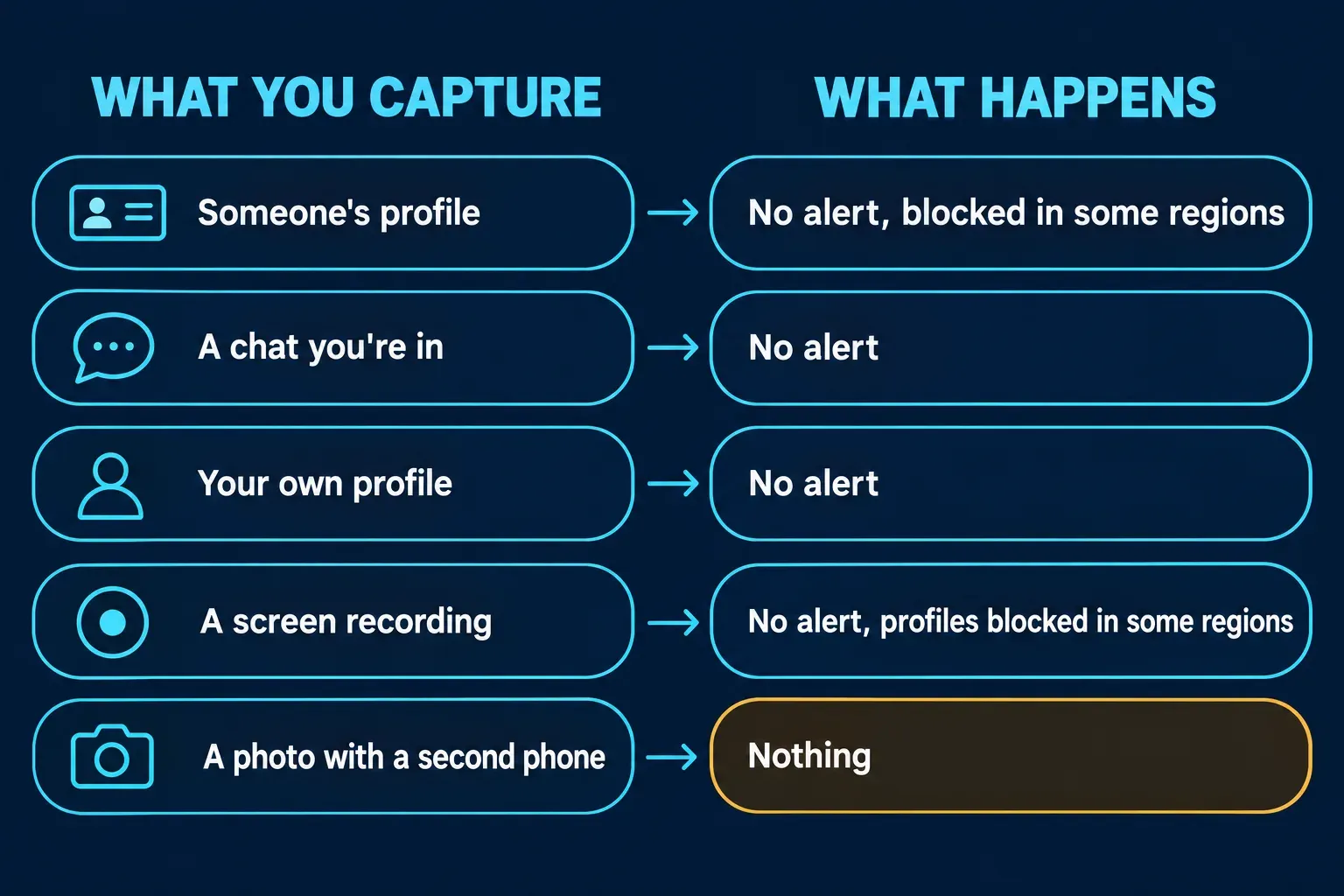
What happens when you screenshot each part of Tinder
Nobody gets an alert in any of these cases. The only difference is whether your phone is allowed to capture the screen.
| What you capture | What happens |
|---|---|
| A profile in Discovery, the swipe deck | Saves normally, except in regions with screenshot protection, where your phone won't capture it |
| A match's profile | Same as Discovery |
| A chat you're in | No alert; see the Android note below if your region has protection |
| Your own profile | No alert |
| A screen recording | No alert; profiles are blocked from recording wherever screenshots are |
| A photo of the screen taken with another phone | Nothing; Tinder can't see it |
Does Tinder notify when you screenshot a profile?
No. There's no alert, badge or message in the chat, whether the profile came up in Discovery or belongs to someone you've already matched with. The person whose profile you captured can't find out from the app.
The published checks agree. Of the top ten Google results for this question, I could read five independent pages in full, SwipeStats, CheatEye, Mashable, BasedDating and XNSPY, and all five report no screenshot notification for profiles or chats. Tinder's own help page on the subject describes blocking, not alerts.
The catch is newer than most of those pages. Three of them say you can capture any profile you like, and SwipeStats puts it flatly: "Tinder doesn't block it." None of the five mention the regional protection. That's why the answers online sound so sure and still disagree: the notification answer hasn't changed, the blocking answer has.
Why won't Tinder let me screenshot a profile?
Because your account has screenshot protection. Tinder's help page on screenshot and screen recording protection says that when someone tries to capture a profile, "their device will prevent the profile from being captured," and that the protection is applied automatically, with nothing to switch on. It works differently on each platform:
- Android: screenshots and screen recordings are "completely blocked."
- iPhone: captures are blocked while a profile is on screen.
You can tell you're covered in two places. Tinder mentions it under Prioritize safety when you finish signing up, and in a note when you add photos to your profile. The page describes the block on your own phone only; it doesn't mention any alert to the person whose profile you tried to capture.
Tinder doesn't publish a list of regions. The one named so far is India: Business Standard reported in October 2026 that Match Group has introduced India-specific safety measures, including screenshot and contact blocking, and Global Dating Insights' summary adds that Hinge already blocks screenshots there and Tinder is expanding the same protection.
Tinder is upfront that the block has limits: its help page says no technology can completely stop profile content from being captured, "such as by using another device." I still think it's worth having. It won't stop someone set on copying a profile, but it does stop the casual screenshot dropped into a group chat, which is how most profiles get passed around.
Does Tinder notify when you screenshot a chat?
No. The protection page is about profiles, and none of the readable top results report an alert for conversations. Unlike Hinge, though, Tinder doesn't promise that chats stay open to capture. Its wording for Android is "completely blocked," with no exception for conversations, so in a protected region I wouldn't count on saving a chat as an image on an Android phone.
If a conversation is the evidence you need and your phone won't capture it, report it from inside the chat and describe what happened in the report form. The steps are below.
I screenshotted and got unmatched. Did Tinder tell them?
No. Nothing in the app told your match about the screenshot, so an unmatch right after it is timing, not an alert. CheatEye's guide reaches the same conclusion. Unmatching is silent in both directions: Tinder's help page on unmatching someone says the other person "won't be notified of your action, but may notice you're missing from their Matches."
What matters more is what an unmatch takes with it. Tinder's answer to whether you can delete a message is that you can't delete single messages, but unmatching removes the entire conversation, and it's permanent. Either of you can do it at any moment, so if a chat matters, I'd save it early rather than at the end.
How to report someone on Tinder, and what to save first
Capture first, then report. Once you unmatch, the conversation is gone, and an email report works best with screenshots attached. Tinder's guide to reporting profiles and content gives these steps for a match:
- Open the chat with the person you're reporting.
- Tap the three dots in the top right corner.
- Tap Report, pick the reason that fits best and add the details.
For someone in Discovery, open their profile, tap the three dots and choose Report; there's also a report button at the bottom of every profile. If you report by email instead, Tinder asks for the name, age, bio and photos on the profile, adding "(screenshots are best)." Reports are confidential: the person may get a generic notice that their account is being reviewed, but not who reported them.
If someone has shared intimate images of you without your consent, use Tinder's form for reporting intimate images shared without consent, which accepts links and screenshots, rather than the general report.
Does Tinder detect screen recording?
Tinder doesn't notify anyone about screen recordings, and the three readable top results that address it, SwipeStats, CheatEye and BasedDating, report none. The only limit is the same protection: where it's on, profiles can't be recorded either, completely on Android and while a profile is on screen on an iPhone.
Can you screenshot Tinder without the other person knowing?
Yes, in the sense that Tinder never tells them. Where profiles are protected, though, I wouldn't try to get around it with a second phone or a workaround app. The block is there so profiles aren't passed around without consent, and Tinder's terms of use already forbid users to "disseminate another person's personal information without his or her permission" and to post "the image or likeness of another person without that person's consent."
If you only want a friend's opinion on a match, show them the profile on your own phone; you'll get the same advice without making a copy. If you're thinking about your own profile, write it on the assumption that it can be saved. The protection isn't on everywhere, and Tinder itself says another device can still capture what's on screen.
Before you send a Tinder screenshot to anyone
A Tinder capture carries more than the line you want a friend to read. A profile shows a first name, age, photos and a bio, which is the same set Tinder asks for to identify someone in an email report. A chat screenshot shows their name and photo at the top. Crop to the part that matters and black out the rest; Mashable makes the same point, that matches send their messages to be read by you, not your followers.
My guide to redacting personal information in a screenshot lists what tends to slip through, and the one on blurring a screenshot covers the built-in tools on iPhone and Android. I'd use a solid box for names rather than blur, since blur and pixelation can leave enough behind to read. If you're keeping chat screenshots as evidence, keep the untouched originals and share only redacted copies.
For a single capture, your phone's markup tool is all you need. If you redact screenshots on a computer every week, for moderation queues or support tickets, Snagit's blur and shape tools cut the repeat work, and my guide to blurring and redacting in Snagit shows them.
How Tinder compares with other apps
Tinder now behaves much like Hinge, which belongs to the same company: no alerts anywhere, and profile captures blocked in some regions. My guide to Hinge screenshots covers its version, which leaves chats open on purpose. Snapchat is at the other end and tells people when you screenshot their Snaps and chats. Telegram tries to in Secret Chats and with self-destructing media, Messenger does it in disappearing-message chats, and WhatsApp sends no alert but blocks view once media. My guides cover Snapchat, Telegram, WhatsApp, Instagram, Facebook and Messenger and TikTok one by one.
The short version
Tinder never notifies anyone about a screenshot or a screen recording. In regions with screenshot protection, India included, it stops profiles from being captured: completely on Android, and while a profile is on screen on an iPhone. Unmatching is silent too, and it wipes the conversation, so save what you need before you unmatch or report someone, and black out names and faces before a screenshot leaves your phone.