
For a screenshot workflow on a current Mac, my answer is Snagit: a maintained release, scrolling capture, OCR, reusable source files, organized retrieval, and screen recording. Keep Skitch only when the standalone Mac app already works on your machine and your job is quick image markup. For a new workflow in 2026, Skitch's update history makes it a risky foundation.
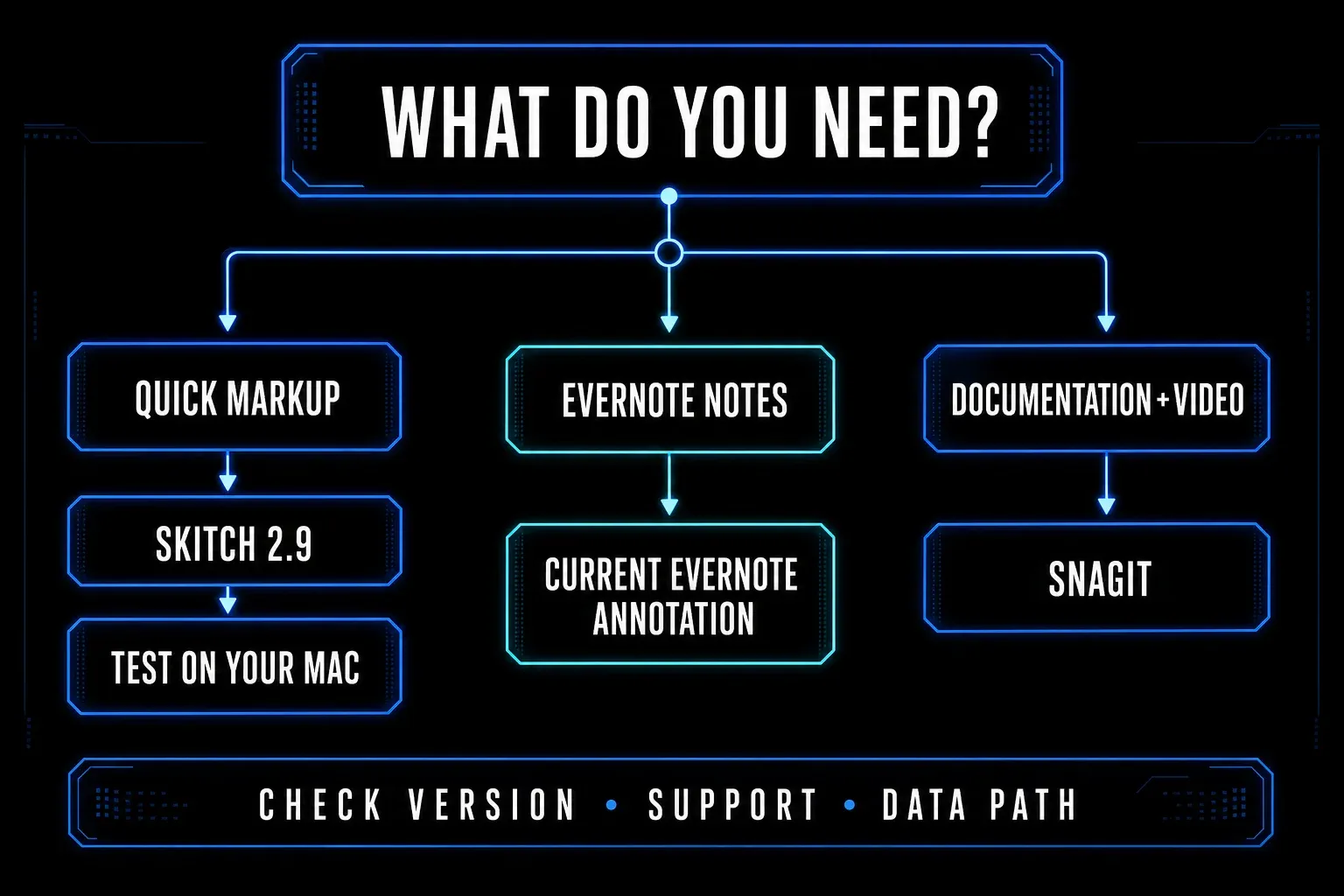
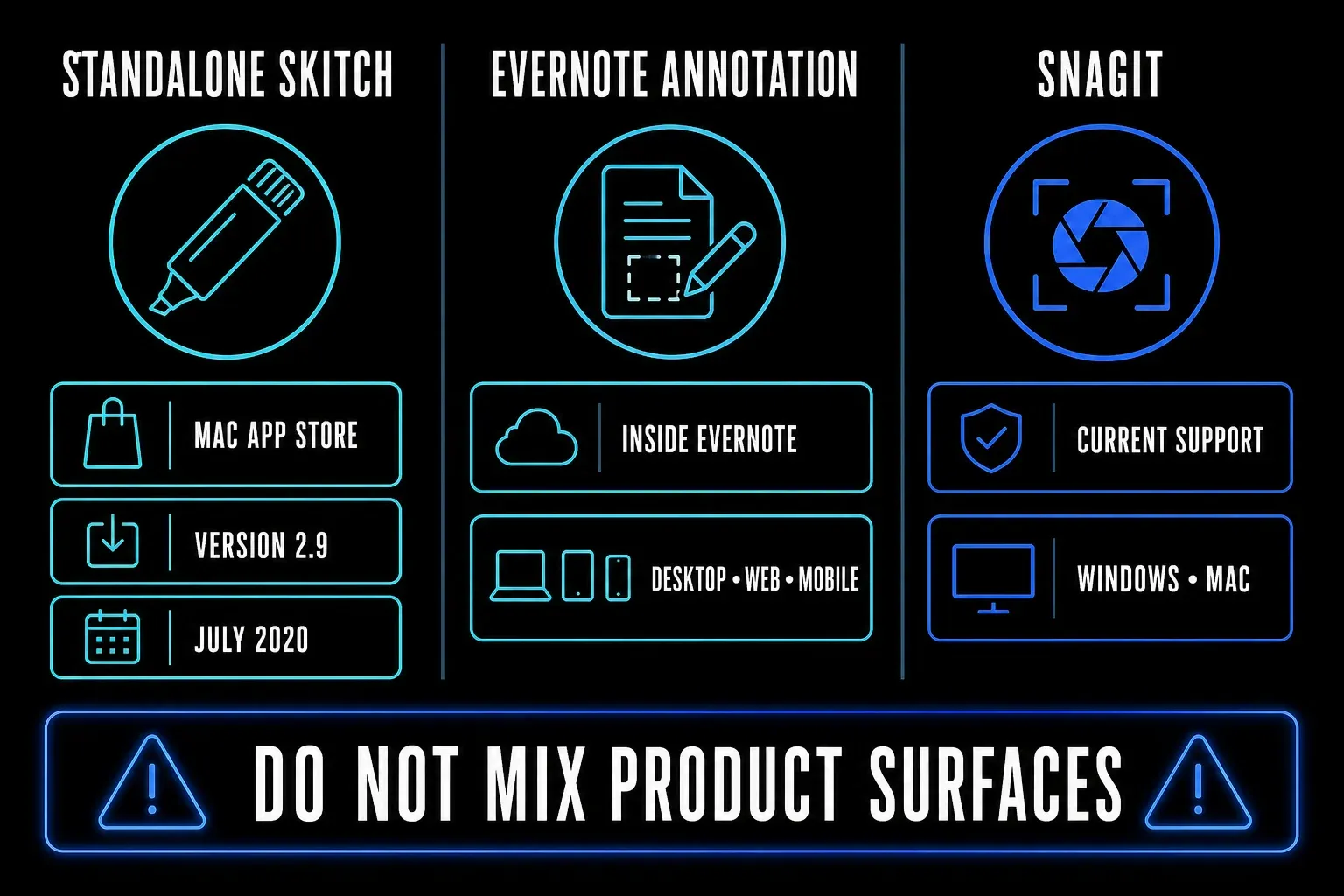
Get the status right first, because it matters. Skitch is not completely unavailable: its standalone Mac app is still listed in the US App Store. The same listing shows version 2.9 from July 7, 2020. Evernote also maintains a newer annotation engine inside Evernote itself, but that doesn't turn the old standalone Skitch app into a newly supported product.
Checked September 18, 2026. This comparison uses current App Store, Evernote, and TechSmith pages. I did not benchmark Skitch and Snagit on the same Mac, so compatibility and speed remain test items. SnagitPro is independent and is not affiliated with or endorsed by TechSmith, Evernote, or Skitch.
Snagit vs Skitch in 30 seconds
| Decision point | Skitch | Snagit |
|---|---|---|
| Best fit | Existing Mac users who need fast, lightweight image markup | Maintained capture, documentation, and short-video workflows |
| Current availability checked | Still listed in the US Mac App Store | Sold and supported by TechSmith |
| Latest version evidence | Version 2.9, July 7, 2020 | Current subscription release with active update documentation |
| Pricing model | Free with legacy in-app purchase entries | Annual per-user subscription at live checkout |
| Platforms | Standalone listing says Mac only | Windows and macOS Golden Gate 27, Tahoe 26, or Sequoia 15 |
| Image markup | Arrows, shapes, text, stamps, crop, resize, and pixelation | Annotations, steps, themes, templates, text recognition, Smart Move, Simplify, and Smart Redact |
| Capture scope | Lightweight screen snaps and timed capture listed | Region, window, scrolling, panoramic, delay, presets, and more |
| Source management | Old listing describes Evernote sync and sharing | Searchable Library, tags, and editable SNAGX source files |
| Video | No current standalone video workflow established | Screen, webcam, audio, trim, clip combining, frame capture, and GIF |
Skitch is still listed, but maintenance changes the choice
Apple's current US App Store listing labels Skitch “Only for Mac” and “Free · In-App Purchases,” and lists version 2.9, released July 7, 2020. That's the strongest current primary evidence for availability and release age.
Resist the simpler claim that Skitch is completely discontinued. Contemporaneous reporting on Evernote's announcement records that support ended for the Windows, Windows Touch, iOS, and Android versions in January 2016, while the Mac app remained. The standalone Mac listing is still reachable. The accurate 2026 description is: Mac-only listing still available, last listed update in 2020, no current standalone maintenance promise found.
The listing says macOS 10.11 or later. That's a compatibility floor in store metadata, not proof that anyone tested Skitch on macOS Golden Gate 27, Tahoe 26, or Sequoia 15. If you already use it, test capture, global shortcuts, drag and drop, export, Evernote sign-in, and every sharing route after a macOS update. If you're choosing a company standard, an old release date and a missing current support statement are operational costs.
The current Evernote annotation tool is a separate route
Evernote still offers image annotation inside Evernote. Its current What's New page describes an Image Annotation tool for marking up photos and screenshots in the browser. That supports a current Evernote feature surface, but it does not prove that the standalone Skitch 2.9 app received a new release.
At the October 19, 2026 recheck, Evernote’s current image and PDF annotation guide was accessible and documented PDF editing on desktop, web, and mobile. On desktop or web, hover over a PDF attachment and choose Edit & Annotate, or right-click it and choose Annotate this PDF. On mobile, open the PDF, use the three-dot menu, and choose Edit and annotate. These are current Evernote routes, not proof of standalone Skitch support; check your plan and app before migrating.
Keeping those two apart prevents two bad conclusions. A maintained Evernote editor doesn't prove that Skitch 2.9 received a standalone update, and the age of Skitch 2.9 doesn't mean Evernote abandoned image annotation. If your images belong in Evernote notes, test the current Evernote editor. If you want a dedicated capture and documentation application, compare standalone tools.
Skitch remains good at quick visual markup
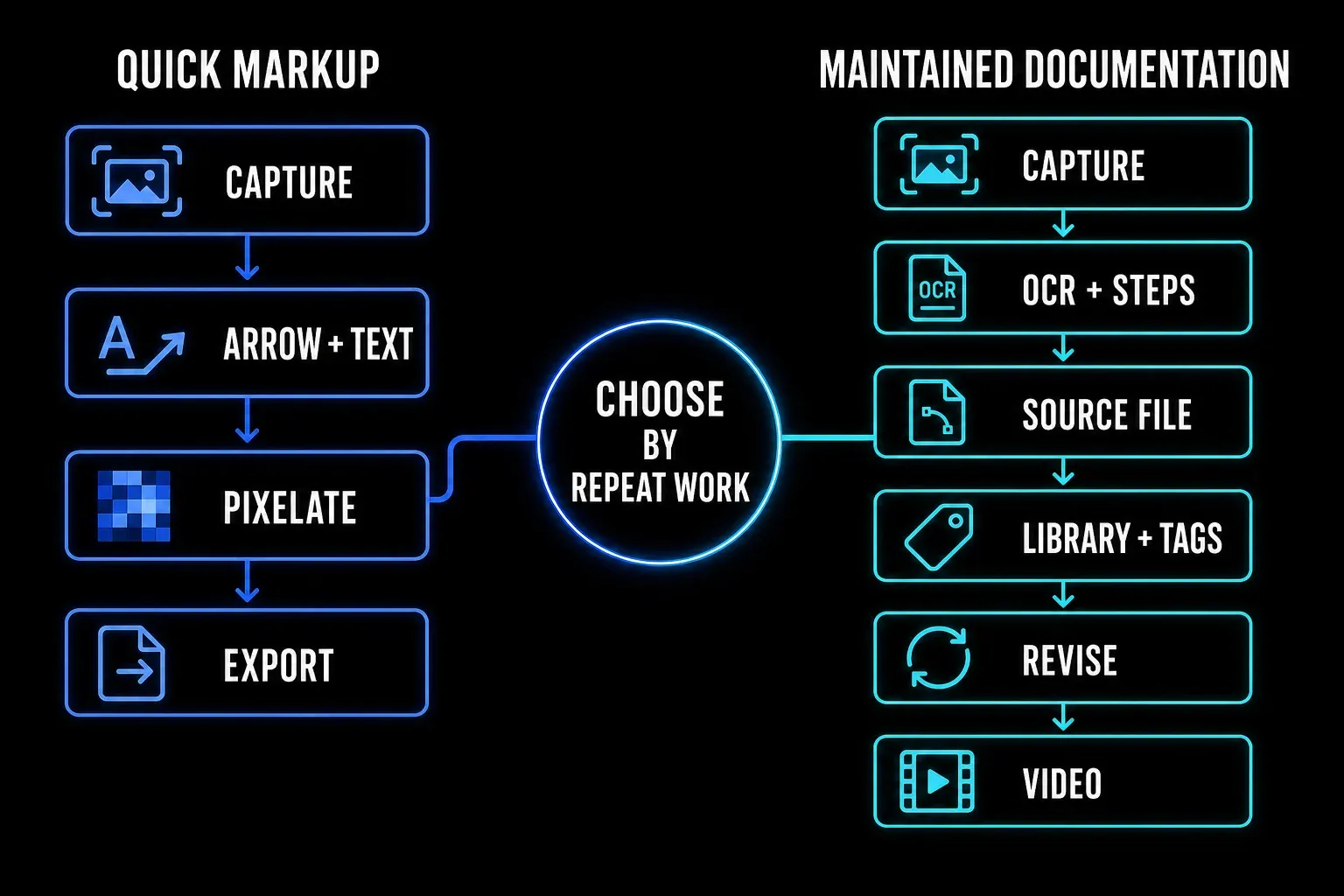
The App Store description presents a focused workflow: snap an image, mark it up, and send it. Listed tools include arrows, shapes, text, stamps, crop, resize, and pixelation. Old release notes also describe timed screen snap, custom colors, direct links, short URLs, FTP or SFTP, and Evernote synchronization.
That compact toolset is still attractive when you want to point at one area, hide one value, crop the frame, and send a PNG. A smaller interface can be faster than a documentation suite when the source image has no future revision cycle. Skitch deserves credit for making annotation feel immediate.
Treat old integration text as something to verify, not a current service guarantee. Create a neutral test image, add each annotation you use, close and reopen it, export the required format, and open the result on a second device. Then test any Evernote, link, FTP, or SFTP route you plan to lean on. Don't start with customer data.
Snagit covers maintained documentation, not only markup
Snagit includes the common image tools, then keeps going. TechSmith's current feature page lists numbered steps, templates, themes, Quick Styles, text recognition, Smart Move, Simplify, Smart Redact, Cut Out, batch processing, and editable SNAGX files.
The difference shows up after the first export: a searchable Library, filters, tags, and editable sources help when a guide changes next month, and OCR can copy or edit text from a capture. Templates and reusable styles keep a team from rebuilding the same callout and layout. Read the SNAGX source-file guide and Library backup guide before treating Snagit as an archive.
None of that makes Snagit the automatic winner. If you mark up three screenshots a month and discard the sources, the extra system may just add cost and friction. The right question is whether retrieval, revision, OCR, repeatable styles, and support remove enough follow-up work to justify a subscription.
Capture and video create hard feature gates
Skitch's current listing establishes lightweight screen snapping and timed capture. It doesn't establish a current standalone workflow for scrolling capture or screen video. Don't fill those gaps with claims copied from decade-old comparison pages.
Snagit handles regions, windows, objects, delayed captures, scrolling pages, panoramic selections, exact dimensions, and capture presets. The scrolling capture guide covers difficult pages and fallback routes. Neither a feature list nor an old review proves that your sticky header, nested panel, or scaled display will capture cleanly, so test the same difficult page.
For video, Snagit records screen, webcam, microphone, and system audio. TechSmith lists cursor emphasis, on-screen drawing, trimming, clip combining, frame capture, and GIF creation. The screen recording guide owns the full workflow. If video is required, this decision ends here: use Snagit or another maintained recorder, not standalone Skitch.
Price favors Skitch until support time enters the math
The App Store labels standalone Skitch free and displays old Evernote Premium in-app purchase entries. Don't read those legacy purchase rows as current Evernote plan pricing or as a promise that every historical premium feature can still be purchased. For the standalone tool, the relevant current fact is the free listing.
TechSmith's store sells Snagit Individual as an annual per-user subscription billed yearly. Live checkout varies by region, currency, tax, and promotion. Its activation guide describes a fully functional 15-day trial.
Free software is often the cheaper choice for a stable personal task, but it gets expensive when an OS update breaks a shortcut, an old integration changes, or nobody owns support. I won't invent a dollar value for that risk, and neither should you. Run the acceptance test, record any workaround time, and decide whether the workflow is disposable or business-critical.
Privacy and sharing require current evidence
The Skitch App Store page says the developer has not provided details about privacy practices and data handling. That's a disclosure gap, not evidence that Skitch collects or misuses specific data. It still matters when your screenshots contain client records, private messages, internal dashboards, credentials, health information, or source code.
Old Skitch notes mention direct links, social sharing, FTP, SFTP, and Evernote sync. Each route has a different audience, retention rule, and account dependency. Keep a sensitive test local. If you use a link or sync route, verify access from a signed-out browser, confirm deletion, and check where the original and annotated copies remain.
Snagit can also upload or share through connected services and Screencast, and a newer product isn't automatically approved for every data class. My safe default: local capture, local redaction, an approved destination, and a final access check. Product convenience doesn't replace your organization's policy.
Which tool should you choose?
Keep Skitch for an existing low-risk Mac workflow
Keep it when version 2.9 already runs reliably on your exact Mac, the work is lightweight image annotation, required exports stay usable, and you can replace the tool quickly if a future OS change breaks it. Don't let an untested old integration hold the only copy of important work.
Choose current Evernote annotation for Evernote-centered work
Use Evernote's maintained image and PDF editor when the annotated file belongs inside a note and the current Evernote plan, platform, sharing, and retention rules fit. Test the current in-app editor rather than assuming it behaves like standalone Skitch.
Choose Snagit for maintained capture and documentation
Snagit is the call when you need current Windows support and macOS Golden Gate 27, Tahoe 26, or Sequoia 15, scrolling capture, OCR, reusable styles, organized source files, templates, or short recordings. Evaluate a representative workflow with nonproduction sample content; Snagit trial terms do not allow company projects or training materials. The Snagit for Mac guide covers setup, while the current Snagit review owns the full value judgment.
Choose another maintained Mac tool for lighter work
If Snagit is more than you need and Skitch's maintenance status is unacceptable, use the Mac alternatives hub to compare maintained lightweight options. The Snagit versus CleanShot X comparison owns that direct choice. The free alternatives guide and alternatives catalog cover broader routes.
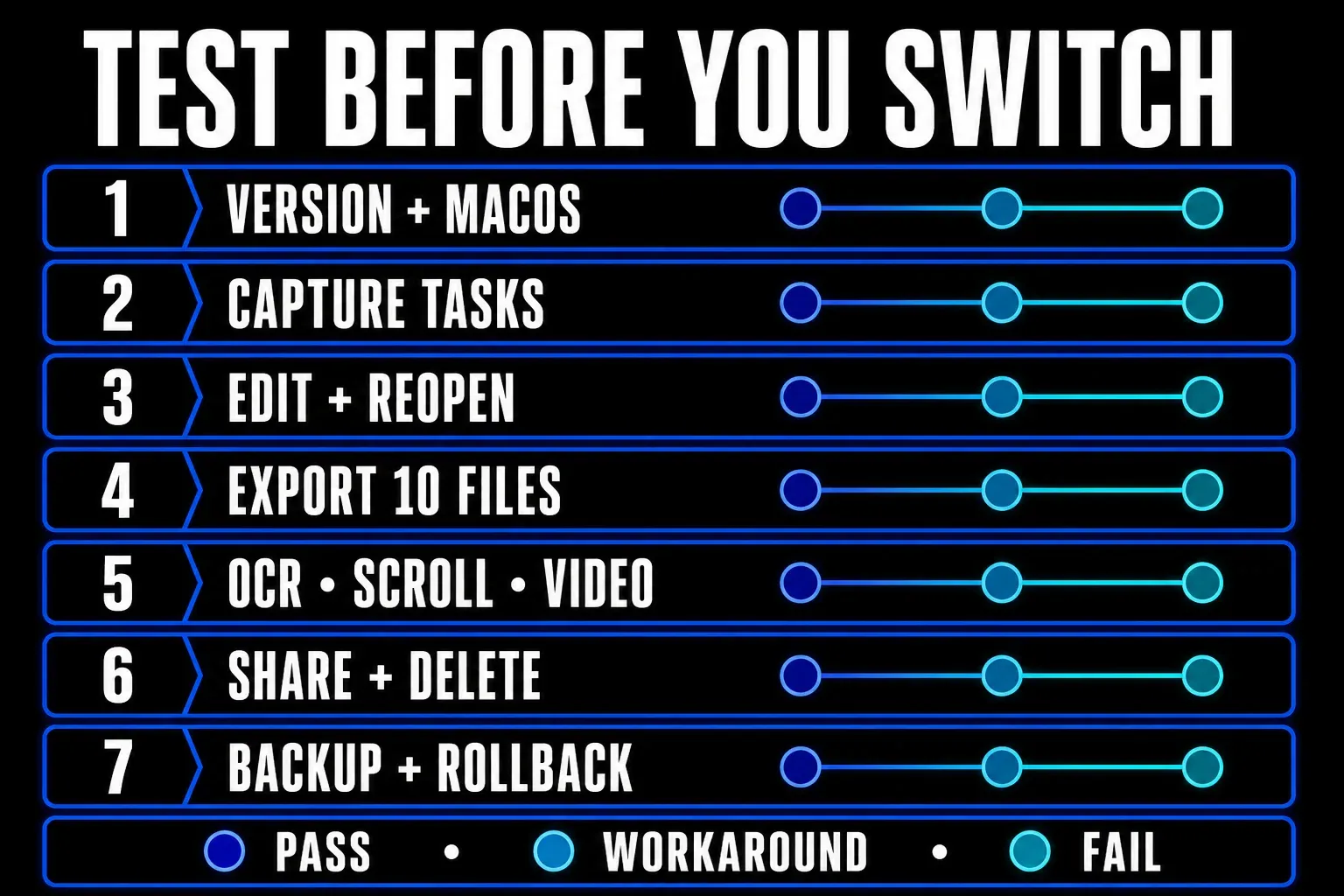
Run this migration test before you commit
- Record the Mac model, macOS version, app version, download source, account requirement, and license.
- Capture a region, window, menu, delayed state, and long page. Mark each task pass, workaround, or fail.
- Add text, an arrow, shape, stamp, crop, resize, and pixelation. Close the app, reopen the source, and revise every item.
- Export ten representative files. Open them on another current Mac and confirm dimensions, text, transparency, and redaction.
- Test OCR, scrolling, source search, and a 90-second video only if your workflow needs them.
- Verify every sync or share route with neutral data, then check access while signed out and test deletion.
- Back up old source files and exported images before changing tools. Keep the old app until the new route passes.
Snagit vs Skitch FAQ
Is Skitch discontinued?
Not completely. The standalone Skitch Mac app was still listed in the US App Store when checked September 18, 2026, but its latest listed release was version 2.9 from July 7, 2020. Support for the old Windows, Windows Touch, iOS, and Android versions ended years ago. Treat the Mac app as an old, still-listed product rather than an actively maintained cross-platform tool.
Does Skitch work on current macOS?
The App Store lists macOS 10.11 or later, but no current standalone statement confirming testing on macOS Golden Gate 27, Tahoe 26, or Sequoia 15 was found. Test version 2.9 on your exact Mac, including capture shortcuts, export, drag and drop, sign-in, and sharing, before relying on it.
Is Skitch free?
The current US Mac App Store listing labels Skitch free with in-app purchases. Its purchase rows and some feature notes are old, so do not treat them as current Evernote pricing or a guaranteed entitlement. Check the live listing and the exact workflow you need.
Is Evernote annotation the same as standalone Skitch?
No. Evernote's current What's New page describes an Image Annotation tool inside Evernote. That is a current Evernote feature surface, separate from the standalone Skitch 2.9 Mac app, and it does not prove that Skitch received a new release.
Is Snagit worth paying for instead of Skitch?
It is worth considering when scrolling capture, OCR, searchable source files, reusable templates, current support, or screen recording removes repeated work. For occasional Mac image markup, Skitch or another lightweight maintained tool may be enough. Use Snagit's 15-day trial to evaluate representative tasks with nonproduction sample content before paying.
What is the safest Skitch replacement for Mac?
The safest choice is a maintained tool that passes your required tasks on the current macOS version and fits your data policy. Snagit suits maintained documentation and recording. Evernote suits annotation inside notes. A lighter current Mac capture app may be better for simple markup.