
There's no ShareX for Mac. ShareX 22.3.0 ships as a Windows installer and a portable Windows build and nothing else, as the ShareX releases page on GitHub shows, and the official ShareX site still calls it a screenshot tool for Windows. A macOS port is being planned in the open, but you can't download a finished one.
On a Mac today, I'd pick a native app by the part of ShareX you'd miss most: Shottr for quick captures with annotation, OCR and a color picker, CleanShot X if you also record video and GIFs, and Dropshare if uploading to your own server was the reason you used ShareX. Below is where the port stands, what the two early Mac builds can do, and which tool covers each ShareX feature.
Is ShareX available on Mac?
Not as an official app. The project's issue Make ShareX cross-platform, opened by a member of the ShareX organization, lays out the plan: a platform layer so the main app, the image editor, region, window, scrolling and recording capture, OCR and the uploaders run on Windows, macOS and Linux, packaged as a notarised .dmg for Apple silicon and Intel Macs. The issue is still open. It was tagged for version 22.0.0, and 22.0 through 22.3 all shipped for Windows only, so I wouldn't plan around a release date.
Version 22 did change a lot on Windows. The ShareX changelog calls 22.0.0 the biggest update in the project's history, with a rewritten interface and screen recording that no longer needs FFmpeg, and 22.1.0 added native GIF recording. None of it reaches a Mac yet. If you also work on a PC, my guide to using ShareX on Windows covers the current version.
What about XerahS and SnapX?
Two projects already offer Mac downloads. Both are test builds, not tools for daily work.
- XerahS sits in the ShareX organization on GitHub. Its XerahS README calls it a cross-platform reimagining of the ShareX interface, labels macOS support as an MVP, and says it was developed entirely through agentic coding as a parallel project. The XerahS releases include Mac archives for Apple silicon and Intel, and the notes warn that macOS may report the app as damaged until you clear its quarantine flag with
xattr -crin Terminal. Global hotkeys also need the Accessibility permission. The same README sends Windows users who want a mature codebase back to ShareX. - SnapX is a community fork. Its SnapX README says it's in early access, its capture and upload engines are experimental, and a rewrite is still needed for hotkey support. The 0.4.0 pre-release has Mac zips and calls itself the first usable release for basic use, while listing a known bug: part of the macOS region-capture window isn't visible.
My take: try XerahS if you want to watch the port take shape, on a Mac where running a Terminal command to open an app doesn't bother you. I wouldn't trust either build with a capture that has to be right the first time.
Can you run ShareX in a Windows virtual machine on a Mac?
You can run Windows, but ShareX won't see your Mac. Microsoft's page on Windows 11 on Macs with Apple silicon lists Parallels Desktop 18, 19 and 20 as the authorized way to run the Arm versions of Windows 11 Pro and Enterprise on Macs with M1, M2 and M3 chips, with Windows 365 Cloud PC as the other route. ShareX installed there captures the Windows desktop inside the virtual machine or the Cloud PC. Your Mac apps, menus and browser windows sit outside it.
That's fine when the thing you're documenting is Windows software. For anything on the Mac side, a native app is the simpler choice because it captures the screen you're working on.
Which Mac app replaces each ShareX feature?
Start with what macOS already does, then add one app for the gaps. The built-in column follows Apple's guides to taking a screenshot on Mac and screenshots and screen recordings.
| ShareX feature | Built into macOS | Mac apps that cover it |
|---|---|---|
| Region, window and full-screen hotkeys | Yes: Shift-Command-3, 4 and 5 | Every app below |
| Scrolling capture | No | Shottr, CleanShot X, Snagit |
| Arrows, text, blur and pixelate | Basic markup from the floating thumbnail | Shottr, CleanShot X, Flameshot, Snagit |
| Screen recording | Yes, saved as .mov, with a microphone | CleanShot X, Dropshare, Kap, Snagit |
| GIF recording | No | CleanShot X, Dropshare, Kap |
| OCR: copy text from an image | Live Text in Preview | Shottr, CleanShot X, Snagit |
| Pin a screenshot on top | No | Shottr, CleanShot X |
| Color picker and ruler | Digital Color Meter (color only) | Shottr |
| Upload to your own server or a host | No | Dropshare; Shottr (S3 or Shottr Cloud); CleanShot Cloud |
| Chained after-capture tasks | Save location, clipboard and thumbnail options | No direct match; Dropshare's automation comes closest |
Two gaps are worth knowing before you choose. The built-in recorder saves .mov video only, so ShareX's GIF recording needs an app. And nothing on the Mac chains after-capture tasks the way ShareX does, where one capture can be saved, copied, uploaded and turned into a short link in a single run. Dropshare's command-line tool and Shortcuts actions get nearest for upload-heavy work. For long pages, my guide to scrolling screenshots on a Mac walks through the app options.
Which ShareX alternative for Mac should you pick?
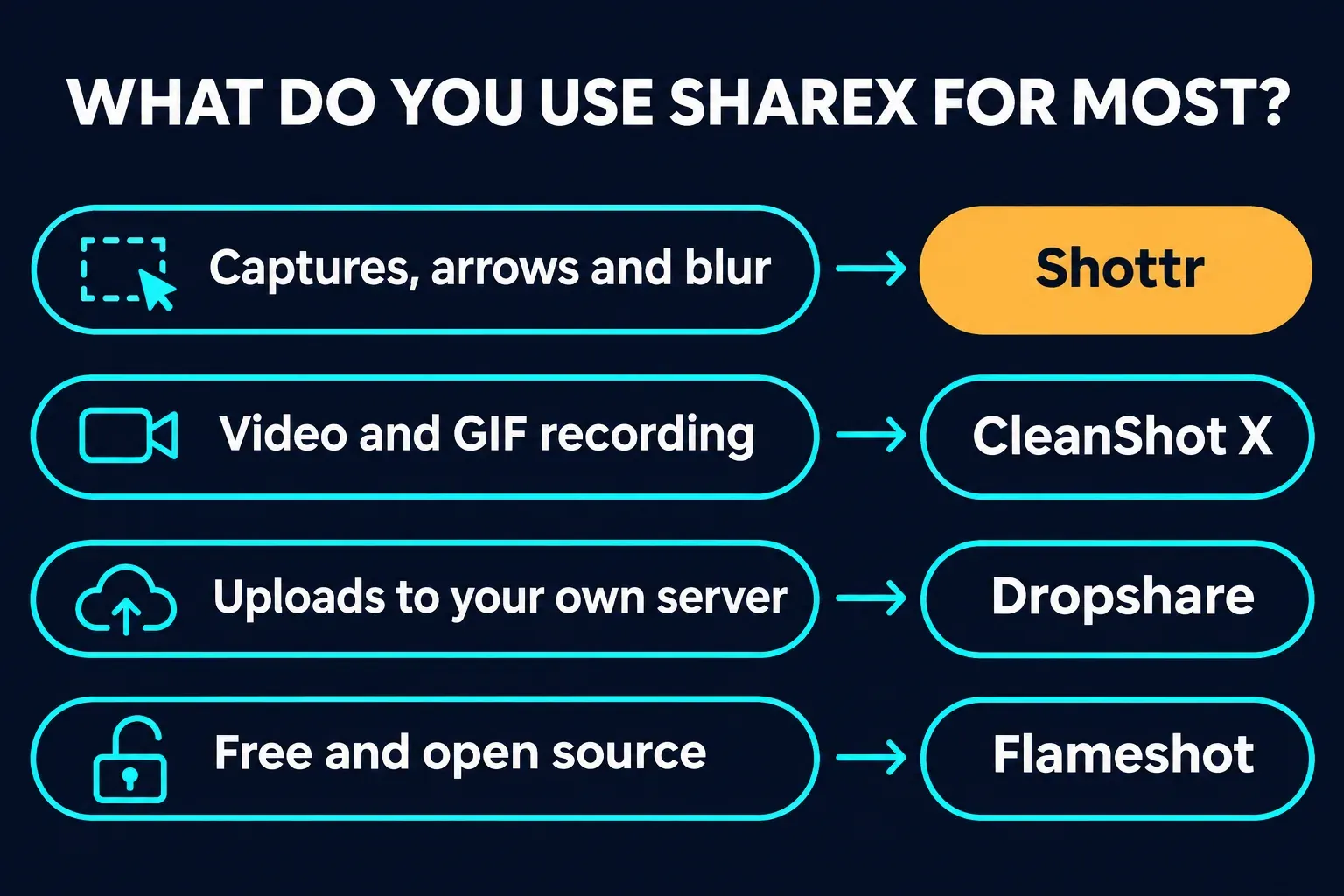
Shottr feels closest to ShareX on the keyboard. Shottr's site describes a small native app optimized for Apple silicon with scrolling screenshots in any app, pixelate and remove tools, OCR that also reads QR codes, pinned screenshots, a screen ruler on the arrow keys and a color picker on the Tab key. It's free to download and use, and it starts asking for an upgrade after 30 days; the Shottr purchase page lists Basic at $12 once and says commercial use needs a license. Uploads go to your own S3 bucket or Shottr Cloud, and the Shottr upload guide treats every Cloud upload as public and offers no FTP or SFTP. I compared it with Snagit in Snagit vs Shottr.
CleanShot X is the pick when recording matters as much as stills. CleanShot X covers scrolling capture, screen recording exported as MP4 or GIF with webcam, clicks, keystrokes and audio, on-device text recognition, pinned screenshots, a capture history and one-click CleanShot Cloud links. CleanShot's pricing page lists Basic at $35 once with a year of updates, an optional $19 yearly renewal, and Pro at $10 per user per month billed annually. It needs macOS 13 or later. The details are in Snagit vs CleanShot X.
Dropshare takes over from ShareX's custom uploaders. Dropshare sends screenshots, recordings and files to storage you control: 36+ providers, S3-compatible buckets, SFTP, FTP, SCP, WebDAV or your own server, with URL shorteners, a command-line tool and Shortcuts automation. It also annotates and records video or GIF. A personal license costs $39 one-off, with a 7-day free trial, and it runs on macOS 12.3 or later.
Flameshot is the free, open-source choice. Flameshot runs on Windows, macOS and Linux, edits in place with arrows, highlights, blur or pixelate, text, shapes and numbered counters, and has a command-line interface for scripts. The Flameshot releases include .dmg files for Apple silicon and Intel, or you can install it with Homebrew. My Snagit vs Flameshot comparison covers where it stops.
Kap handles free GIF recording. Kap is an open-source recorder that exports GIF, MP4, WebM or APNG on macOS 12 or later, but its newest GitHub release, 3.6.0, came out in 2022, so I'd use it for occasional clips rather than build a workflow on it.
My take: if you used ShareX mostly for region captures, arrows and blur, start with Shottr's free period, because its hotkey-and-annotate loop is the nearest thing to ShareX on a Mac. If you recorded screens or GIFs as often as you captured stills, CleanShot X is worth the $35. Add Dropshare only if your links have to come from your own server. For a broader ranking, see my picks for the best screenshot software on Mac.
How do you set up ShareX-style hotkeys on a Mac?
Most of ShareX's default capture hotkeys have a macOS twin:
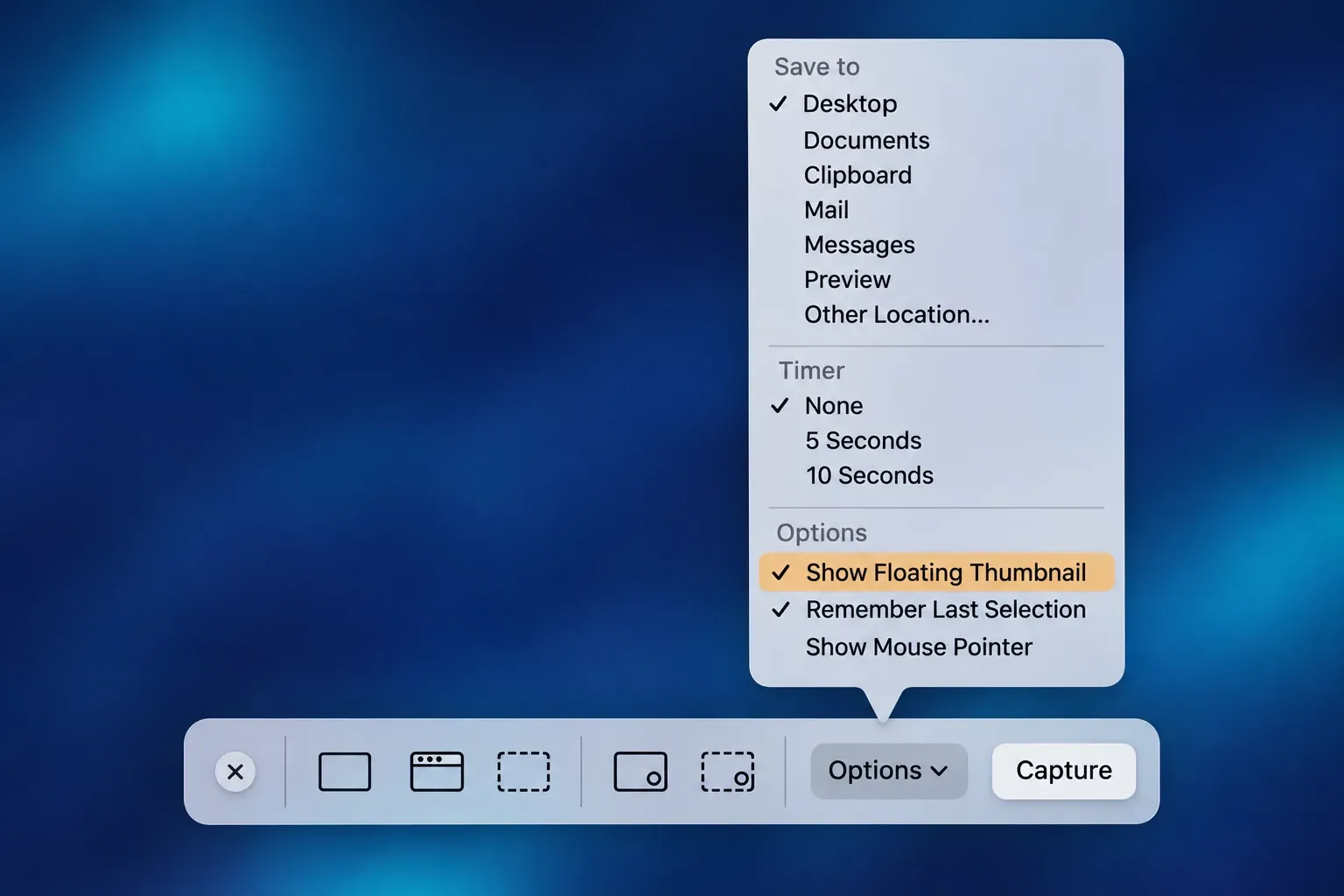
Shift-Command-3captures the whole screen, like ShareX'sPrtSc.Shift-Command-4turns the pointer into a crosshair for a region, likeCtrl + PrtSc. Hold Space while dragging to move the selection.Shift-Command-4, then Space, then a click captures one window, likeAlt + PrtSc. Hold Option as you click to leave out the shadow.Shift-Command-5opens the Screenshot toolbar with its recording tools, the nearest match toShift + PrtSc.- Add
Controlto any of these to copy the capture to the clipboard instead of saving a file.
The Options menu in that toolbar handles what ShareX keeps in its after-capture settings: Save to (a preset folder or Other Location), Timer, Show Floating Thumbnail, Remember Last Selection and Show Mouse Pointer. The floating thumbnail is the quick edit step, so click it to mark up a screenshot or trim a recording before it saves. To remap the shortcuts, go to Apple menu → System Settings → Keyboard → Keyboard Shortcuts → Screenshots. My guide to taking a screenshot on a Mac covers every shortcut, and the one on screen recording on a Mac covers the video side.
Two more built-ins fill ShareX gaps. For text, open the screenshot in Preview, drag across the words, Control-click and choose Copy Text, as Apple's guide to Live Text in Preview describes; I covered the other routes in copying text from a screenshot on a Mac. For colors, Digital Color Meter shows the value of the color under the pointer, and Command-L locks the aperture so the value holds still while you copy it.
When is Snagit worth it instead?
For one person moving from ShareX to a Mac, the built-ins plus Shottr or CleanShot X cover nearly everything, and both sell a one-time license where Snagit is a yearly per-user subscription. Snagit earns its place in two situations. The first is a team split across Windows and Mac: TechSmith's Snagit page says it runs on Windows and macOS with most core features on both, so one set of instructions covers nearly everyone, and my Snagit for Mac guide goes through the Mac version. The second is documentation work, where Step Capture turns a click-through into a guide, scrolling capture fits a long page into one image, and Smart Redact finds sensitive details before you share. To weigh the two tools on Windows, read Snagit vs ShareX; for more Mac options, see my roundup of Snagit alternatives for Mac.