
Here's where I land: PicPick if you work on Windows and need strong screenshot editing plus color and measurement tools, with a free personal edition and annual or lifetime Pro choices for commercial use. Snagit if you need Windows and Mac support, searchable source captures, OCR, reusable documentation styles, or more complete finishing for short screen recordings.
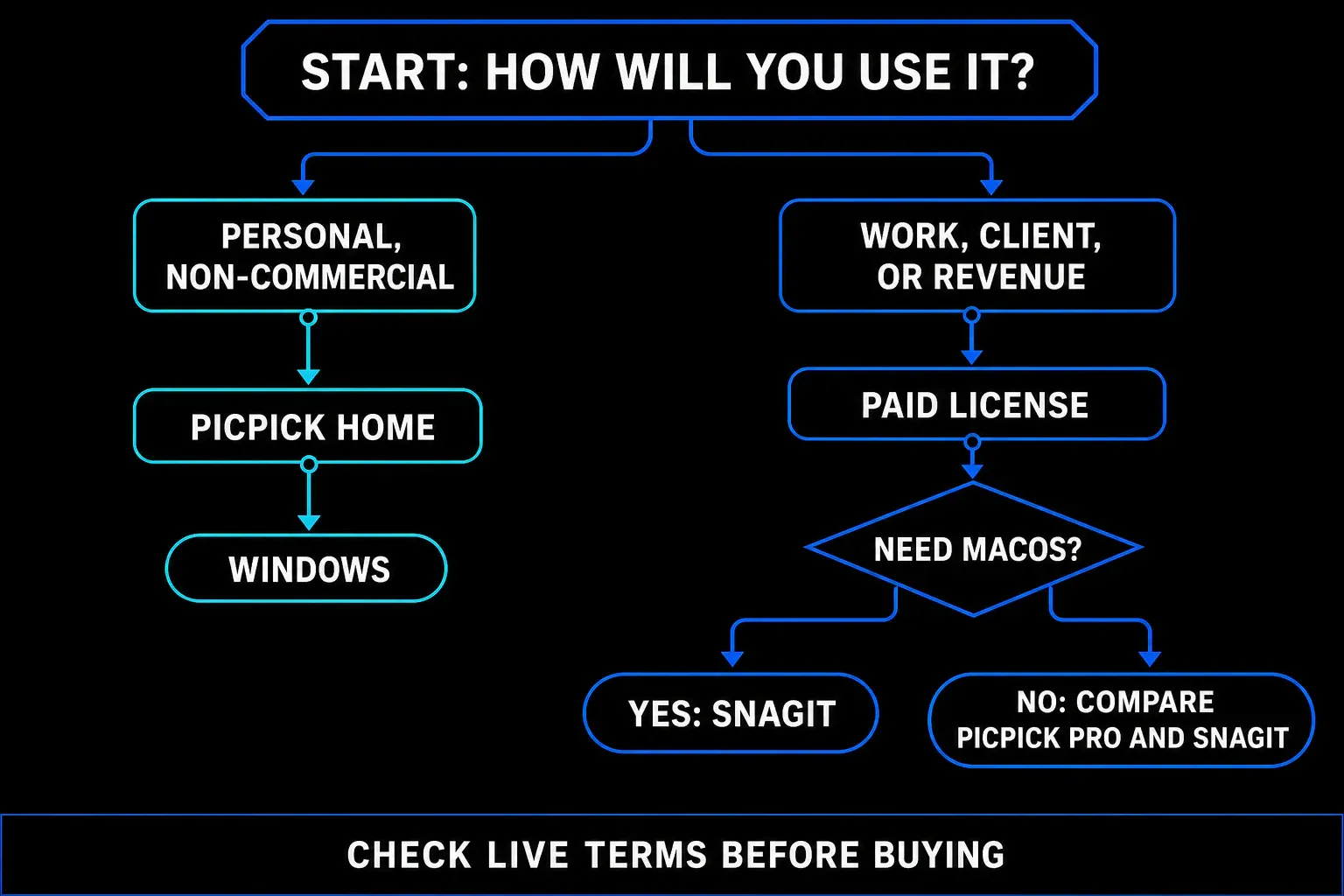
Start with the license gate. PicPick Home is free for personal, non-commercial use; work, client projects, and revenue-generating use require Pro. Snagit is a paid annual subscription. Once you compare both choices on the license you actually need, the decision usually comes down to design utilities versus documentation reuse.
Checked September 18, 2026. This is a source-led comparison using current vendor pages for pricing models, versions, requirements, and features. I did not benchmark both applications on one controlled Windows machine, so performance and capture reliability are test items, not invented results. SnagitPro is independent and is not affiliated with or endorsed by TechSmith or NGWIN.
Snagit vs PicPick in 30 seconds
| Decision point | PicPick | Snagit |
|---|---|---|
| Best fit | Windows capture, image editing, color work, and on-screen measurement | Windows and Mac documentation with reusable source assets |
| Personal use | Free for personal, non-commercial use | 15-day trial, then paid subscription |
| Business use | Pro required | Paid plan required |
| Current pricing model | Free Home edition for personal use; annual and lifetime Pro options at live checkout | Annual Individual subscription at live checkout |
| Platforms | Windows | Windows and macOS |
| Still capture | Full screen, window, control, region, fixed region, scrolling, freehand, repeat last | Region, window, object, scrolling, panoramic, time delay, presets, and other modes |
| Editing | Ribbon editor, drawing, shapes, text, stamps, retouching, effects, and watermarks | Annotations, steps, templates, themes, text recognition, Smart Move, Simplify, and Smart Redact |
| Distinct advantage | Color picker, palette, pixel ruler, magnifier, crosshair, protractor, and whiteboard | Searchable Library, tags, SNAGX source files, Step Capture, templates, and OCR |
| Recording | Screen, window, or region with system audio and microphone; MP4 or GIF settings | Screen, webcam, microphone, system audio, trim, combine clips, frame capture, and GIF creation |
| Sharing | Local files, clipboard, auto-save, web URL, cloud drives, FTP, email, and Office apps | Local files, Office and cloud destinations, or Screencast Share Link |
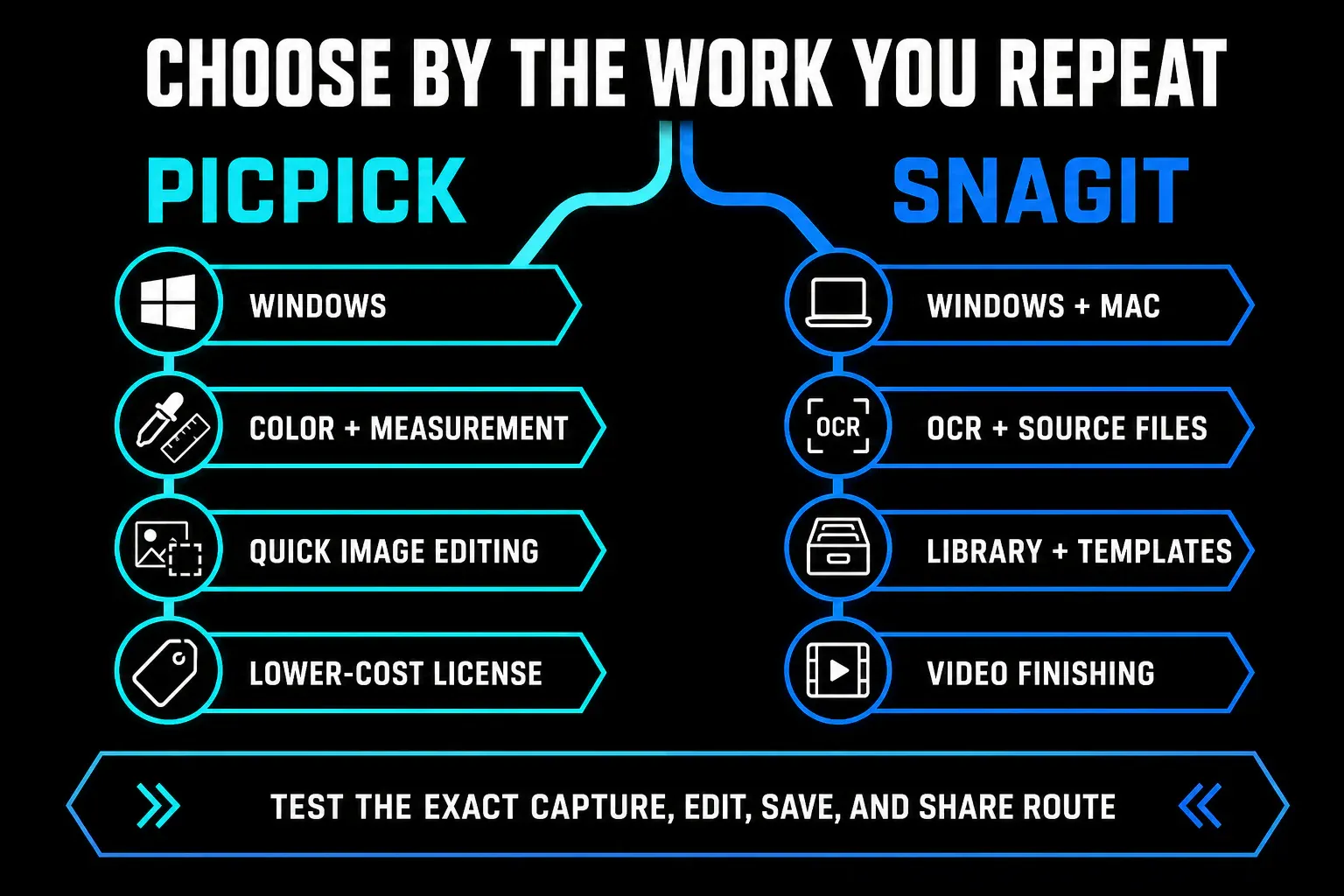
License and platform can settle the choice first
PicPick's current pricing page limits the Home edition to personal, non-commercial use. If you use it at work, on a client project, or in any revenue-generating context, you need Pro. That rule applies even when the free build already has the feature you want.
PicPick is a Windows product. Its download page lists x86 and x64 builds, 512 MB of RAM, about 250 MB of storage, and a portable ZIP that can run without installation. “All Windows versions” is the vendor's wording; I'd still test your approved Windows 10 or 11 image, security policy, display scaling, and target applications before deployment.
Snagit supports current Windows and macOS releases. TechSmith's requirements checked on September 18 list Windows 10 and 11 plus macOS Golden Gate 27, Tahoe 26, and Sequoia 15. Its activation guide describes a fully functional 15-day trial. If you're on a Mac, you can stop the comparison here and choose Snagit or another Mac-compatible product. The Windows alternatives guide owns the broader Windows choice; this page covers the final PicPick-versus-Snagit decision.
Capture and scrolling cover the same basic jobs
PicPick's current capture guide lists full screen, window, rectangular region, fixed region, window control, scrolling window, freehand region, and repeat-last-capture modes. You can delay a capture, include the pointer, auto-save to a folder, copy to the clipboard, open the image in its editor, or send it to an external program. Custom hotkeys cover the main capture modes.
Snagit also handles region, window, object, delayed, and scrolling work. Its current feature list adds custom capture presets, preset shortcuts, exact dimensions, multiple areas on Windows, and panoramic capture for manually controlling a long or wide selection. That wider set earns its keep when a team repeats the same capture recipe; for an occasional rectangular screenshot, you won't miss it.
No feature list proves that your specific long page will stitch cleanly. Sticky headers, nested panels, lazy-loaded rows, hardware acceleration, protected windows, and mixed monitor scaling can all break scrolling capture. Throw the same difficult page at both trials. Record whether the automatic route works, what fallback exists, and how much cleanup remains. The Snagit scrolling capture guide covers the Snagit-side recovery paths.
The editors overlap, but revision depth differs
PicPick's Ribbon editor is far more capable than a basic snipping utility. Its official editor guide lists text, arrows, shapes, callouts, drawing tools, number and cursor stamps, selection tools, crop, resize, rotation, fill, erasing, retouching, blur, mosaic, frames, watermarks, color correction, and effects. Image tabs make it practical to work through several captures in one session.
Snagit covers the common annotation set, then adds documentation-specific tools. TechSmith's current feature page lists numbered steps, templates, themes, Quick Styles, text recognition, Smart Move, Simplify, Smart Redact, Cut Out, batch processing, and editable SNAGX output. Those features matter when a screenshot is a maintained asset rather than a finished PNG.
Don't assume the stable PicPick release has the same source-file behavior as SNAGX. PicPick's 8.0 beta page advertises a new .picpick format that keeps shapes and layers editable — that's a beta feature, and I wouldn't attribute it to the stable build. In your test, save a marked-up image, close PicPick, reopen it, and try to change the text, arrow, blur, and crop without rebuilding them.
PicPick wins when color and measurement tools are the job
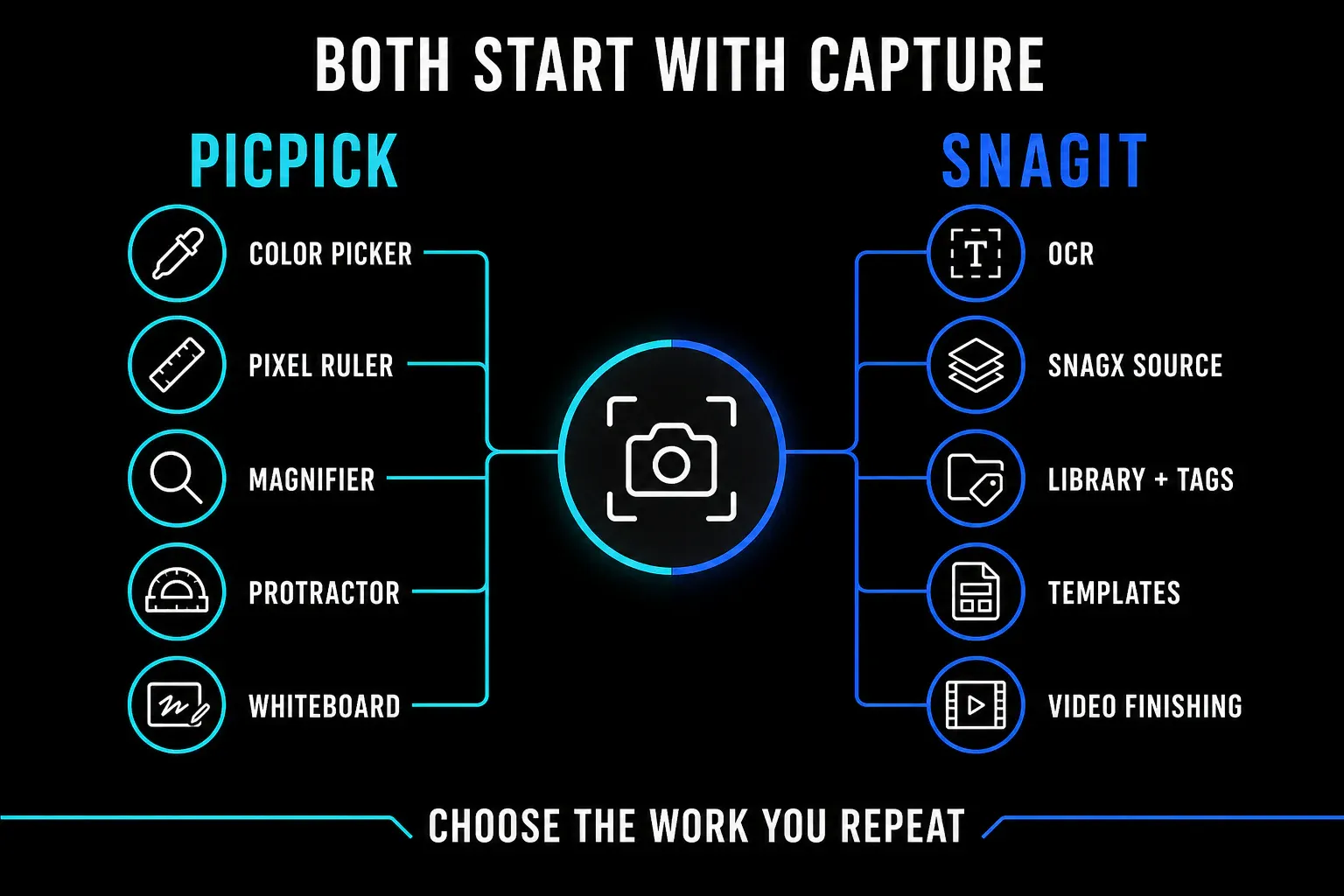
PicPick bundles tools that usually live outside a screenshot editor: a color picker, color palette, pixel ruler, magnifier, crosshair, protractor, and whiteboard. The current product page describes HEX and RGB sampling, saved swatches, horizontal and vertical measurement, several units and DPI settings, coordinate inspection, angle measurement, and drawing directly on the desktop.
That matters for UI review, web work, QA, slide preparation, and any task where you measure an element or sample its color before annotating the capture. PicPick can genuinely replace a screenshot tool plus several small utilities. Snagit is still useful in those roles, but TechSmith doesn't position an equivalent measurement set as a core feature.
Test the real handoff. Sample a color, measure a component, capture it at a fixed size, add an annotation, and export the result. Check the unit, DPI behavior, color format, scaling on a second monitor, and whether the exported image preserves the dimensions you recorded.
Both record video, but Snagit lists more finishing tools
Stale comparisons keep calling PicPick screenshot-only. The current product page says otherwise: it records a full screen, window, or region with system audio and microphone input. Its recording settings document MP4 and GIF output, frame-rate controls, quality, stereo audio settings, an output folder, an F9 start-stop hotkey, and a maximum recording-length setting.
Snagit records the screen, webcam, microphone, and system audio. TechSmith also lists cursor emphasis, click animation, drawing while recording, webcam shape and position controls, trimming, combining clips, frame capture, and GIF creation. See the Snagit recording workflow for the audio and export checks.
The PicPick pages I checked don't list webcam overlay, in-app trimming, or clip merging. That's a scope warning, not proof that every current or beta build lacks them — if you need one of those, confirm it in the exact installer before purchase. For either product, use a full video editor when the deliverable needs several tracks, detailed audio repair, animated titles, color work, or repeated editorial revisions.
OCR, source files, and retrieval favor Snagit
Snagit's current feature page explicitly lists text recognition that can copy, edit, or delete text in a screenshot, and the Snagit OCR guide explains Grab Text and its accuracy checks. PicPick's current desktop feature and reference pages do not list native OCR. PicPick Cloud separately lists Extract Text as an online tool — a different product surface, and it requires uploading content.
For repeated documentation, Snagit also has a searchable Library with filters and tags. SNAGX keeps editable capture data, which pays off when a callout, label, or redaction changes later. Read the SNAGX file guide before you settle on an archive format and the Library backup guide before moving source files.
PicPick has recent documents, image tabs, local folders, auto-save naming, and direct output routes. That can be enough when finished images live in a normal project folder. Run a retrieval test: save 30 images and five videos, close the app, then find one source by project, date, application, tag, or filename and revise an annotation. Capture speed doesn't compensate for lost source work.
Local files and uploads need separate rules
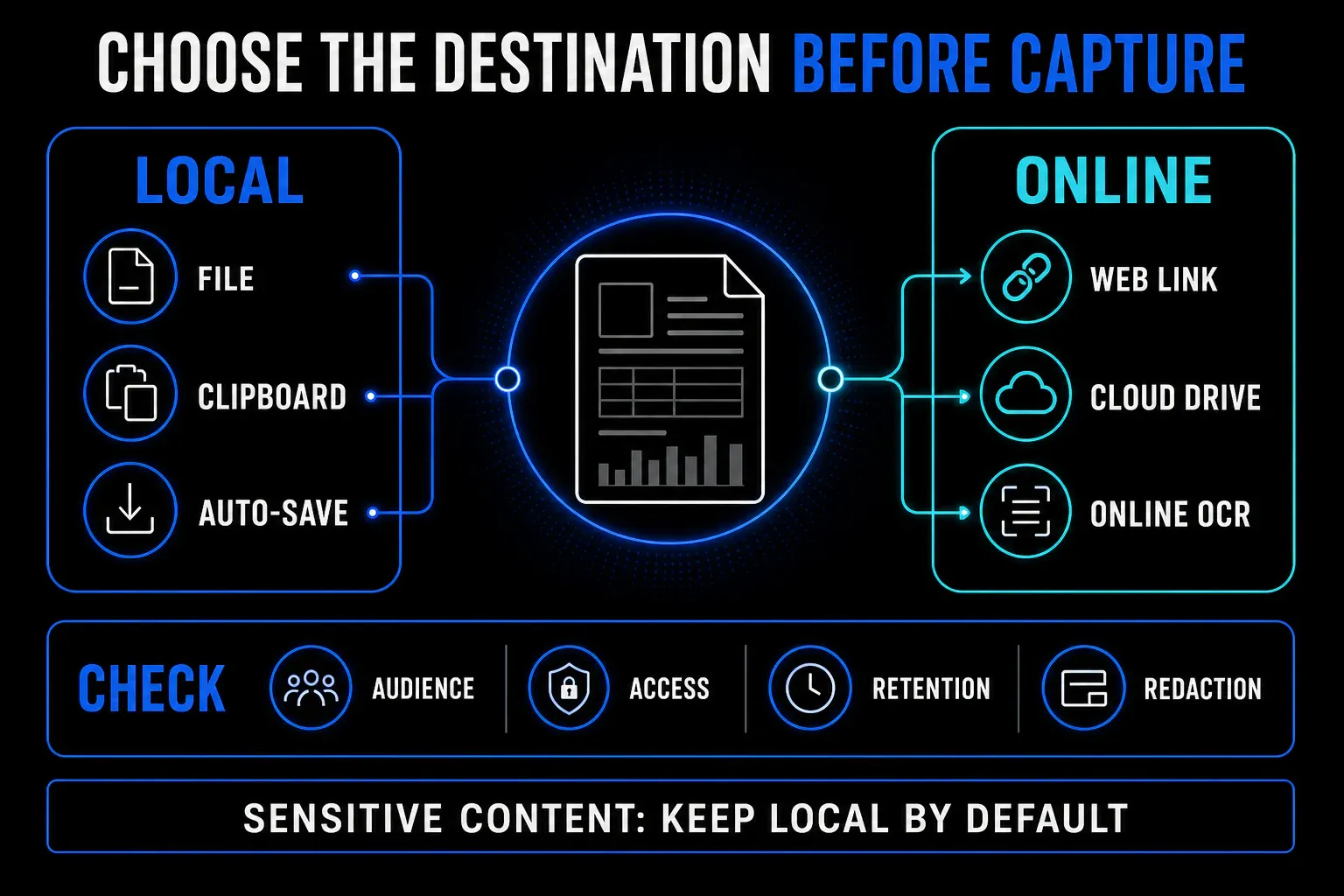
PicPick can keep work local through files, auto-save, clipboard output, printing, or an external program. It also lists web URLs, Google Drive, Dropbox, OneDrive, Box, FTP, email, social services, and Microsoft Office destinations. Snagit can also save locally or send content to Office, cloud services, and Screencast through Share Link.
Don't treat every destination as the same privacy decision. A local PNG in an approved encrypted folder has a different audience and retention path than a shareable web URL, and an online OCR tool adds another upload. Before capturing customer records, credentials, private messages, health data, source code secrets, or internal dashboards, decide where the file may go, redact it, and verify the final link from a signed-out browser.
My default is simple: keep sensitive captures local, disable the automatic upload routes you don't use, and send only a redacted export to an approved service. Confirm deletion and retention rules on that service separately. Product convenience doesn't grant organizational approval.
Pricing models differ, so compare the live terms
PicPick offers a free Home edition for personal, non-commercial use and annual or lifetime Pro options for commercial use. The live purchase page can change by region and promotion, so record the checkout total, currency, tax, user count, and renewal terms on the day you buy.
A PicPick Pro license belongs to one person and can be installed on up to two computers for that user. Those installations are not separate seats. The pricing FAQ limits included updates to the current major version, while the buy page uses broader “future updates” wording. Save the exact checkout terms or request written clarification if lifetime update scope affects the purchase.
TechSmith's store sells Snagit Individual as an annual per-user subscription billed yearly. A universal three-year total would be misleading because checkout pricing, tax, promotions, and PicPick's annual-versus-lifetime choice vary. Compare both live quotes in the same currency and include the update period and number of users you actually need.
PicPick can be the stronger value for a personal Windows user because its Home edition is free for personal, non-commercial use. For paid work, compare the live terms and count the value of Mac support, OCR, Library retrieval, editable source assets, templates, video finishing, support, and any second application you would need. The current Snagit review owns the full Snagit value question.
Which tool should you choose?
Choose PicPick for Windows capture plus design utilities
PicPick fits when all users are on Windows and your repeated work includes color sampling, pixel measurement, quick markup, scrolling capture, or basic recording. Use Home only for personal, non-commercial work. For business use, compare the live annual and lifetime Pro terms and test the stable build you plan to deploy.
Choose Snagit for maintained documentation
Snagit fits when Windows and Mac users need one product family, source captures must stay easy to find and revise, or OCR, templates, Step Capture, reusable styles, webcam recording, trim, and clip combining remove real follow-up work. Its annual subscription makes sense only when those repeated workflow gains outweigh the recurring cost for your team.
Choose another tool when neither workflow fits
Use a built-in capture tool for rare simple screenshots, an automation-focused tool for scripted uploads, or a full video editor for production work. The free alternatives guide, screenshot software comparison, and alternatives hub cover those broader decisions.
Run this six-task test before buying
Use neutral sample data. Record the product version, stable or beta channel, operating system, license, and destination before the test.
- Capture a normal window, a fixed-size region, a menu, and a long page with a sticky header.
- Add text, an arrow, numbered steps, blur, and a crop. Save, close, reopen, and revise every item.
- Sample a color and measure a UI element in PicPick. Reproduce the needed output in Snagit or record the second tool required.
- Extract text from one screenshot, compare every character, and record whether the task stays on the desktop or requires an upload.
- Record 90 seconds with system audio and microphone, make one correction, and export the required MP4 or GIF.
- Save 35 mixed files, close the app, find one source item, confirm its backup, and test the approved sharing route.
Mark each task pass, workaround, or fail. Include setup, correction, export, retrieval, second-app work, and license compliance. Choose the smaller commitment that passes the jobs you repeat.
Snagit vs PicPick FAQ
Is PicPick better than Snagit?
PicPick is better for a Windows user who needs screenshot editing, color sampling, pixel measurement, and a choice of annual or lifetime Pro licensing for commercial work. Snagit is better for Windows and Mac documentation, OCR, searchable source files, reusable styles, and short videos that need webcam, trimming, or clip combining.
Is PicPick free for commercial use?
No. PicPick Home is free only for personal, non-commercial use. The vendor says work, client projects, and revenue-generating use require a Pro license.
Does PicPick work on Mac?
No current Mac version is listed on PicPick's official download page. PicPick is a Windows product. Snagit supports Windows and current macOS versions, so it is the direct fit for a mixed-platform team.
Does PicPick record video with audio?
Yes. PicPick's current official pages list full-screen, window, and region recording with system audio and microphone input. Its settings document MP4 and GIF output, frame-rate and quality controls, and local file saving.
Does PicPick have OCR?
The current PicPick desktop feature and reference pages checked on September 18, 2026 do not list native OCR. PicPick Cloud separately lists an online Extract Text tool. Snagit lists desktop text recognition. Test accuracy and review upload policy before choosing an OCR route.
How should I compare PicPick and Snagit pricing?
Compare PicPick's live annual and lifetime Pro offers with Snagit Individual's live annual subscription in the same currency and tax context. Record user count, renewal terms, and included update coverage. PicPick Home is relevant only for personal, non-commercial use.