
Choose Greenshot for free Windows screenshots and routine markup. Choose Snagit when you need screen video, scrolling capture and step-by-step documentation in one app. Greenshot also supports editable source files and plugin-based OCR on Windows. Neither capability, by itself, requires paying for Snagit.
A paid Greenshot Mac app exists, but it is a separate, older release with fewer features than the Windows version. Its last App Store update dates from June 2020, so on a Mac I wouldn’t pick it for more than quick captures and simple markup.
Which tool fits your work?
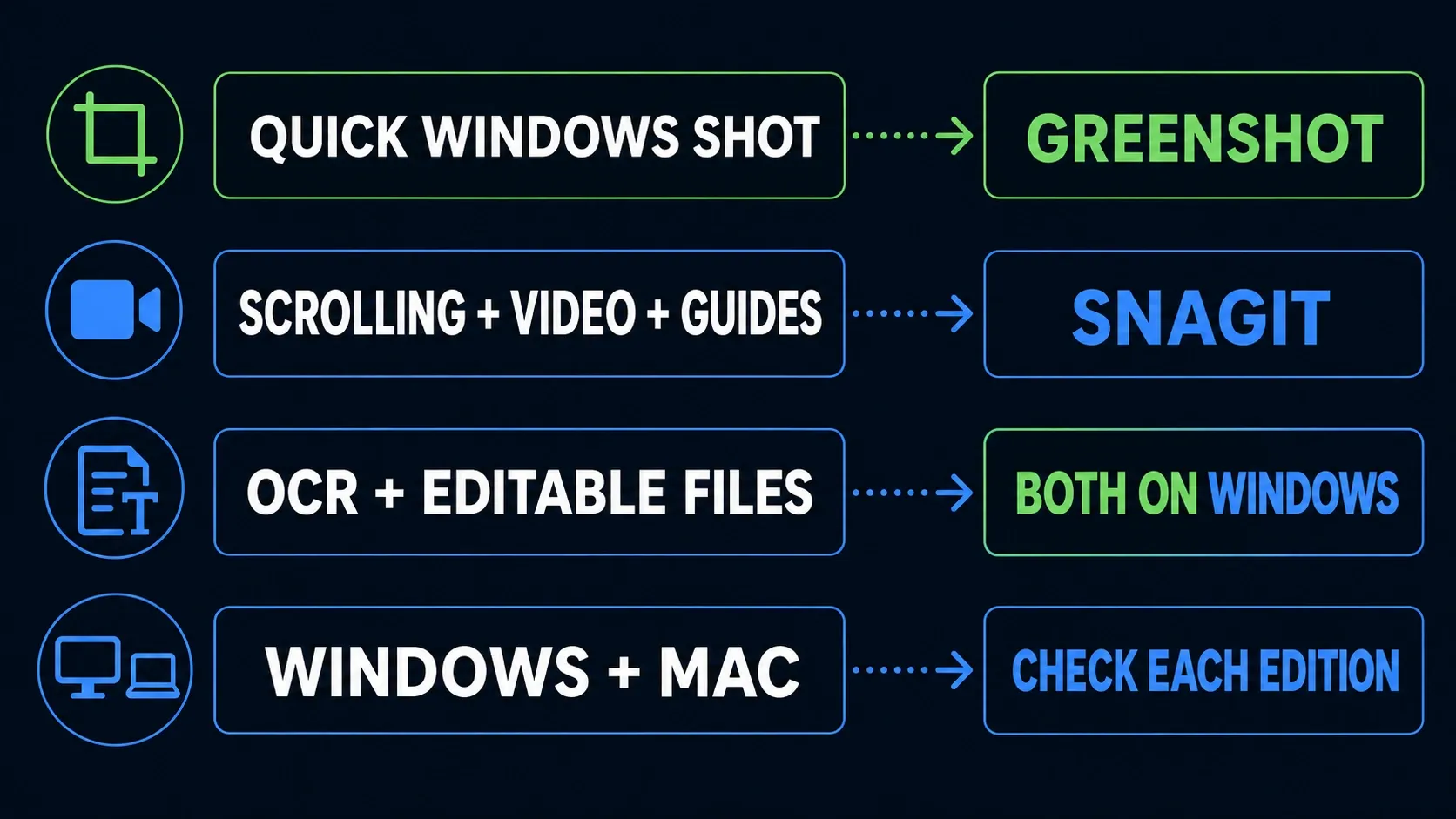
For OCR and later annotation changes, compare both Windows tools: Greenshot uses a plugin and editable .greenshot files; Snagit combines Grab Text with editable SNAGX sources. On Mac, compare the separate editions and their actual features.
| Task or cost | Greenshot | Snagit |
|---|---|---|
| Windows price | Free, open source | Individual: US$39/year, billed yearly |
| Mac availability | Separate paid app; older release, fewer features | Current macOS release; check OS requirements |
| Everyday images | Region, window, full screen; annotations | Capture, Editor tools and Library |
| Reopen for revision | Editable .greenshot files on Windows | Editable SNAGX sources |
| Text recognition | Windows OCR plugin; check installation | Grab Text and Edit Text |
| Long pages | Older help documents Internet Explorer capture | Automatic and manual scrolling; target-dependent |
| Screen video | No built-in recorder documented | Recording with audio and basic trimming |
| Process instructions | Capture and assemble manually | Step Capture produces numbered guides |
| Delivery | Local files/clipboard; optional plugins | Local files; optional hosted sharing |
For a support reply that needs one arrow and a short label, start with Greenshot. For a guide that needs a long application capture, numbered steps and a narrated clip, try Snagit against that complete task. The broader screenshot software comparison covers options outside this pair.
Windows and Mac are different comparisons
The official Greenshot download page lists Windows stable version 1.3.328, released October 19, 2026. Its Mac download button points to the Greenshot Mac App Store listing, which shows US$1.99 and version 1.2.19 dated June 29, 2020. The developer explicitly warns that the Mac app has fewer features.
The Mac app is real, but six years without an update is a long time on macOS. The plugin and editable-format details below refer to Greenshot for Windows; the Mac listing doesn’t mention either.
Greenshot's Windows project has newer development builds, but the version history labels those downloads unstable and unsigned. I’d stay on the stable branch. The 1.3.328 release notes fix a security issue in which a malicious image URL could make Greenshot send your Windows credentials to that server, and every executable and plugin is now code-signed, so Windows Smart App Control no longer blocks them. That’s reason enough to skip old installers.
Snagit has separate Windows and Mac release histories. Windows is on 2026.4.0 from October 6, and Snagit 2027.0.0 for Mac arrived on October 29. Check the requirements for your Snagit version before installing. Menus and export options aren’t identical across the two platforms.
Everyday screenshots and annotations
Greenshot covers region, window and full-screen capture, configurable hotkeys, text, arrows and cropping. Its official help also documents a capture delay and reusable drawn-object sets. The help is written for version 1.2.10, so some dialogs in 1.3 look different.
Compare the steps after capture: does the image go straight to the clipboard, open for markup, or need organizing for future work? Snagit's Editor and Library workflow gives you more to manage, but can be useful when you return to a collection of captures. A larger editor does not automatically make a one-arrow reply better.
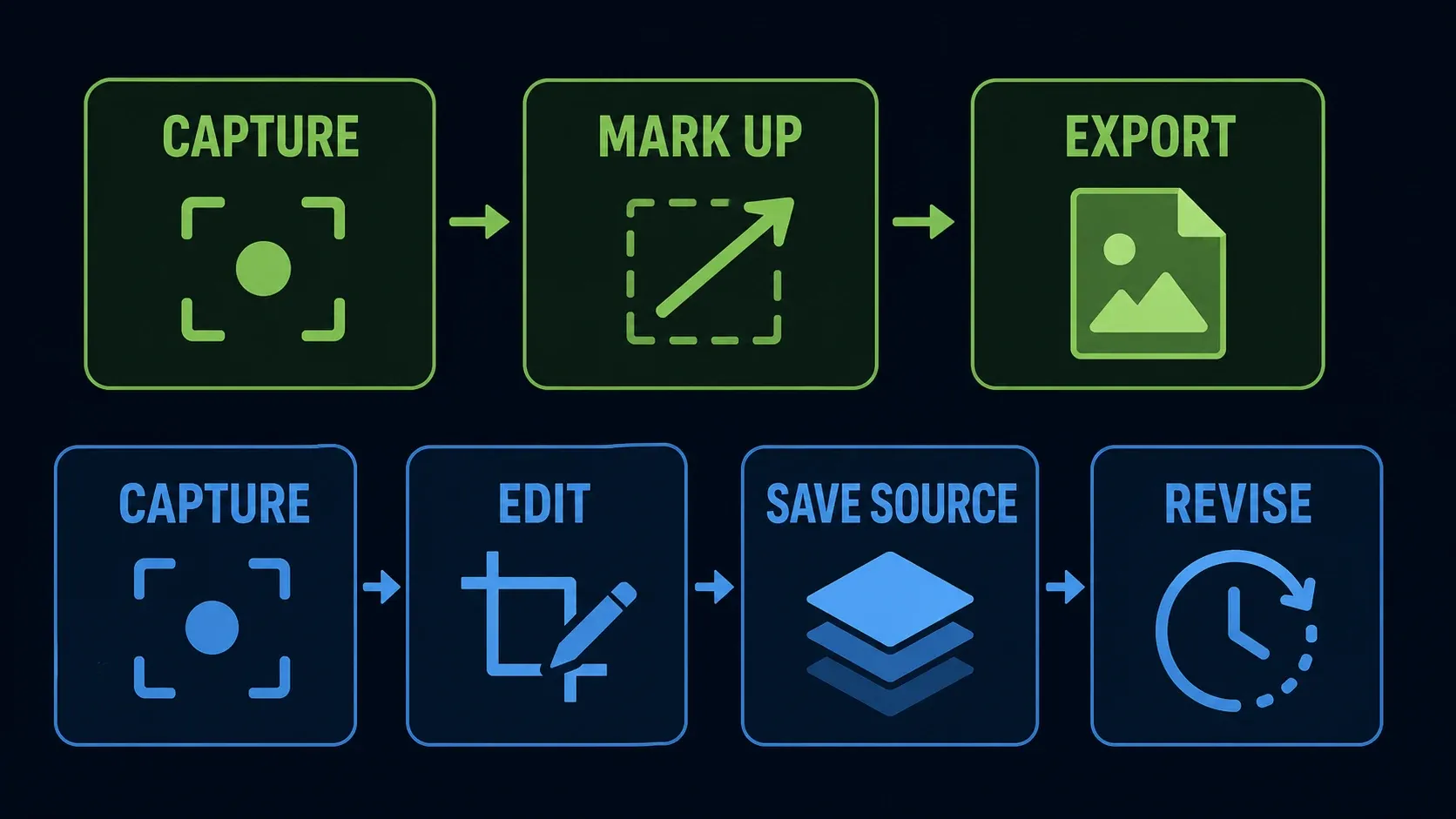
Greenshot can also save a source and revise it later. When you evaluate whether Snagit saves you work, compare a quick export with a longer revision workflow; Greenshot's file format is not the limitation.
Scrolling capture: test your actual page
TechSmith documents vertical and horizontal scrolling capture. Snagit offers automatic capture where it detects a compatible target and manual scrolling when you need to control the area. Its scrolling troubleshooting guidance lists browser, application and page-layout limitations. Parallax pages can stitch badly.
Greenshot's older help documents an Internet Explorer page-capture command. That is not evidence of general scrolling support in current Chrome, Edge, Firefox or desktop applications. I wouldn’t buy or deploy either tool on the strength of an unqualified checkmark in a comparison table.
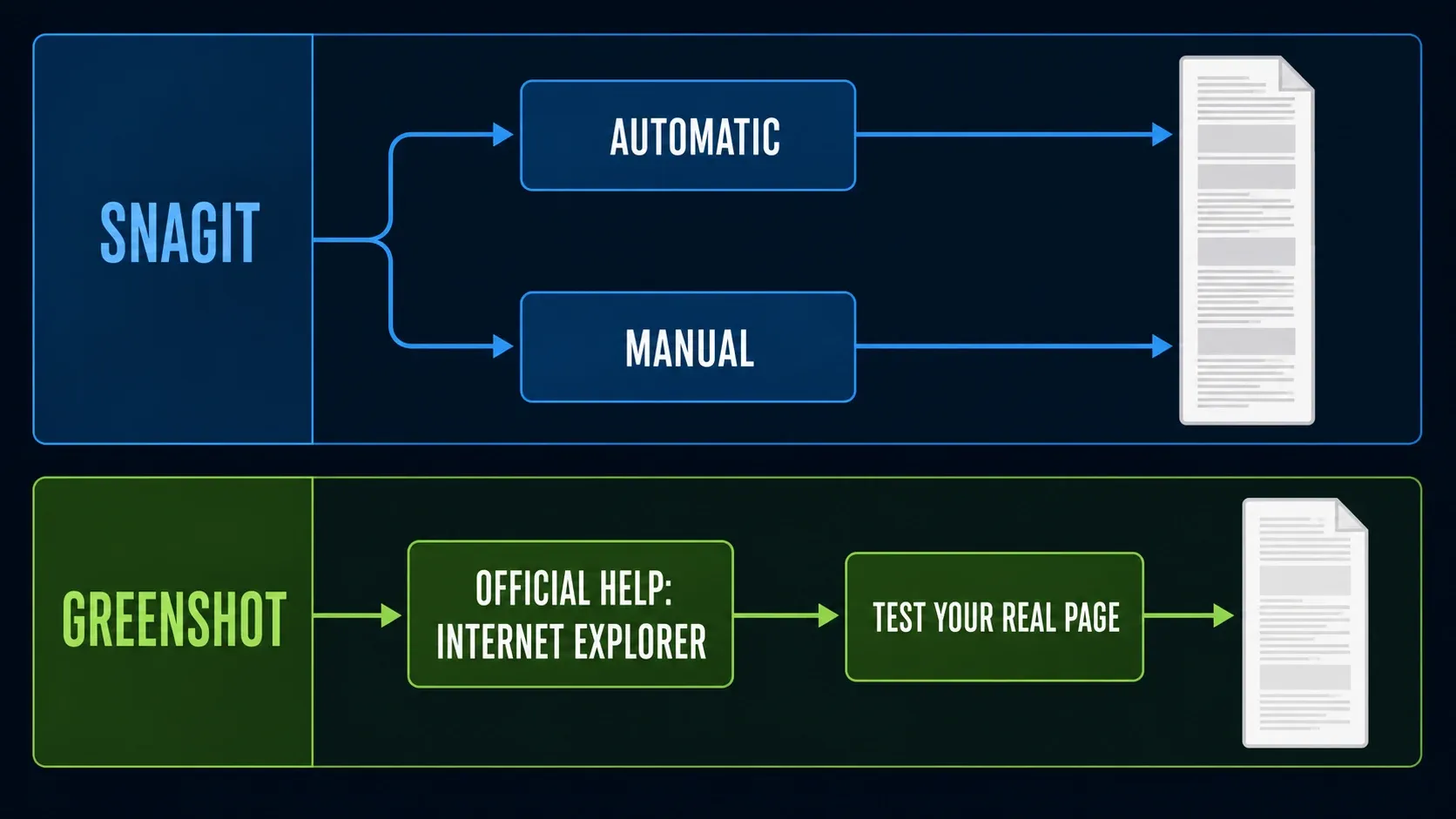
Use the same non-sensitive long page in your evaluation and inspect the joins, missing sections and repeated headers. For Snagit's automatic/manual options, follow the scrolling capture guide. If your only need is an unedited full webpage, also compare your browser's own capture route before paying for a desktop editor.
Editable files: both tools have a source format
Greenshot introduced its editable format in the 2013 version 1.1 release. This is not just an old announcement: the stable 1.3.323 file-format implementation still saves and loads .greenshot files containing the image and its drawn elements. Saving a flattened PNG is a different choice.
Snagit's SNAGX source workflow preserves supported objects such as callouts, text and shapes. PNG and JPEG exports flatten those objects into the delivered image.
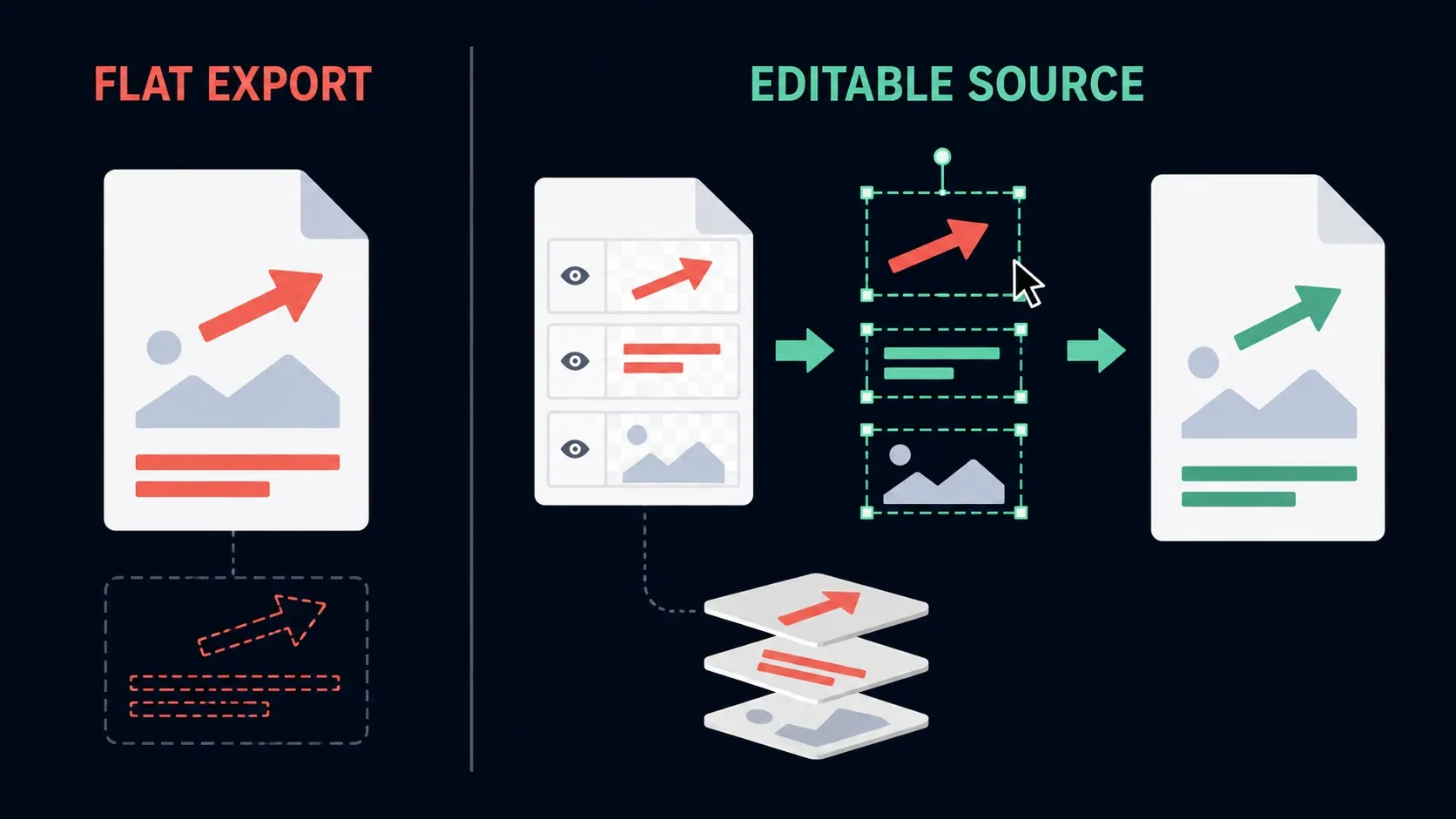
The source-versus-export principle above applies to both products. Snagit's case is its combination of editing, Library organization and documentation features, not exclusive ownership of editable screenshots.
Before switching, reopen a copy of an older source, change one annotation and export another copy for the recipient. Do not assume a Greenshot source opens as editable objects in Snagit, or that importing a PNG restores its former objects. Keep the original application and source files available until the migration is verified. The Snagit Library backup guide covers that side of the move.
OCR: extraction is not the same as editing text
Greenshot's current plugin documentation lists a Windows 10/11 OCR destination. The stable-release OCR implementation uses Windows text recognition and copies recognized text to the clipboard. Check that the Win10 plugin is present and permitted in your installation.
A separate older OCR FAQ describes Microsoft Office Document Imaging. It is a historical route, not a reason to install Office 2007 as your default solution today. Nor does it justify saying Greenshot has no OCR.
Snagit offers Grab Text for extraction and Edit Text for changing recognized text within an image. Its OCR troubleshooting article explains why low contrast and angled text can cause errors. Check names, codes and totals in either tool. If you only need to copy a short error message, evaluate Greenshot's extraction first; do not pay for image-text editing you will never use.
Video and numbered instructions
Greenshot is a still-image capture tool; its help and store listings describe no screen recorder. Snagit documents video recording with audio and basic trimming. That can cover a brief explanation of a bug or process.
Snagit Editor is not a full multi-track video editor. Recording into or sharing to Camtasia Editor is a separate workflow; do not assume another application's editing features come with a standalone Snagit purchase. The Snagit recording guide separates capture from later editing.
For documentation, Step Capture assembles captured actions into numbered instructions that you can edit and reorder. Review the sequence, add missing context and remove private information before sharing. The Step Capture workflow covers this review. Greenshot can supply images for a manually assembled guide; the difference is the automation, not whether a guide can be made at all.
Privacy depends on the delivered file
Both tools can save a local image. Optional destinations, plugins and synchronized folders can change where it goes afterward. On a managed computer, use the approved configuration and destination; a local Save button does not make the whole workflow offline.
TechSmith's technology register identifies Snagit's text and face recognition as on-device. That does not cover every connected service. The Windows 2026.3.1 and later and Mac 2026.3.2 and later release notes say sharing to Camtasia Online sends the original SNAGX, including additional capture information. Treat that differently from sending a checked flat image.
Do not rely on blur or pixelation for secrets. Crop them out where possible, or use a fully opaque mask in the delivery copy and inspect the exported result. Keep editable originals private: removable objects may expose what was underneath. Follow the redaction and export checks before sharing sensitive screenshots. Neither a paid license nor an open-source license makes that review unnecessary.
Price and when Snagit is worth paying for
Greenshot for Windows is free for ordinary private and commercial end use under the project's GPL FAQ. Modification and redistribution raise separate license obligations. The paid Mac listing is a different distribution; do not apply the Windows price to it.
TechSmith's US store listing lists Snagit Individual at US$39 per user per year, billed yearly. It is not $39 per month or a current $62.99 perpetual purchase. Currency, taxes and checkout totals vary. Individual subscriptions are non-transferable to another person; consult the license comparison for team purchasing.
Use your own workload to judge value. If you bill your time at $30 an hour, $39 equals 78 minutes of that time. That is arithmetic rather than a promised saving, so count only the work the tool removes. Editable files and basic OCR already exist in Greenshot, so those alone are weak reasons to switch.
Make the decision with your own files
On Windows I’d start with Greenshot. It’s free, and screenshots, annotations and local delivery are exactly what it does well. Keep it if your editable-file and OCR checks also pass. If you need other free options, use the free Snagit alternatives comparison.
Try Snagit when you repeatedly combine scrolling pages, image editing, organized captures, numbered instructions or short videos. On Mac, compare the current Snagit release against the older Greenshot port's actual limitations, not the false claim that Greenshot is Windows-only.
For your evaluation, use a non-sensitive support screenshot, a source that needs an annotation changed, and any long page, OCR sample or video your work genuinely requires. Record what fails, which output the recipient can open, and how much cleanup remains. A screenshot-only user can skip the video test. If neither tool solves the job, widen the Windows screenshot-tool shortlist instead of buying the one with the longer feature list.
Snagit vs Greenshot FAQ
Is Greenshot better than Snagit?
For free Windows screenshots and routine markup, Greenshot is a sensible first choice. Snagit is worth evaluating for integrated scrolling, video and numbered documentation. Editable files and OCR are not exclusive to Snagit.
Is Greenshot free for business use?
The project allows ordinary private and commercial end use of Greenshot for Windows without a fee. Modification and redistribution have separate GPL obligations. The Mac App Store edition is paid.
Does Greenshot work on Mac?
Yes. The US Mac App Store lists a separate paid Greenshot app. Its latest version, 1.2.19, dates from June 2020, and the developer warns that it has fewer features than the Windows edition.
Does Greenshot have OCR?
Yes, the Windows version has a Win10 plugin with a Windows 10/11 OCR destination. Check that the plugin is installed and enabled. It extracts text to the clipboard, which isn’t the same as editing text inside the image with Snagit’s Edit Text.
Can I edit a Greenshot screenshot later?
Yes, save an editable .greenshot source rather than only a flattened PNG or JPEG. The Windows stable-release implementation preserves the image and drawn elements. Keep that source separate from the file you send to other people.
Can Greenshot capture scrolling pages?
Its older official help documents Internet Explorer page capture, not a general modern-browser scrolling workflow. Test the exact target. Snagit documents automatic and manual scrolling, but it also has page and application limitations.
Does Greenshot record screen video?
No. Greenshot’s help and store listings describe no built-in screen recorder. Snagit supports video capture with audio and basic trimming; use a separate editor when you need multi-track editing.
Is Snagit $39 per month or per year?
Per year. The US Individual plan is $39 per user per year, billed yearly. Local currency, tax and offers can differ. Compare the actual checkout total and license type before purchasing.
Which tool is safer for confidential screenshots?
Do not choose on the license model alone. Use an approved current build, review storage and sharing destinations, remove confidential material from the delivery file, and keep editable sources private. Inspect the actual exported file before sending it.